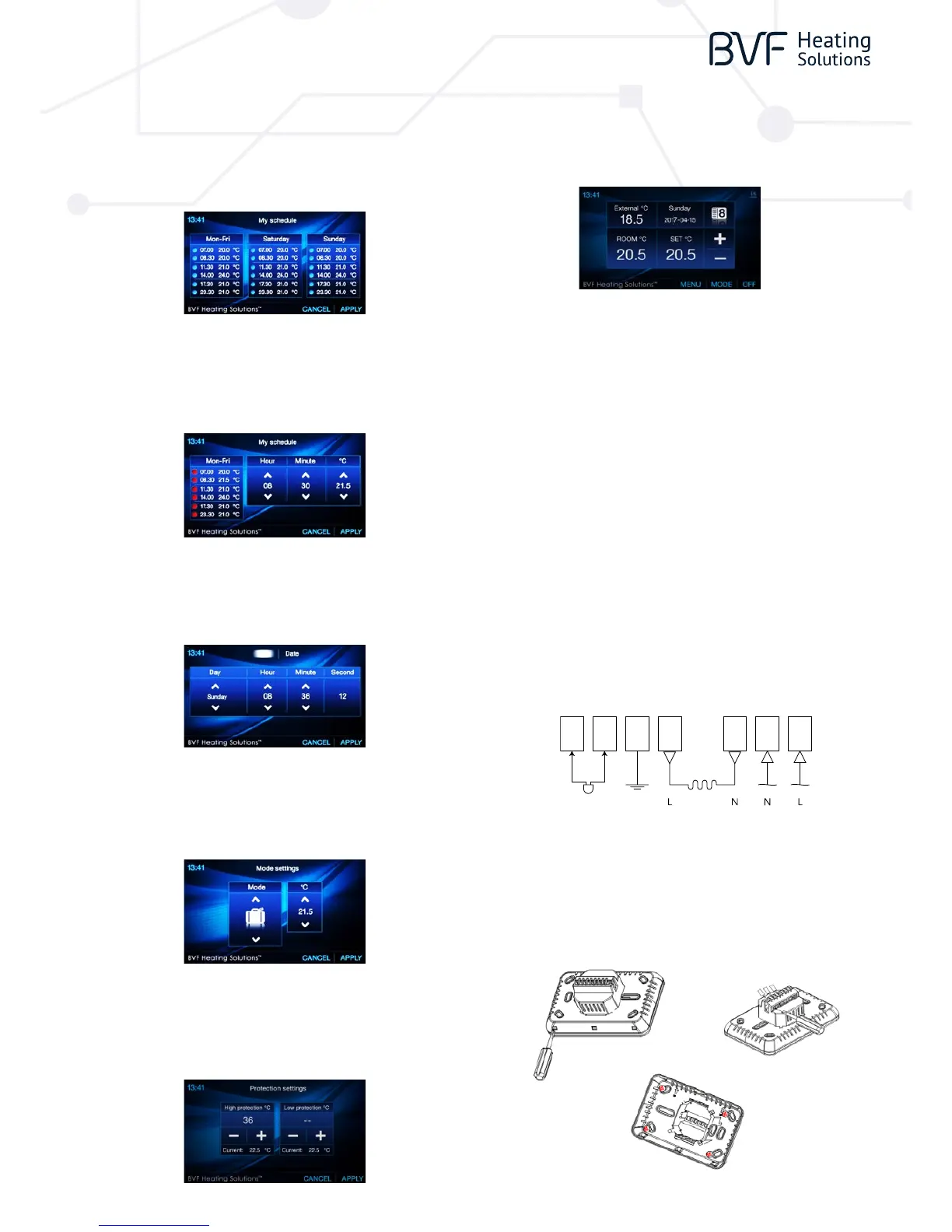
1. SCHEDULE REVIEW & EDIT
you can review weekly schedule. You can press the three column to change the
5+1+1 events.
For example, if you want to edit Sat. schedule, you can press Sat. column, then
you will enter the edit page as picture shows. Every setting can be nish by
pressing or button.
2. TIME AND DATE SETTINGS
Press Menu button, choose Time and date button to edit date and time by or
button. After setting pls. press “ APPLY” to save the changes.
5. ENTER PARAMETER SETTINGS
Within 3 seconds after turning thermostat to OFF mode, press
THE BVF HEATING SOULTIONS for 3 seconds, then will enter parameter setting,
you can set the desired value by pressing “<<” or “>>” , and go to other pages by
pressing “Pre” or “Next”.
6. WIRING DIAGRAM
3. MODE PRE-SET TEMP. SETTINGS
Press Menu button, choose mode settings button to pre-set mode working
temp. by up and down Button. After setting, pls. press “APPLY” to save the
changes.
7. INSTALLATION
Using a screw driver to open the upper and lower body part, then connect the
wiring to terminals tightly, then x the lower body part into wall with attached
screws.
4. HIGH PROTECTION SETTINGS
Press Menu then select protection button to enter Protection Settings page.
You can set High Protection temp. & Low Protection temp. by up and down
button. After setting, pls. press “ APPLY” to save the changes.
1. In Sun. column, there are six periods. You can press up or down button to
choose the period you are going to change. Whichever period is selected,
will display.
2. After period is selected, you can set hour, minute and temperature by
pressing and button.
3. After new schedule is set, pls. press “APPLY” to save the new schedule.
MENU DESCRIPTION RANGE
01 Temp. Oset -8 °C ~8 °C
02 Dead Zone 0 °C ~3 °C
03 Set Point Max. 5 °C ~80 °C
04 Set Point Min. 5 °C ~80 °C
05 NTC Select (Internal, External) I only, E only, I & E, I or E
06 Low Protection Max. 5 °C ~10 °C
07 Low Protection Min. 5 °C ~10 °C
08 High Protection Max. 5 °C ~90 °C
09 High Protection Min. 5 °C ~90 °C
10 Backlight o Time after Operation 3s ~180s
11 Min. Backlight Brightness of Standby Status 1% ~100%
12 Relay Delay Time 0s ~250s
13 Relay Output Normal(NO); Inverted(NC)
14 Restore << or >>
7
EXTERNAL
SENSOR
3600W/16A 230V/AC
6 5
4 3 2 1


 To Previous Page
 Loading...