User Manual
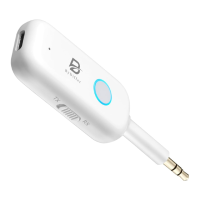
ByDiffer Bluetooth 5.2 Audio Receiver Transmitter
Model: T5
The ByDiffer Bluetooth 5.2 receiver transmitter has the capability to convert non-Bluetooth
devices into wireless ones. Utilizing the Qualcomm QCC chip, it ensures minimal distortion, low
power usage, low latency, high fidelity, and stereo capabilities. In Bluetooth receiver mode, it
allows the simultaneous connection of two cellphones, while in Bluetooth transmitter mode, it
supports the simultaneous connection of two Bluetooth earphones.
Please scan the QR code provided to view the instructional video for the operation. Alternatively,
you can search for the operation video on Youtube by using the term "[bydiffer transmitter]".
Please keep in mind to double-click the power button before connecting new Bluetooth
earphones (in TX mode) or new cellphones (in RX mode). Additionally, ensure to clear the pairing
history of your Bluetooth earphones if necessary
.
Contact Information:
Feel free to reach out to our customer service team via email with any inquiries.
Official Email: support@bydif.com.
Q&A:
· Toggle the TX-RX switch and long press the power button again.
· Charge for more than 5 minutes.
. Make sure the connected device is working properly.
· Make sure you have done the necessary settings on devices like TV.
· Make sure the audio interface is plugged in properly.
· Make sure the Bluetooth transmitter receiver is connected to your
desired devices instead of other devices of other people or neighbors.
· Double click power button to reconnect
· Disconnect the charging cable and plug it in again.
· Consider changing to a different charger.
Cannot Connect to the
second earphones
· Clearing the pairing history of your earphones first then power off the
earphones and then power it on. Double click the power button to let
the transmitter enter into pairing status.


 To Next Page
 Need help?
 General