3
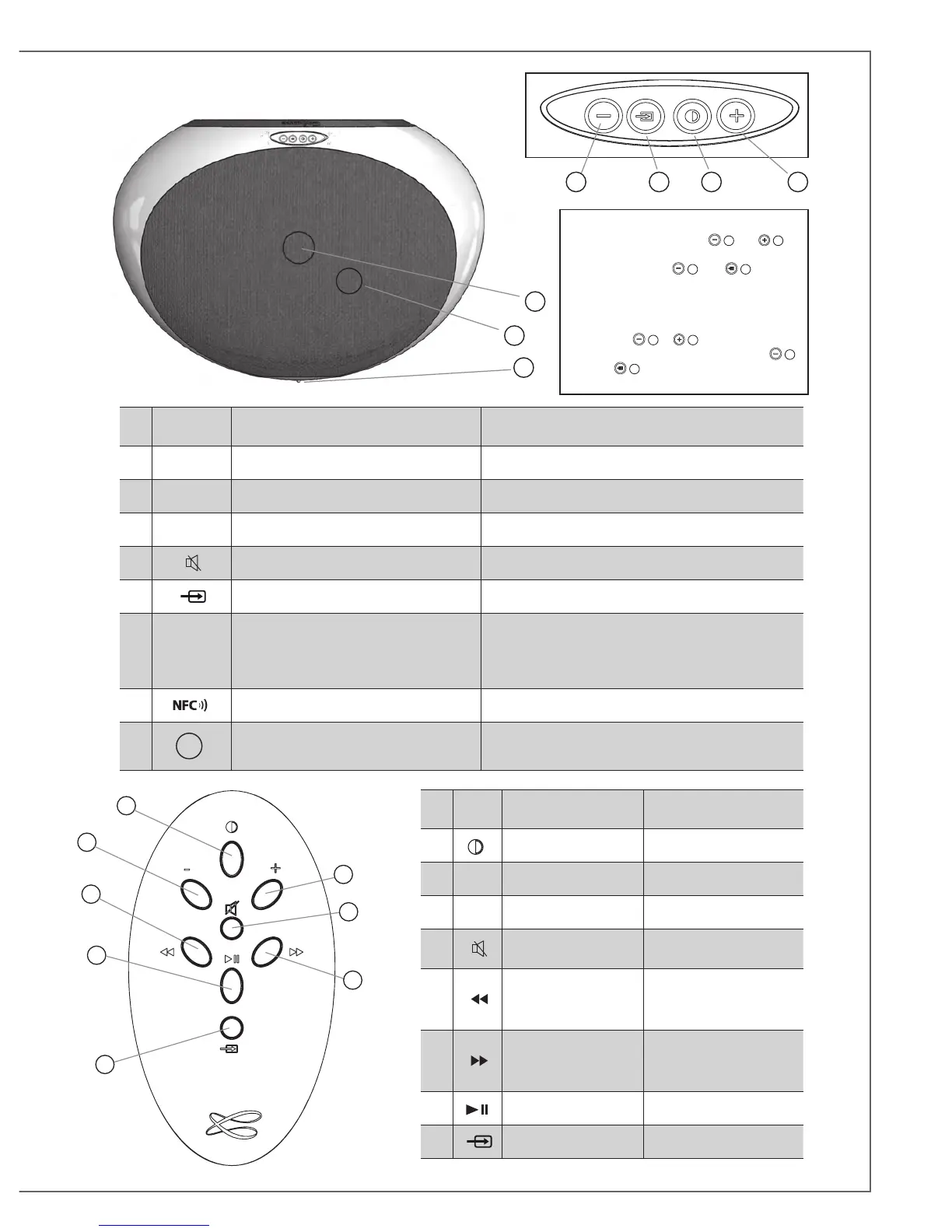
IDENTIFYING
CONTROLS
IDENTIFICATION
DES COMMANDES
1
LED DISPLAY ON / ECO MARCHE / ECO
2 VOL - Volume DOWN Diminution du volume
3 VOL + Volume UP Augmentation du volume
4
Mute on/off Active et désactive la coupure du son
8 Source selection Selection de la source
9
SOURCE
LED
Red: ECO mode
Blue: Bluetooth
Orange: Wifi
Green: analogue
Rouge: mode ECO
Bleu : Bluetooth
Orange : Wifi
Vert : analogique
10 Position of the NFC patch Position du patch NFC
11
Position of the infrared sensor and
of the microphone for Bluetooth handsfree use
Position du capteur infra-rouges et du microphone du kit
mains-libres Bluetooth
10
11
382 1
9
1
2
5
7
3
4
6
8
IDENTIFYING
CONTROLS
IDENTIFICATION
DES COMMANDES
1
ON / ECO MARCHE / ECO
2 VOL - Volume DOWN Diminution du volume
3 VOL + Volume UP Augmentation du volume
4
Mute on/off
Activation et et désactivation
de la coupure du son
5
Wifi: reverse scanning
Bluetooth: previous title
of the played album
Wifi : retour rapide
Bluetooth : titre précédent de
l'album lu
6
Wifi: forward scanning
Bluetooth: next title of the
played album
Wifi : avance rapide
Bluetooth : titre suivant de
l'album lu
7 Pause/Play Pause/Lecture
8
Source selection Selection de la source
KEYPAD SPECIAL FUNCTIONS:
- BLUETOOTH RESET: press
2
and
3
together
- LED DISPLAY: press
2
then
8
to switch
between full time and flash display modes.
FONCTIONS SPECIALES :
- REINITIALISATION DU BLUETOOTH :
appuyer sur
2
et
3
simultanément
- AFFICHAGE DES DIODES : appuyer sur
2
puis sur
8
pour permuter entre l'affichage
permanent et le mode flash.



 To Next Page