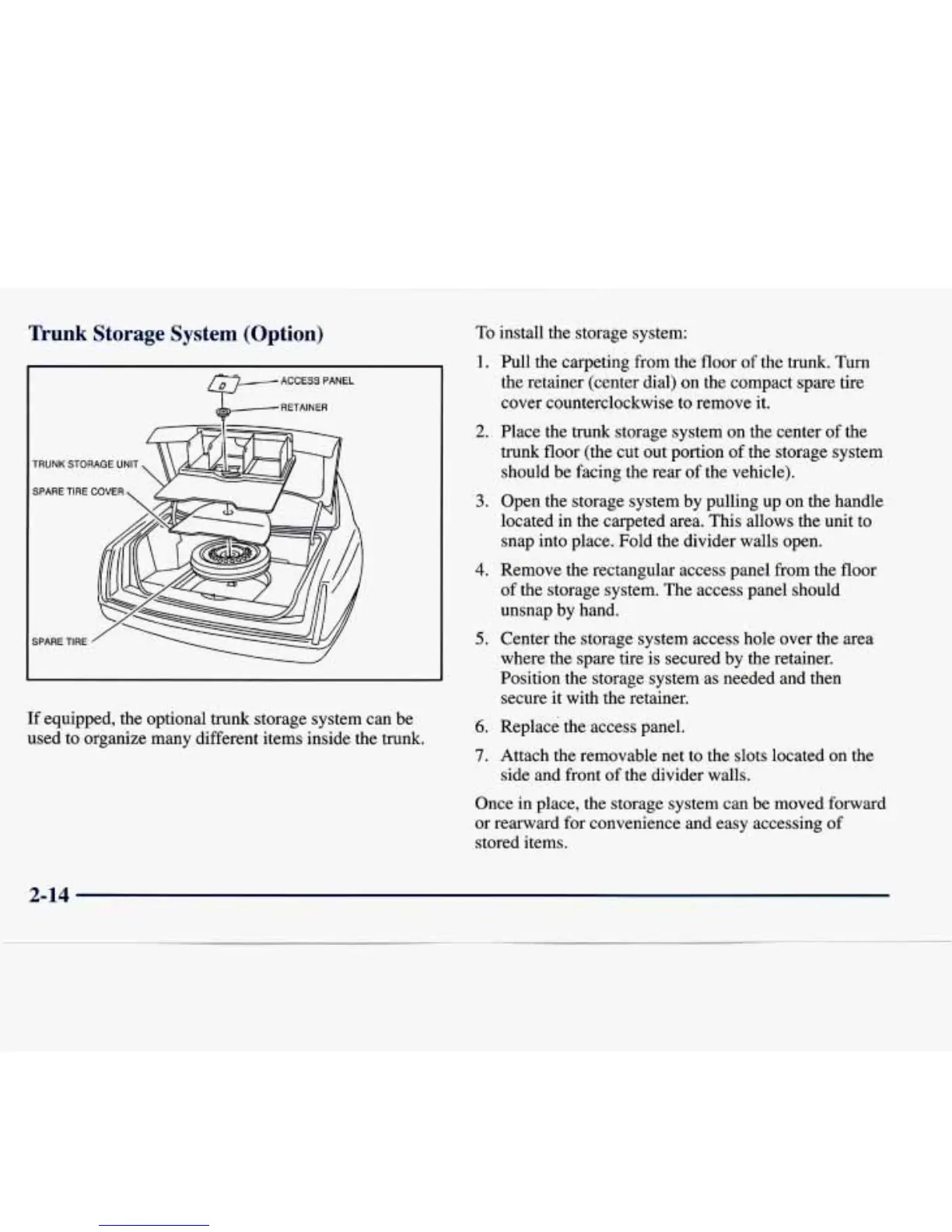
Trunk Storage System
(Option)
ACCESSPANEL
RETAINER
TRUNK
STORAGE
UNIT
SPARE
TIRE
COVER
SPARE TIRE
If equipped, the optional trunk storage system can be
used to organize many different items inside the trunk.
To
install the storage system:
1.
Full the carpeting
from
the
floor
of
the trunk.
Turn
the
retainer (center dial) on the compact spare tire
cover counterclockwise to remove it.
2.
Place the trunk storage system on the center
of
the
trunk floor (the cut out portion
of
the storage system
should be facing the rear
of
the vehicle).
3.
Open the storage system by pulling up on the handle
located in the carpeted area. This allows the unit to
snap into place. Fold the divider walls open.
4.
Remove the rectangular access panel from the floor
of the storage system. The access panel should
unsnap by hand.
5.
Center the storage system access hole over the area
where the spare tire is secured by the retainer.
Position the storage system as needed and then
secure it with the retainer.
6.
Replace the access panel.
7.
Attach the removable net to the slots located on the
side and front of the divider walls.
Once in place, the storage system can be moved forward
or rearward for convenience and easy accessing of
stored items.
2-14













 To Next Page