7-76 Infotainment System
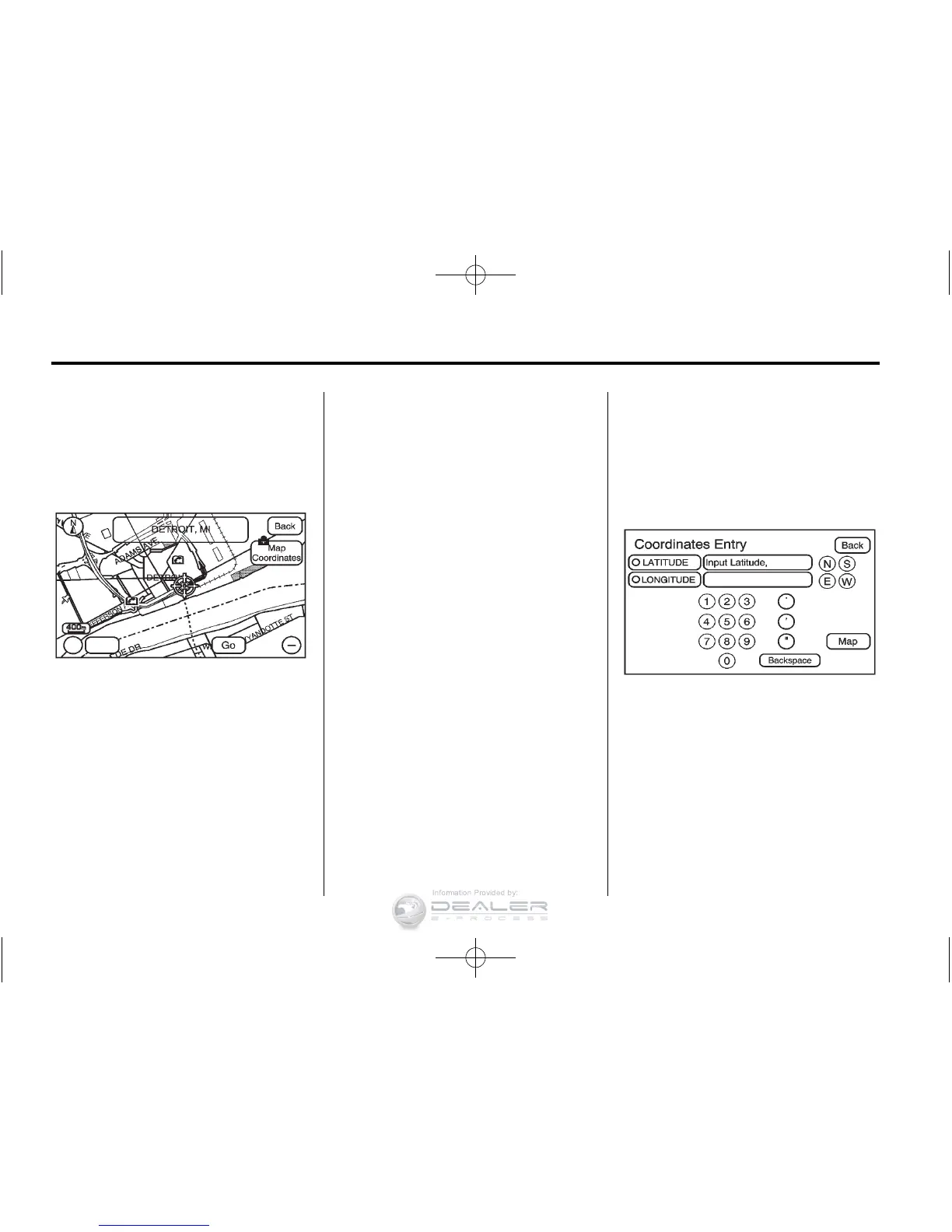
From Map
This destination entry method allows
you to select a destination by
scrolling on the map.
) From Map: Press to enter the
From Map destination entry method.
To use this destination entry
method:
1. Press DEST.
2. Press
). A map screen displays
with the scrolling symbol.
3. Use
0 / 1 and press on the
map to find the area that you
would like to select as your
destination.
Pressing/holding and dragging
your finger on the map activates
fast scrolling.
4. Press once on the area that you
would like to set as your
destination.
The map screen displays the
address information.
5. Press GO. The map screen, with
the destination marked displays.
6. Select the route preference for
Fastest, Shortest, or Other. The
system calculates and highlights
the route.
7. Press Start Guidance. The route
is now ready to be started.
See “Getting Started on Your
Route” in this section for more
information.
Map Coordinates
The coordinates destination entry
method lets you select a destination
by entering latitude and longitude
coordinates.
Map Coordinates: Press to access
the Coordinates Entry screen.
To use the coordinates destination
entry method:
1. Press DEST.
2. Press From Map.
3. Press Map Coordinates.













 To Next Page