INFOTAINMENT SYSTEM 167
.
Event Odometer: This displays the
distance driven since the recording
began.
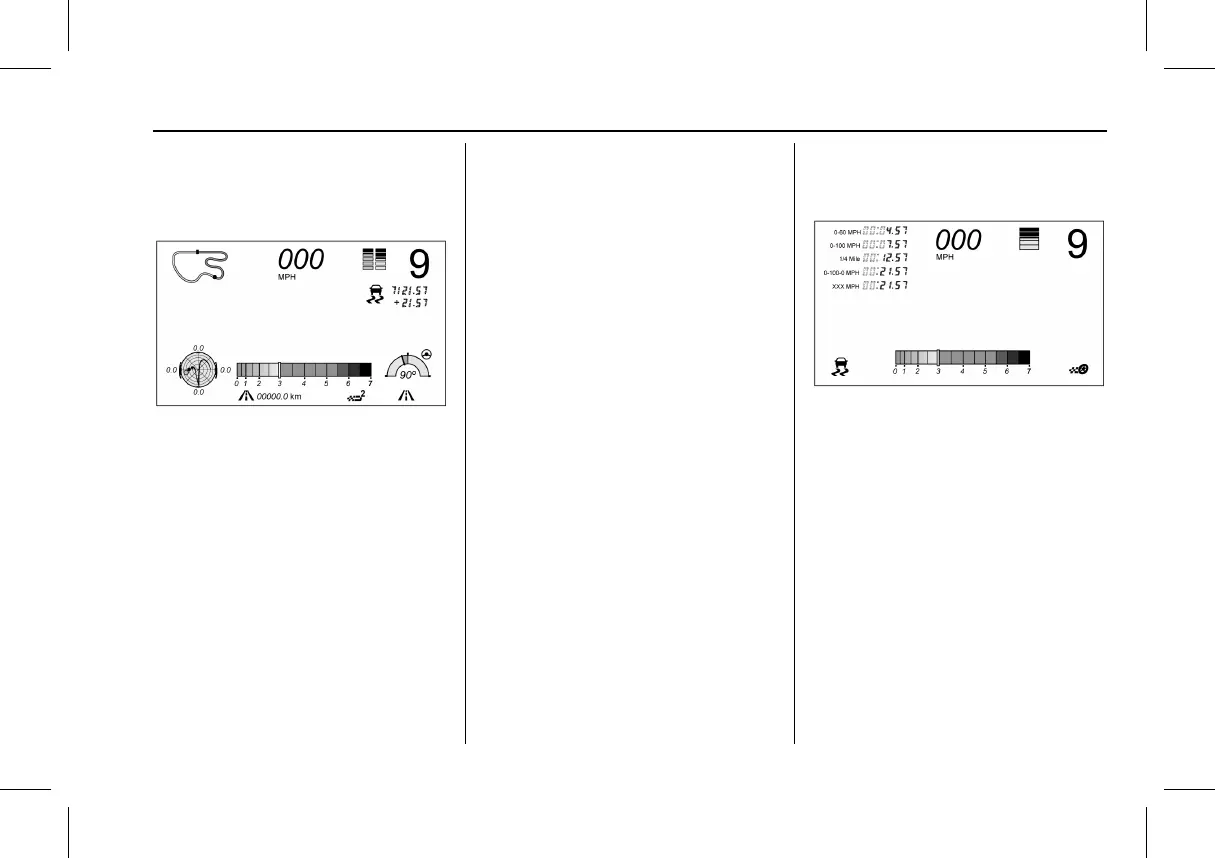
Track:
Displays these vehicle metrics:
.
Vehicle Speed: Same as Sport.
.
GPS Tracking Map: Shows the
vehicle’s current position relative to
a known route.
.
Engine Revolutions Per Minute
(rpm): The vertical line and triangle
show current rpm’s. As the rpm’s
increase, the backfill follows.
.
Transmission State (Current Gear):
Same as Sport.
.
Friction Bubble Graphic: Lateral and
longitudinal G-Forces are displayed
as a dot within a bubble. A red dot
displays when the vehicle starts
braking and turns green when the
vehicle accelerates. The dot is white
when the vehicle is not moving.
A white dot is the default.
.
Brake and Throttle Graphic:
Displays the percentage value of
brake and throttle pedal position
from 0–100%.
.
Steering Angle: The graphic fills
from the center to the left or right
depending on the direction of
steering. The numerical steering
angle displays below the graphic.
.
Active Handling Active Indicator:
The graphic only displays if the
active handling systems are
activated.
.
Performance Traction Management
(PTM) Mode: Displays the current
PTM mode. The options are Wet,
Dry, Sport 1, Sport 2, or Race.
.
Current Lap Time: Displays the
elapsed lap time if the finish line is
defined and the vehicle has crossed
the defined finish line at least once.
.
Event Odometer: This displays the
distance driven since the recording
began.
.
Drive Mode: Displays the vehicle’s
current drive mode.
Timing:
Displays these vehicle metrics:
.
Vehicle Speed: Same as Sport.
.
Engine Revolutions Per Minute
(rpm): Same as Sport.
.
Transmission State (Current Gear):
Same as Sport.
.
0–100 km/h (0–60 mph),
0–200 km/h (0–100 mph), 400 m
(1/4 th mi), and 0–200–0 km/h
(0–100–0 mph): The timer starts
recording as soon as the vehicle
accelerates. As the vehicle passes
each speed and distance milestone,
it is displayed on the overlay.





 To Next Page