14 KEYS, DOORS, AND WINDOWS
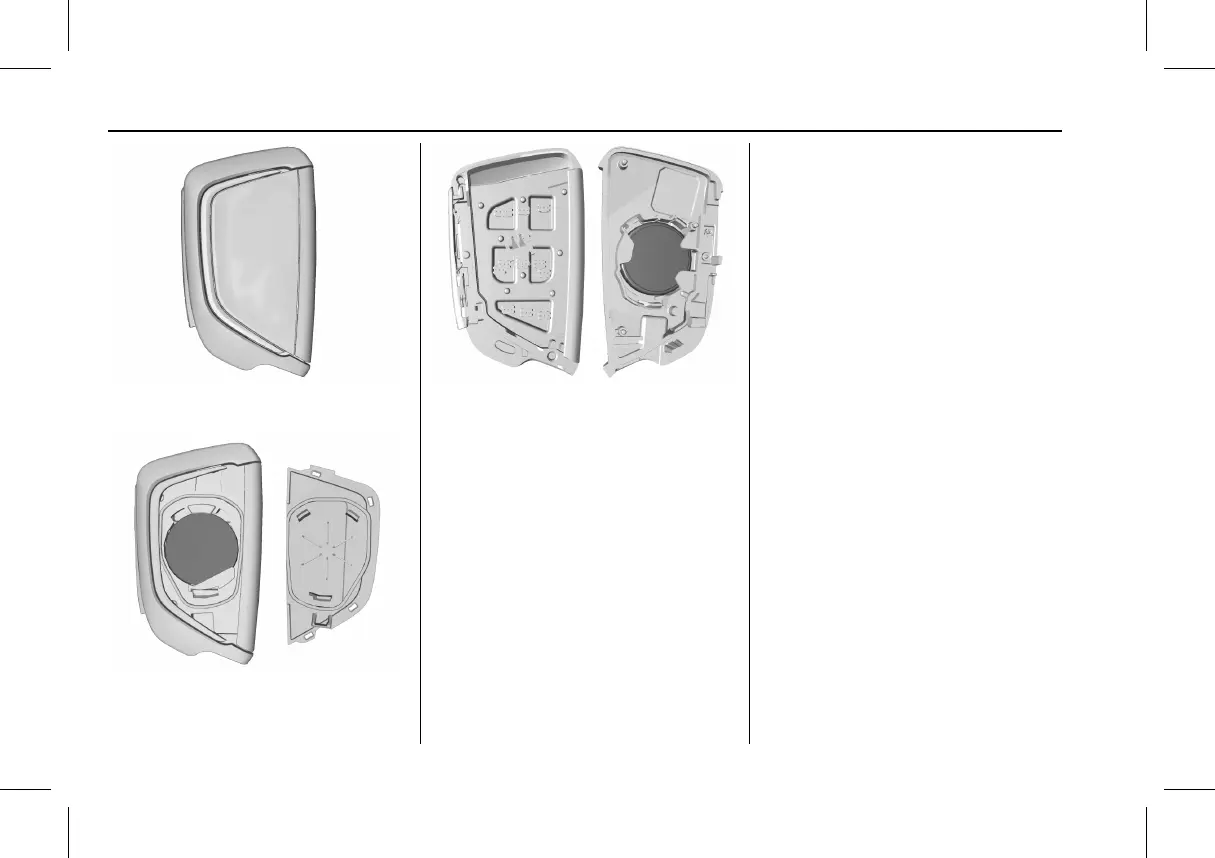
2. Turn the remote key over.
3. Remove the battery cover.
4. Remove the old battery. Do not
use a metal object.
5. Insert the new batter y on the
back housing, positive side facing
down. Replace with a CR2450 or
equivalent batter y.
6. Align the front and back housing,
then snap the remote key
together.
7. Reinsert the key.
Remote Vehicle Start
This feature allows the engine to be
started from outside the vehicle.
S : This button on the remote key is
for remote start.
The climate control system will use
the previous settings during a remote
start. The rear window defogger may
come on during remote start based on
cold ambient conditions. The rear
defog indicator light does not come on
during remote start .
If equipped, the heated and ventilated
front seats may also come on when
the vehicle personalization setting is
enabled. See Heated and Ventilated
Front Seats 0 45.
If equipped with a remote start heated
steering wheel, it may come on during
a remote start. See Heated Steering
Wheel 0 92.
Laws in some local communities may
restrict the use of remote starters. For
example, some laws may require a
person using remote start to have the
vehicle in view. Check local
regulations for any requirements.
If your vehicle is low on fuel, do not
use the remote start feature. The
vehicle may run out of fuel.



 To Next Page
 Loading...