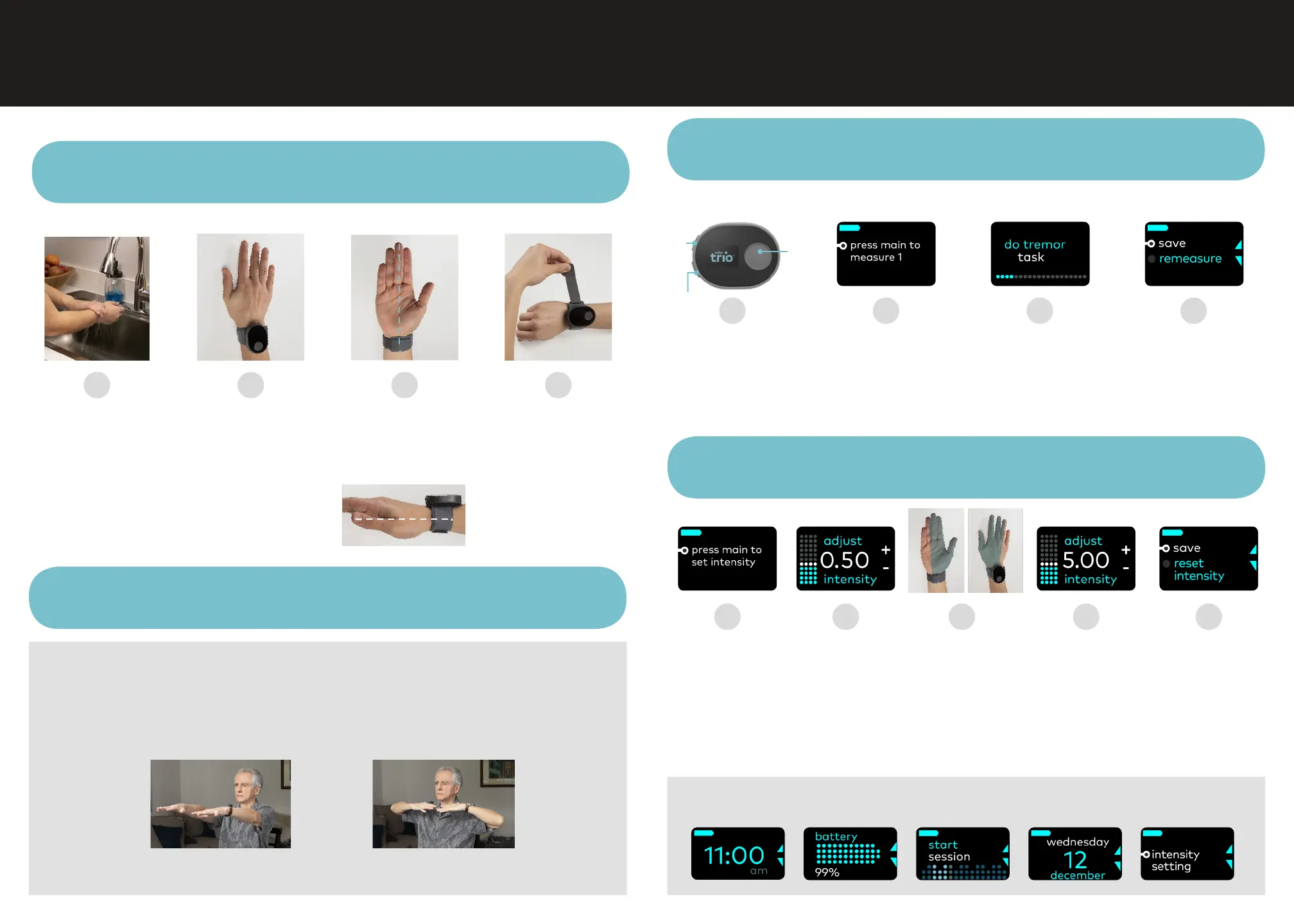
Dampen entire
wrist circumference
with ample
amounts of water
Center on the back
of your wrist
•
MAIN button points
toward the elbow—
not the hand
•
Position as close to hand
as possible without
hindering wrist movement
Ensure the blue
and white mark are
aligned as shown
Before beginning this section, check your prescription information for your prescribed "Tremor Task"
Pull end of the band
to tighten and fasten
the Velcro securely
so that electrodes
are lush to skin
Step 2b
Calibrating Cala Trio™
Step 1
Positioning & Fastening Cala Trio™
Step 3
Setting Stimulation Intensity for Therapy
ONE TIME SETUP
•
Press MAIN button
to wake up device
•
Then press and hold
MAIN for 3 seconds
to start setup
Get in position for
your prescribed
“Tremor Task”
and press MAIN
Hold your “Tremor
Task” until Cala Trio
vibrates, 20 sec
Press MAIN to save the
measurement
Repeat steps B-D for
measures 2 and 3
Press MAIN to set
intensity used
for therapy. Wait
3 seconds before
moving to the
next step
Press UP to
slowly increase
intensity
As you increase
intensity, you
should feel a
tingling sensation
in the areas
highlighted in blue
Press MAIN once
you ind the highest
level that you can
comfortably
tolerate for
40 minutes
Press MAIN
to save
Your Cala Trio™ therapy is personalized and ready to use!
A
A
A
B
B
B
C
C
C
D
D E
D
Your "Tremor Task"
Find your prescribed "Tremor Task" in your Prescription Information
Outstretched postural hold Wing-beating postural hold
OR
Home Screens
Press UP or DOWN buttons to navigate between home screens
UP
DOWN
MAIN
View instructional videos when you login to my.CalaTrio.com
Step 2a
Identifying Your Tremor Task


 To Previous Page
 Loading...