This document describes the Cameron MO-1010 Mini-Oven/Oven Toaster, a compact electric appliance designed for various cooking tasks.
Function Description
The Cameron MO-1010 is a mini-oven or oven toaster primarily used for baking, toasting, and heating food items. It features a selector dial for controlling the heating elements and a timer for setting the cooking duration.
Important Technical Specifications
- Model: MO-1010
- Voltage (Russian Manual): 220 V
- Voltage (English Manual): 230 V
- Total Electric Absorbed Power: 800 W
- Capacity: 10 liters (Russian Manual) / 9 litres (English Manual)
- Timer: Maximum 60 minutes
- Heating Elements: Upper and lower, can be operated independently or together.
- Service Life: 3 years from the moment of sale.
Usage Features
The oven toaster is designed for straightforward operation with a few key controls:
Heating Control Knob (Selector Dial)
This knob allows users to select the desired heating configuration:
- 0: Both upper and lower heating elements are switched off.
- I: Only the upper heating element is switched on. This position is recommended for pizza, toast, and other flat products.
- II: Only the lower heating element is switched on. This is the general recommended starting position for most cooking tasks.
- III: Both the upper and lower heating elements are switched on. This position is suitable for French loaves, sausage rolls, and other high-shaped products.
During cooking, users can switch between positions I and III depending on the food's shape and desired outcome. The heating elements will not activate until the timer is set.
Time Control Knob (Timer)
- To Switch On: Turn the timer knob clockwise. It clicks into place, and further clockwise rotation sets the cooking time, up to a maximum of 60 minutes.
- Automatic Shut-off: The oven toaster will automatically switch off once the set time has elapsed, indicated by an audible bell sound.
- Interrupting Operation: To stop cooking at any time, turn the timer knob anti-clockwise back to the "V" (OFF) position.
Accessories
The appliance comes with:
- A flat baking tray (противень / bake tray)
- A removable wire rack (проволочная решетка / wire rack)
General Usage Tips
- It is generally recommended to start cooking with the selector dial in position II.
- For pizza, toast, and other flat products, select position I.
- For French loaves, sausage rolls, and other high-shaped products, select position III.
- The heating elements will not activate until the timer has been set.
Maintenance Features
Proper maintenance ensures the longevity and safe operation of the appliance.
Cleaning
- Cool Down: Always allow the appliance to cool down completely and unplug it from the outlet before cleaning.
- Washable Parts: The removable wire rack and baking tray can be washed.
- Exterior Cleaning: Clean the outside of the appliance with a damp sponge.
- Crumb Removal: Crumbs can be removed by pressing a button to release the crumb tray, which can then be pulled out for cleaning.
- Heating Elements: Do not touch or clean the heating elements.
- Cleaning Agents: Do not use abrasive cleaners, commercial oven cleaners, or sharp utensils, as these can damage the appliance.
Safety Precautions (Important Safety Instructions)
- Read Instructions: Read all instructions thoroughly before use.
- Intended Use: Use the toaster oven only for its intended purpose.
- Damaged Appliance: Do not operate the appliance with a damaged cord, plug, or if it has malfunctioned or been damaged in any way. Return it to an authorized service facility for repair.
- Electrical Shock: To prevent electrical shock, do not immerse the cord, plug, or oven toaster in water or any other liquid.
- Unattended Operation: Do not leave the appliance switched on unattended. Close supervision is necessary when children are present.
- Cord Safety: Do not let the cord hang over the edge of a table or counter, or touch hot surfaces.
- Unplugging: Unplug the appliance from the outlet when not in use and before cleaning.
- Accessories: Using accessories not evaluated for use with this oven toaster may cause hazards.
- Outdoor Use: Do not use the appliance outdoors.
- Voltage Check: Ensure the appliance's operating voltage matches your household's voltage before plugging it in.
- Hot Surfaces: The oven surface becomes very hot during operation. Use caution and place the oven on flat, heatproof surfaces. Only touch the knobs and plastic handles.
- Movement: Do not move the unit while it is in operation.
- Grounding: Connect the appliance to an earthed mains outlet.
- Liquid Immersion: Never immerse the appliance in water.
- Cord Placement: Do not lay the supply cord on the hot surface of the appliance.
The manual emphasizes the importance of retaining these instructions for future reference.

 Need help?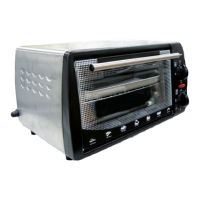

 To Next Page
 General