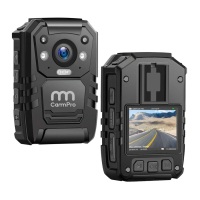
Open vehicle-mounted mode, and assemble the camera to the base, one side of
data cable connect to mini USB port on the base, the other side connect to USB
port of the car. Fire the car and it will auto- recording while fire off it will stop
recording and save the video automatically. (Set it open or close in the menu)
• Screen Light Intensity
High, middle, low and auto adjust for options.
• Indicator Light
On or off.
e Video Classification
Traffic control, criminal investigation, public security can be selected by long
press key for 4 seconds. Short press o to select the mode, and
short press to confirm your selection. (Note: this function is close in default)
• Chime
Voice alert hourly. (Note: this function is closed in default)
• Default setting
To set device menu to restore factory mode, the data can saved and cann't
deleted.
• Firmware
the device version information.
10


 To Next Page
 Loading...