Troubleshooting
1 .Software doesn't work
--Press reset button (inside HDMI port) to have camera resetting when camera works
abnormally. Please note: DO NOT PRESS this button except maloperation.
2.Auxiliary camera port doesn't fit camera cable.
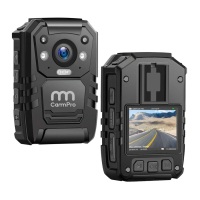
--1f you buy other brand's auxiliary camera and try to attach it to our Cammpro body
camera, there is chance that the cable of the auxiliary camera does not fit our port.
3.How can i get the driver install in my window 10 computer? my computer is saying
amba simple driver unavailable.
--1t may the USB drive don't allow you to install it. Here is the website link where you
could download the software :http://www.policecamera.cn/en/xiazai.php
Or you could contact our technical support at :
support@cammpro.com OR geargood@outlook.com for the download link.
4.How to organize and delete video?
--Turn on your body cameras once you connect the computer. 2. To press six zero into
body cameras then it will be like a disk or flash in your computer. 3. To delete something
what you like.
5.How do you install on my Mac Book Pro?
--The Stand-alone software is only for Windows. Recently CammPro upgraded a simpler
version firmware which can be used without stand-alone software. We'd be glad to help
you to update your camera, so it can be connected with Mac Book Pro to read data.
Email: support@cammpro.com or geargood@outlook.com
6. The software that operates the memory and function of the camera will not run
on my computer
--As this camera have password protection to prevent unauthorized tampering.
Before connect to computer,you should use the CD to install the driver onto the
computer, after that, the camera could be read on computer and the software could
run on the computer.
23


 To Next Page
 Loading...