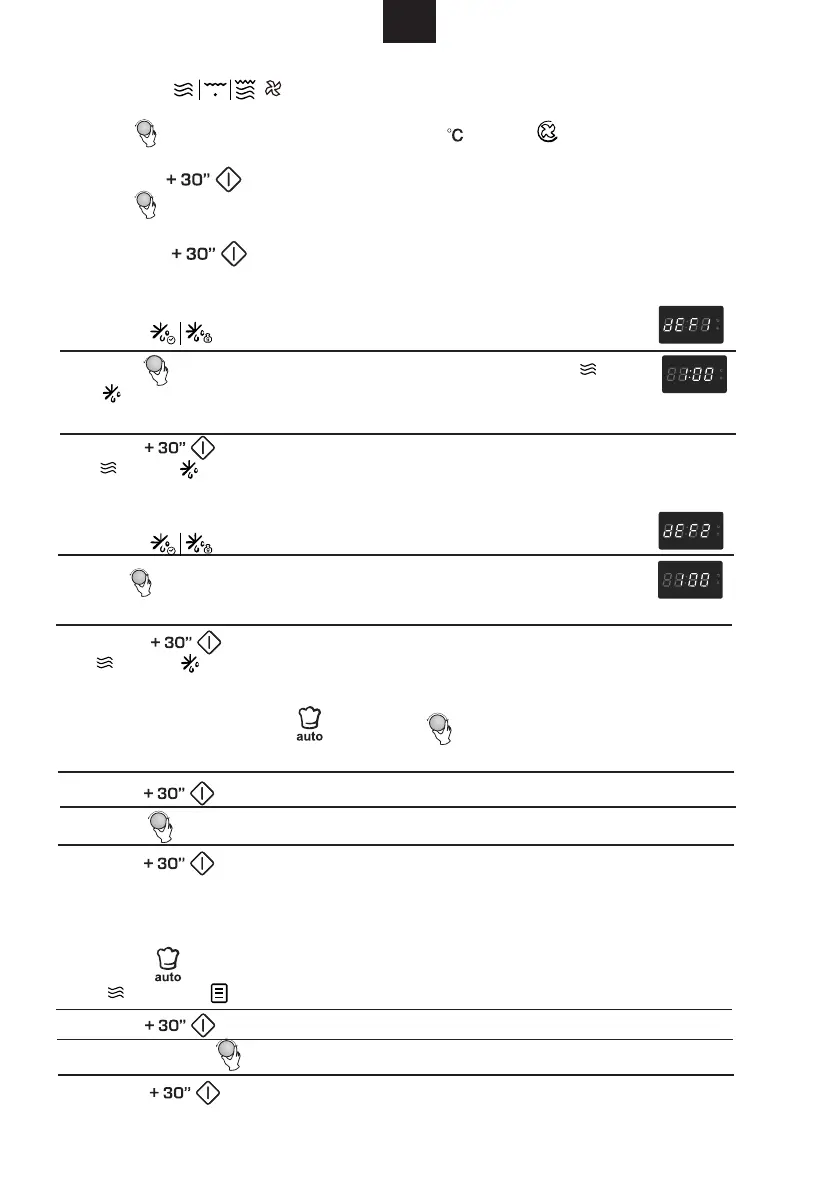
1). In waiting states, press " " or turn " " right to choose the menu you need.
"A-01","A-02"...."A-10" will display in order.
3) Press " " to start cooking.
When cooking finish, buzzer will sound five times. If the clock has been set before,
the current time will be displayed, otherwise, 0:00 will be displayed.
2). Turn " " to select the menu from b-1 to b-4.
For example: to cook the pasta.
1) Press " " for seven times, "A-07" displays and pasta menu is selected.
" " and " " indicator will light.
3) Press " " to start cooking.
When cooking finish, buzzer will sound five times. Then turn back to waiting states.
The default power level is P30. It is not adjustable.
1) Press " " key once, the LED will display "dEF1".
2) Turn " " to select the cooking time. At the same time, " " and
" " will be lighted. The time setting is from 00:05 to 95:00.
3) Press " " key to start defrosting.
" " and " " indicators will flash .
GB
" to confirm the selected main menu.
2) Press "
" to confirm the selected main menu.
2) Press "
3). Stop turning " " when "b-4" displays.
Weight
1) Press " " pad twice,the LED will display "dEF2".
3) Press " " key to start defrosting.
" " and " " indicators will flash and "g" indicator will go out.
2) Turn " " to select the weight of food.At the same time, "g" will light.
The weight should be 100-2000g.
1) Press the " " key three times, "140" flash.
2) Turn " " to select the convection function. " " flash." " light.
To choose the convection temperature you need by keeping turning it.
3) Press the " " to confirm.
4) Turn " " to adjust the cooking time. (The maximum setting time is
95 minutes.)
5) Press the " " key to start cooking.
7. Convection Cooking( Without pre-heating function)
8. Defrost By Time
9. Defrost by
10. Auto Menu


 To Next Page