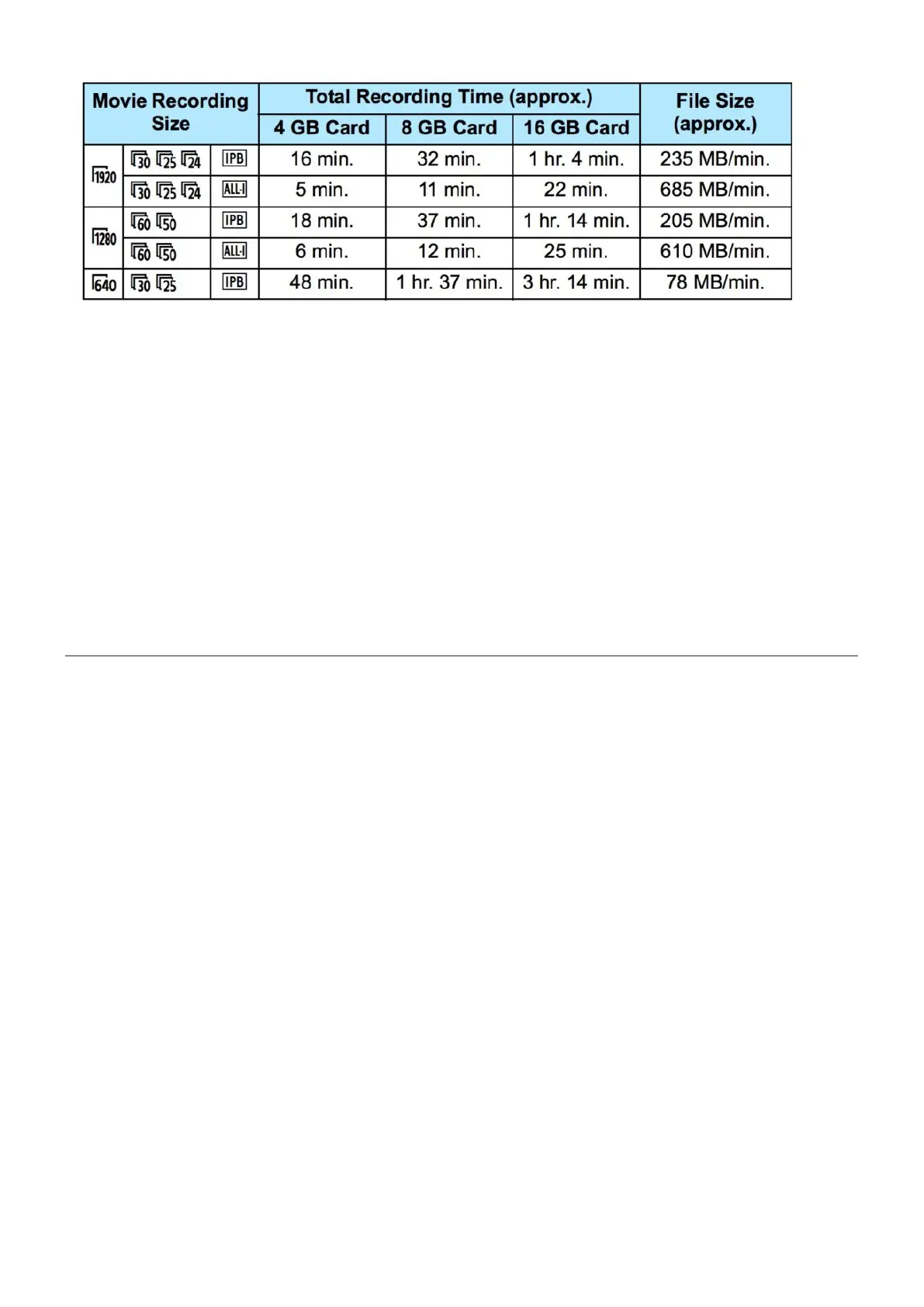
Video Shooting Time Limit
The maximum recording time of one video clip is 29 minutes and
59 seconds. The recording will stop automatically when the
limit is reached.
This happens to let the camera’s internal temperature cool
down. It gets hot because a mechanism is holding the mirror up
while the video is recording.
Shooting VIdeo on Full Auto
Sometimes it’s ok to shoot in full auto mode, especially for
fast moving actions. Don’t be afraid to use full auto.
Turn on Lens Stabilizer.1.
Switch Lens to AF AutoFocus.2.
Turn camera on.3.
Switch to Movie mode.4.
Turn the mode dial to the green A for Auto mode.5.
Press the Menu button.6.
Scroll to the second last menu and set Video System to7.
PAL.
Scroll to the fourth menu and set Movie rec size to 19208.
25 IPB.
Set Sound Recording to On.9.













 To Next Page