_.~ Customizing a Picture Style _
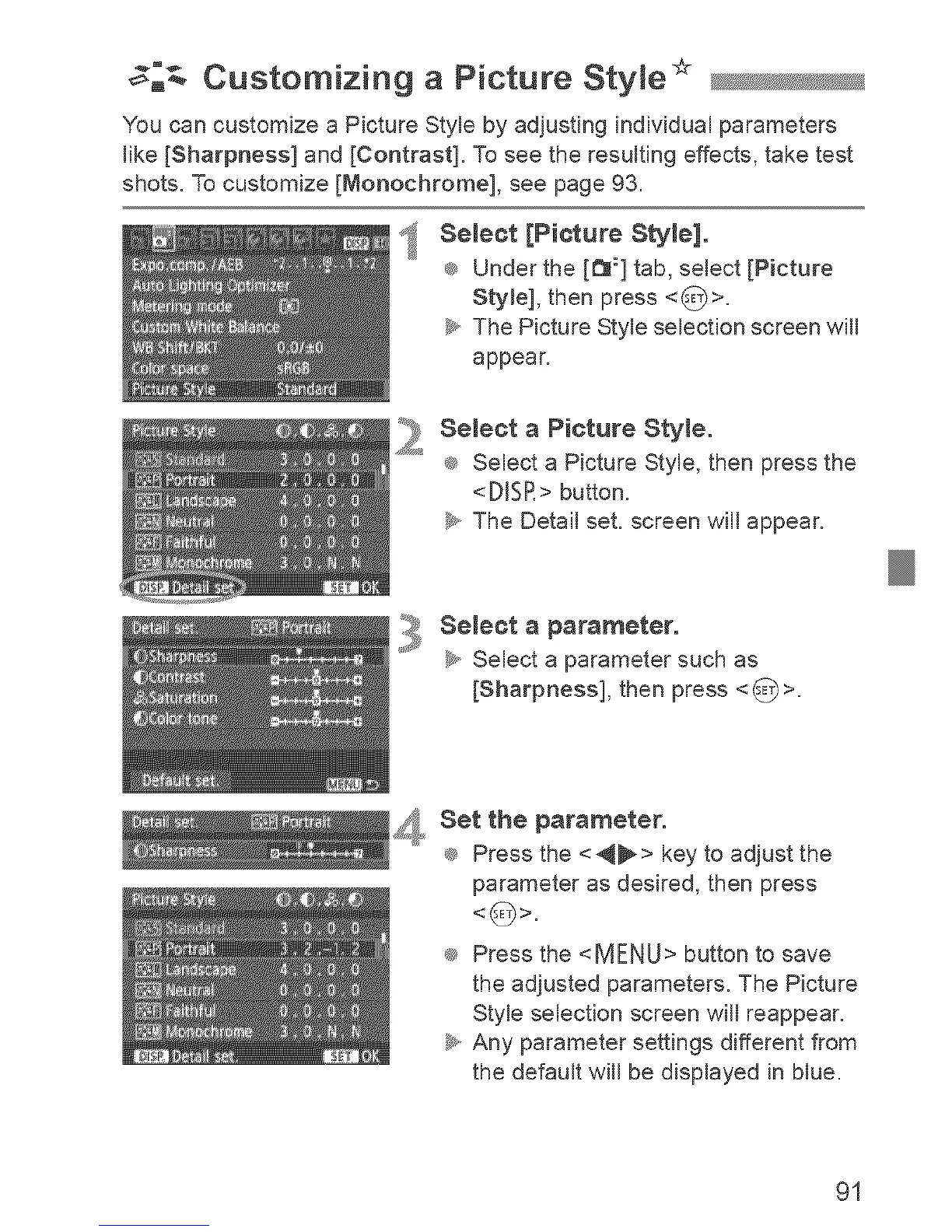
You can customize a Picture Style by adjusting individual parameters
like [Sharpness] and [Contrast]. To see the resulting effects, take test
shots. To customize [Monochrome], see page 93.
Select [Picture Style].
® Under the [t_:] tab, select [Picture
Sty[el, then press <_>.
_y,,The Picture Style selection screen will
appear.
2
Select a Picture Style.
® Select a Picture Style, then press the
<D[SR> button.
_y,,The Detail set. screen will appear.
Select a parameter.
_y,,Select a parameter such as
[Sharpness], then press <_>.
, Set the parameter.
® Press the <_> key to adjust the
parameter as desired, then press
® Press the <MENU> button to save
the adjusted parameters. The Picture
Style selection screen will reappear.
_y,,Any parameter settings different from
the default will be displayed in blue.
91












 To Next Page