ENHANCING SECURITY
Once system access is granted, a number of standard and
optional security measures go to work to keep confidential
data secure. The Encrypted Secured Print option protects print
data as it’s sent over the network. The document can only be
decrypted and printed after the correct password is entered at
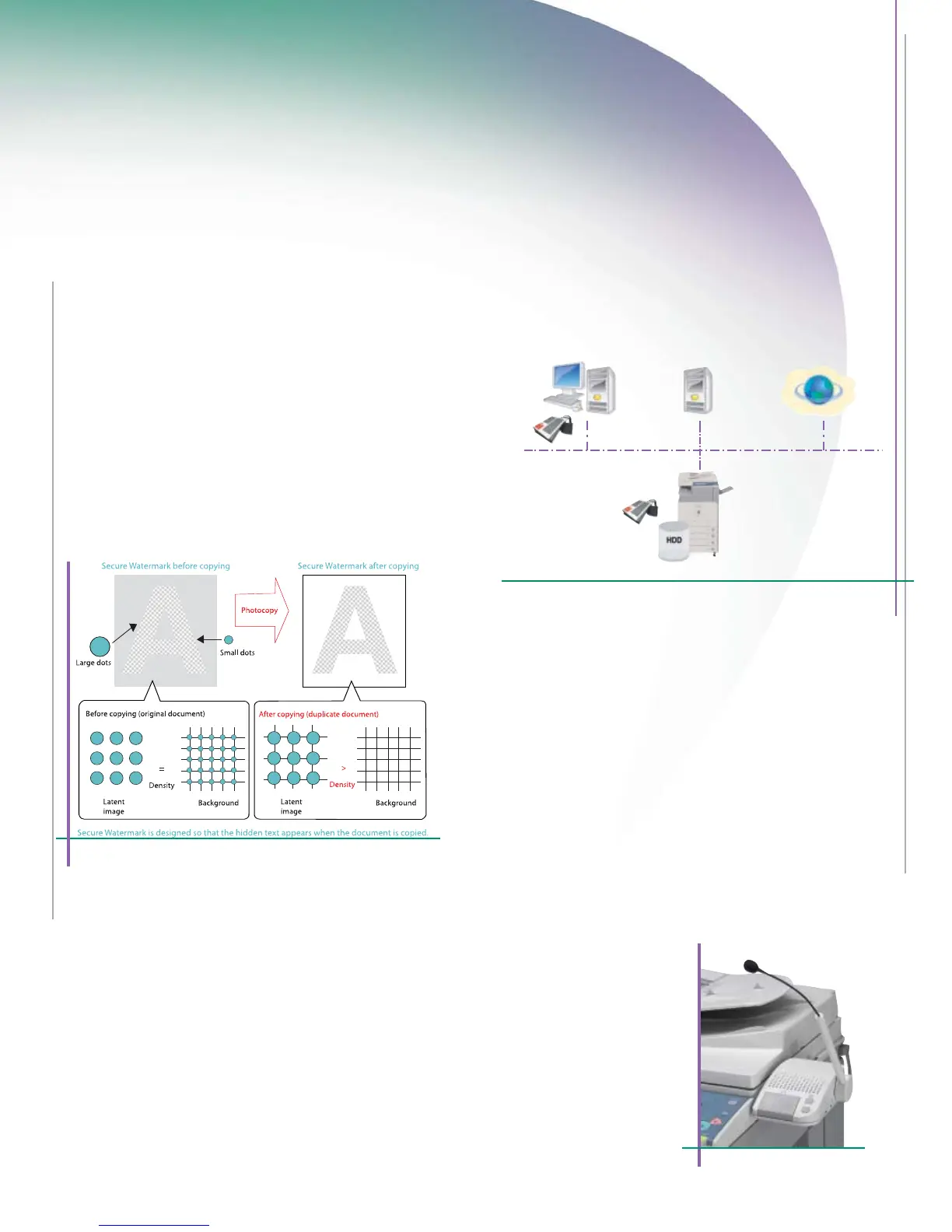
the control panel. When the Secure Watermark option is activated,
the system embeds text and background patterns on printed
documents that become visible if the page is reproduced, deter-
ring users from copying sensitive information.
For highly sensitive environments dealing with classified data,
the HDD Data Encryption option provides additional security by
encrypting data before it is written to the hard disk drive, and
has achieved Common Criteria (CC) Certification. For the ultimate
in data protection, when the optional HDD Data Erase Kit is
added the device can be set to automatically overwrite
previously stored data.
MAINTAINING ACCESSIBILITY
The imageRUNNER 3045/3035 systems support a number of
solutions that go even further to provide easy access for every
authorized user. At the device, ease-of-use starts with the easy-
to-read, full-color touch-panel, interactive on-board help menus,
plus user-friendly documentation and tutorial tools for begin-
ners and advanced users alike. Employees can have full access
to system functions from a laptop or desktop PC using the
Remote Operator’s Software Kit, an option that emulates the
device control panel on a computer monitor. Users with visual
or motor impairments can operate the device using spoken
commands or receive audible confirmation of selected
functions with the optional Voice Operation Kit.
Advanced security capabilities address today’s needs for data protection.
Data Protection With Access For
All Authorized Users
Secure Watermark
Device Management and Security Overview
Voice Operation Kit
Document Security
Encrypted Secured Print
Watermark/Secure Watermark
Copy Set Numbering
Encrypted PDF
FAX Forwarding
FAX Destination Confirmation
HDD Security
• HDD Data Erase
• HDD Data Encryption
• HDD Format
• Mail Box Password Protection
Mail Server Security
POP Authentication before SMTP
SMTP Authentication
Network Security
MAC Address Filtering
IP Address Filtering
SSL Encryption
Network Application On/Off
USB Block
Destination Restriction
Device Access Security
• Department ID (up to 1000 IDs)
• User Authentication (SDL/SSO)
• Control Card/Card Reader system (optional)
Device Management
• DIDF (Device Information Delivery Function)
• imageWARE Enter
rise Management Console
Internet















 To Next Page