21
Conguring the Fax
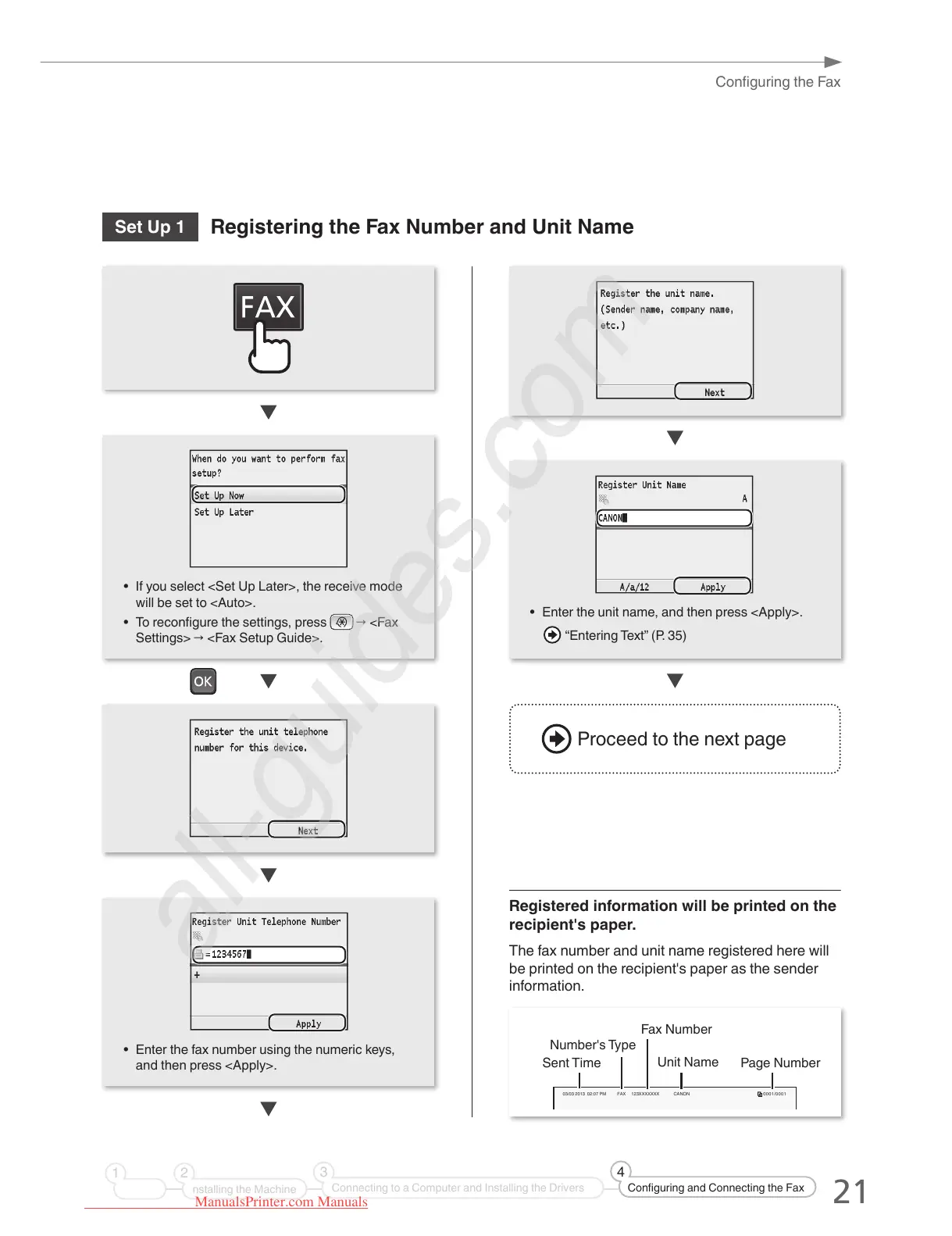
Set Up 1
Registering the Fax Number and Unit Name
• Enter the unit name, and then press <Apply>.
“Entering Text” (P. 35)
Registered information will be printed on the
recipient's paper.
The fax number and unit name registered here will
be printed on the recipient's paper as the sender
information.
• If you select <Set Up Later>, the receive mode
will be set to <Auto>.
• To recongure the settings, press
→ <Fax
Settings> → <Fax Setup Guide>.
03/03 2013 02:07 PM FAX 123XXXXXXX CANON 0001/0001
Sent Time Page Number
Fax Number
Unit Name
Number's Type
• Enter the fax number using the numeric keys,
and then press <Apply>.
Proceed to the next page
nstalling the Machine
21
Connecting to a Computer and Installing the Drivers
3
Configuring and Connecting the Fax
4
ManualsPrinter.com Manuals





 To Next Page