23
Conguring the Fax
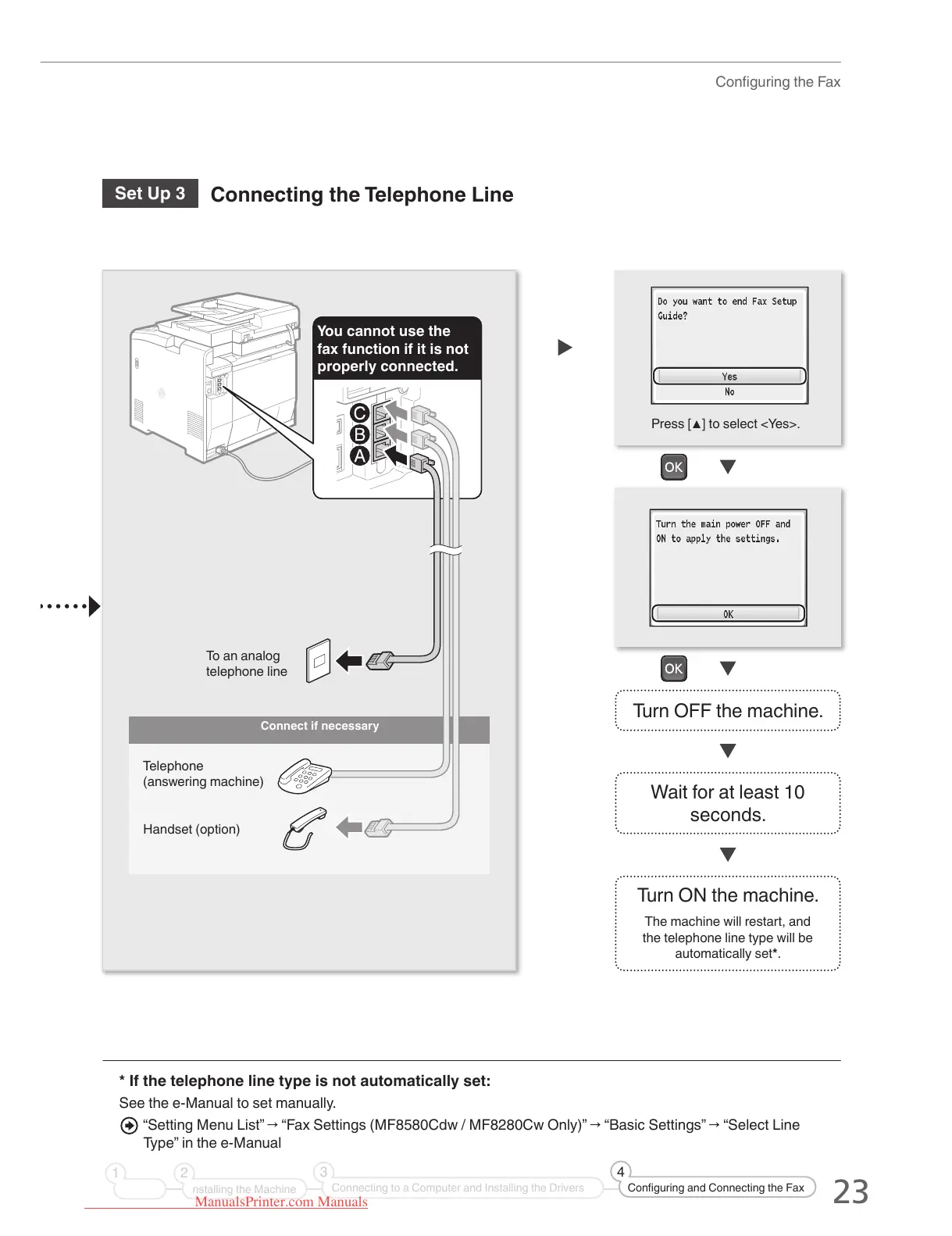
Turn OFF the machine.
Wait for at least 10
seconds.
Turn ON the machine.
The machine will restart, and
the telephone line type will be
automatically set*.
Press [▲] to select <Yes>.
Set Up 3
Connecting the Telephone Line
* If the telephone line type is not automatically set:
See the e-Manual to set manually.
“Setting Menu List” → “Fax Settings (MF8580Cdw / MF8280Cw Only)” → “Basic Settings” → “Select Line
Type” in the e-Manual
Connect if necessary
You cannot use the
fax function if it is not
properly connected.
Telephone
(answering machine)
Handset (option)
nstalling the Machine
21
Connecting to a Computer and Installing the Drivers
3
Configuring and Connecting the Fax
4
To an analog
telephone line
ManualsPrinter.com Manuals





 To Next Page