Additional Functions
PDF(OCR) Settings
Enables you to set the machine to detect original orientation. You can also specify the number of
characters for the machine to detect and extract from the rst line of the document to be used as
the lename.
See the Sending and Facsimile Guide Chapter 9
*14 Displayed only if the optional Universal Send PDF Advanced Feature Set is activated.
*15 Displayed only if the optional Universal Send PDF Security Feature Set is activated.
*16 Displayed only if the optional Digital User Signature PDF Kit is activated and you are logged
in to the machine using the SDL or SSO login service.
(3/5)
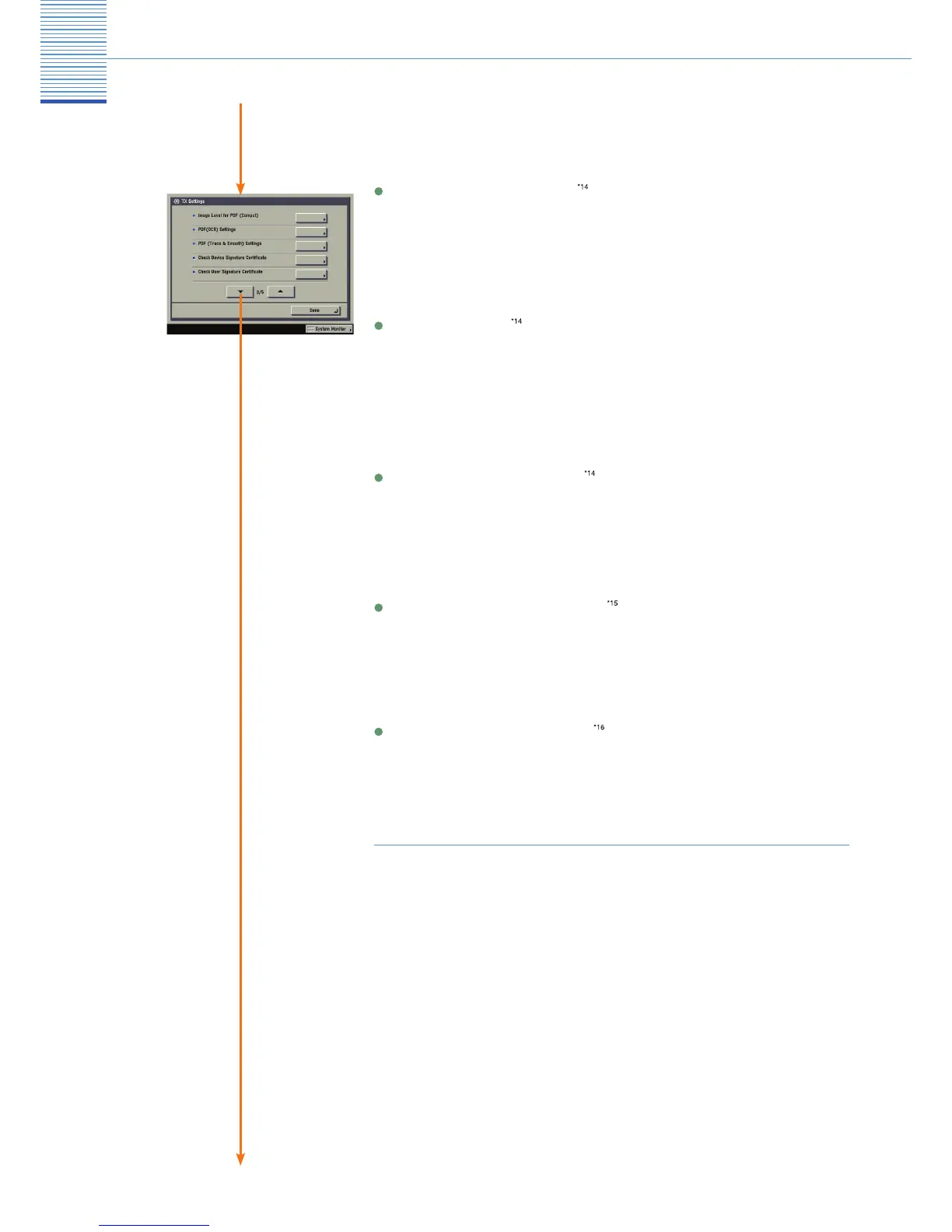
TX Settings
Check Device Signature Certificate
Enales you to verify the certicate and key pair required for adding a device signature to PDF les.
See the Sending and Facsimile Guide Chapter 9
Check User Signature Certificate
Enables you to verify the certicate and key pair required for adding a user signature to PDF les.
See the Sending and Facsimile Guide Chapter 9
Image Level for PDF (Compct)
Enables you to set the image quality level of the document if [PDF (Trace)] or [PDF (Compact)] is
selected as the le format.
PDF (Trace & Smooth) Settings
Enables you to change the recognition rate of line drawings of the original when outlining
documents that are to be sent.
See the Sending and Facsimile Guide Chapter 9
See the Sending and Facsimile Guide Chapter 9


 To Next Page