Additional Functions
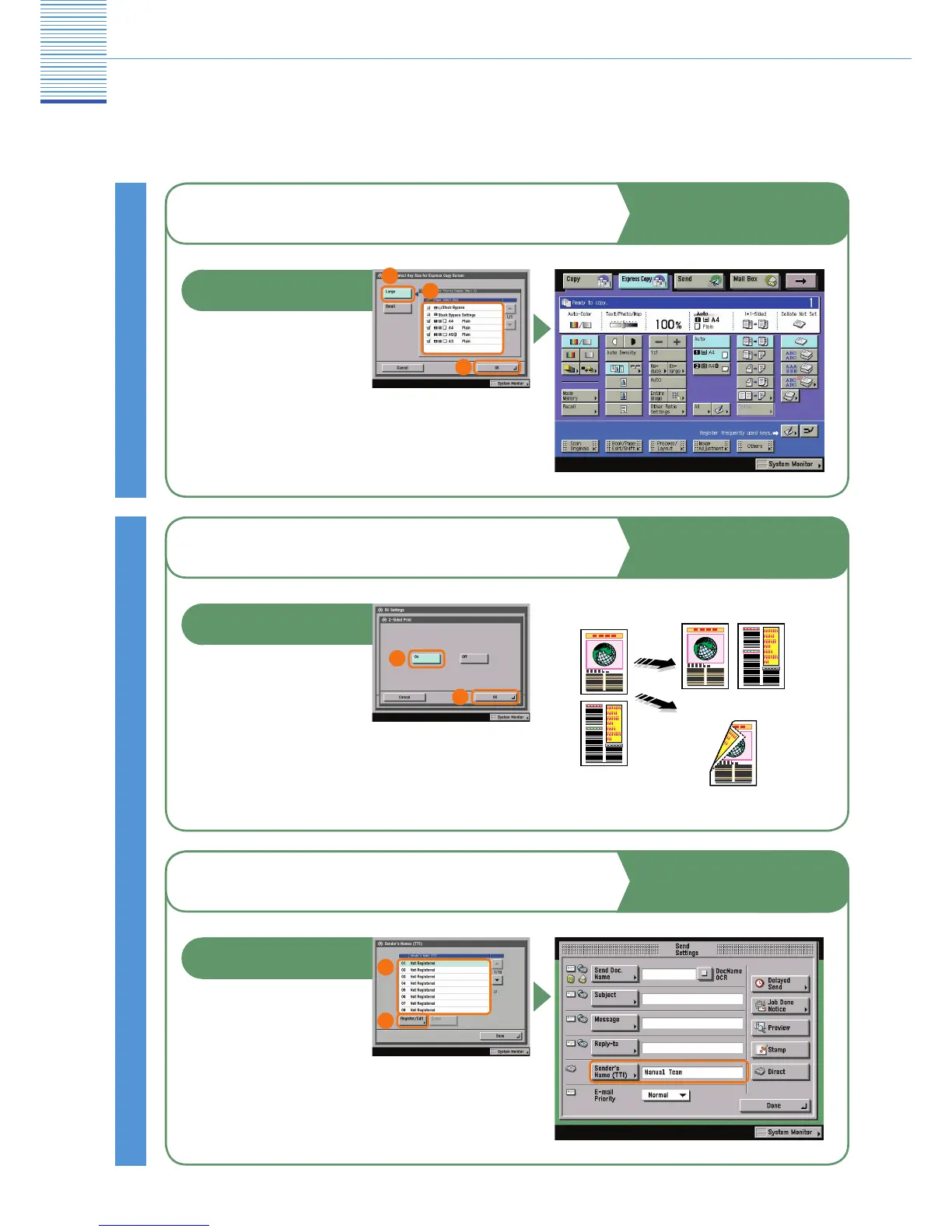
To Display a Specic Paper Source on the
Express Copy Screen
You can set the order and
number of paper sources
and paper drawers to display
for the paper select keys
on the Express Copy Basic
Features screen.
Copy Settings
Copying and Mail Box Guide
Chapter 8
2
Paper Select Key Size for Express
Copy Screen
Communications Settings
To Print Received Documents on Both Sides
of the Paper
You can print received
documents on both sides of
the paper you select. This
enables you to save paper.
Sending and Facsimile Guide
Chapter 9
1
2
2-Sided Print
With 2-Sided Printing
Without 2-Sided Printing
3
To Add the Sender’s Name, Section, or
Department to Sent Documents
For fax, you can register
the sender’s name, section,
or department in Sender’s
Names (TTI). This name is
displayed on the recipient’s
machine, and printed on sent documents.
Sending and Facsimile Guide
Chapter 1
1
2
Sender’s Names (TTI)
* The numbers in the illustrations refer to operation steps.
1


 To Next Page