(B)(A)
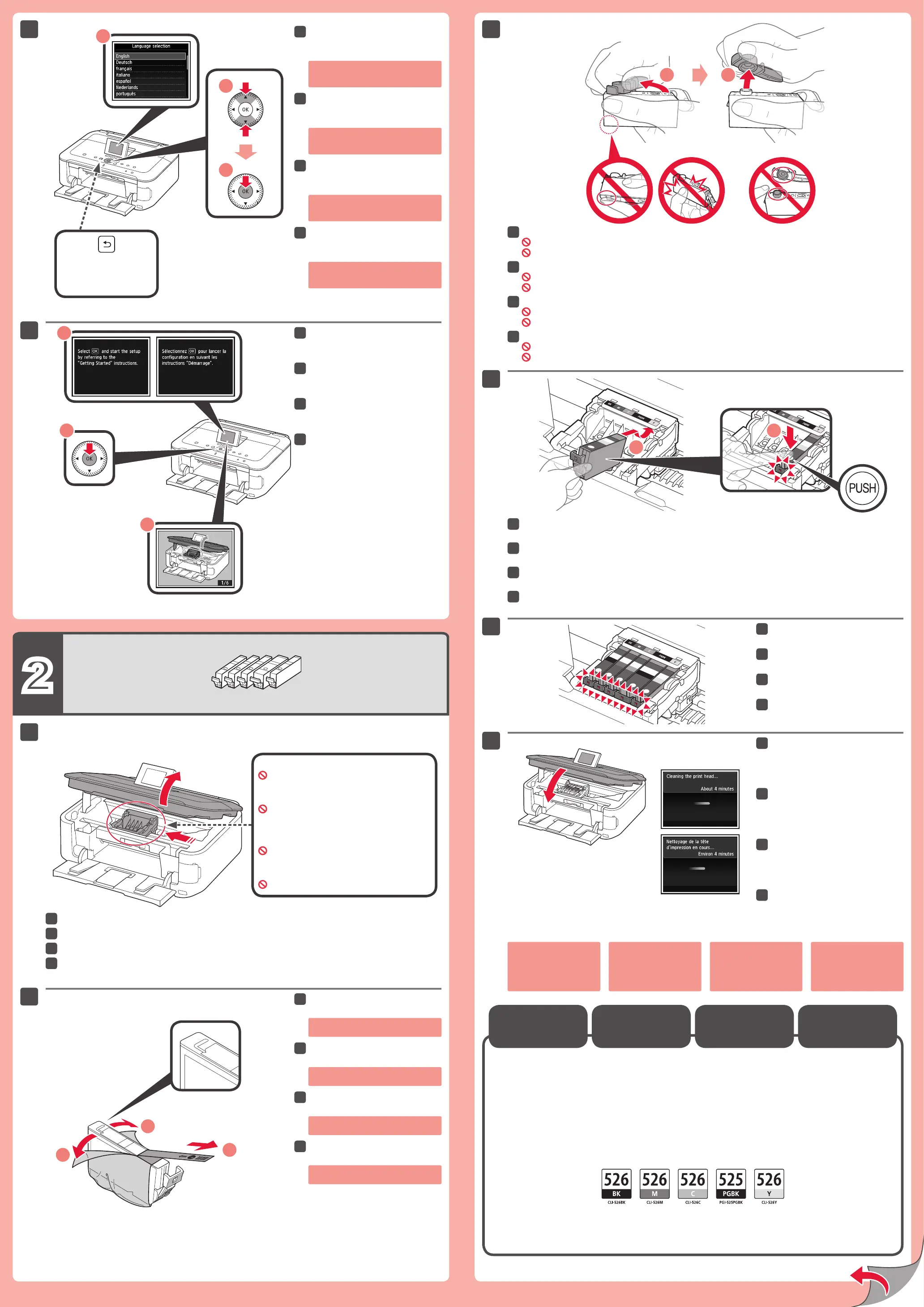
Wanneer het scherm 1 wordt
weergegeven, drukt u op de knop
OK.
Open de scaneenheid / klep (Scanning Unit / Cover).
Draai het oranje kapje open en verwijder dit.
(A) Druk niet op de zijkanten wanneer de L-vormige gleuf is geblokkeerd.
(B) Niet aanraken!
Plaats de inkttank (ink tank) en druk deze omlaag in de sleuf met dezelfde kleur.
Controleer of het inktlampje (ink lamp) brandt en plaats vervolgens de volgende inkttank (ink tank).
Controleer of alle lampjes branden.
Als er een foutbericht
wordt weergegeven,
controleert u of de inkttank
(ink tank) correct is
geïnstalleerd.
Sluit de scaneenheid / klep
(Scanning Unit / Cover).
Wacht ongeveer 4 minuten totdat dit
scherm is verdwenen en ga verder.
De volgende inkttanks (ink tanks) zijn compatibel met dit apparaat.
Hier worden de inkttanks (ink tanks)
geïnstalleerd.
Niet aanraken voordat de bewerking is gestopt.
Selecteer uw taal en druk op de
knop OK.
Als u de taalinstelling wilt wijzigen,
drukt u op de knop Terug (Back).
De inkttanks
(Ink Tanks)
vervangen
Knop Terug (Back)
Verwijder de oranje tape (orange tape)
volledig.
Verwijder de beschermende
verpakking.
Wenn Bildschirm 1 angezeigt wird,
drücken Sie die Taste OK.
Öffnen Sie das Scan-Modul/Abdeckung (Scanning Unit / Cover).
Drehen und entfernen Sie die orangefarbene Kappe.
(A) Üben Sie keinen Druck auf die Seiten aus, wenn die L-förmige Öffnung blockiert ist.
(B) Nicht berühren!
Setzen Sie die Tintenpatrone (ink tank) in den Schacht für die entsprechende Farbe ein, und drücken Sie sie nach unten.
Vergewissern Sie sich, dass die Anzeige für Tintenbehälter (ink lamp) leuchtet. Setzen Sie dann die nächste Tintenpatrone (ink tank) ein.
Stellen Sie sicher, dass alle
Anzeigen leuchten.
Wenn eine Fehlermeldung
angezeigt wird, überprüfen
Sie, ob die Tintenpatrone
(ink tank) ordnungsgemäß
eingesetzt ist.
Schließen Sie das Scan-Modul/
Abdeckung (Scanning Unit / Cover).
Warten Sie etwa 4 Minuten, bis dieser
Bildschirm nicht mehr angezeigt wird, und
fahren Sie dann fort.
Die folgenden Tintenpatronen (ink tanks) sind mit diesem Gerät kompatibel.
Hier werden die Tintenpatronen (ink tanks)
eingesetzt.
Erst nach Abschluss des Vorgangs berühren.
Wählen Sie Ihre Sprache aus,
und drücken Sie anschließend die
Taste OK.
Um die Spracheinstellung zu ändern,
drücken Sie die Taste Zurück (Back).
Austauschen der
Tintenpatronen
(Ink Tanks)
Taste Zurück (Back)
Ziehen Sie das orangefarbene
Klebeband (orange tape) vollständig ab.
Entfernen Sie die Schutzhülle.
Lorsque l’écran 1 s’afche,
appuyez sur le bouton OK.
Ouvrez l’unité de numérisation / le capot.
Faites pivoter la capsule orange et retirez-la.
(A) N’appuyez pas sur les côtés lorsque la rainure en forme de L est bloquée.
(B) À ne pas toucher!
Insérez et enfoncez la cartouche d’encre dans l’emplacement de couleur correspondante.
Vériez que le voyant d’encre est allumé, puis installez la cartouche d’encre suivante.
Vériez que tous les voyants sont
allumés.
Si un message d’erreur
apparaît, vériez que la
cartouche d’encre est
correctement installée.
Fermez l’unité de numérisation /
le capot.
Attendez environ 4 minutes que cet écran
ne soit plus afché, puis passez à l’étape
suivante.
Les cartouches d’encre suivantes sont compatibles avec cette machine.
C’est ici que les cartouches d’encre doivent
être installées.
Évitez tout contact tant que les cartouches ne sont
pas correctement installées.
Sélectionnez votre langue, puis
appuyez sur le bouton OK.
Pour modier le paramètre de langue,
appuyez sur le bouton Précédent
(Back).
Remplacement
des cartouches
d’encre
Bouton Précédent (Back)
Retirez complètement la bande orange.
Retirez l’emballage de protection.
Open the Scanning Unit / Cover.
Twist and remove the orange cap.
(A) Do not press the sides when the L-shaped groove is blocked.
(B) Do not touch!
Insert and push down the ink tank into the matching color slot.
Check that the ink lamp is lit, then install the next ink tank.
Check that all lamps are lit.
If an error message
appears, check that
the ink tank is installed
correctly.
Close the Scanning Unit / Cover.
Wait for about 4 minutes until this screen
disappears, then proceed.
The following ink tanks are compatible with this machine.
When screen 1 is displayed, press
the OK button.
Remove the orange tape completely.
Remove the protective wrap.
This is where the ink tanks are to be installed.
Do not touch it until it stops.
Select your language, then press
the OK button.
To change the language setting, press
the Back button.
Back button
BK: CLI-526BK
C: CLI-526C
Y: CLI-526Y
M: CLI-526M
PGBK: PGI-525PGBK


 To Next Page
 Loading...