Instruction manual DD610BK
27
Please keep this instruction manual for future reference
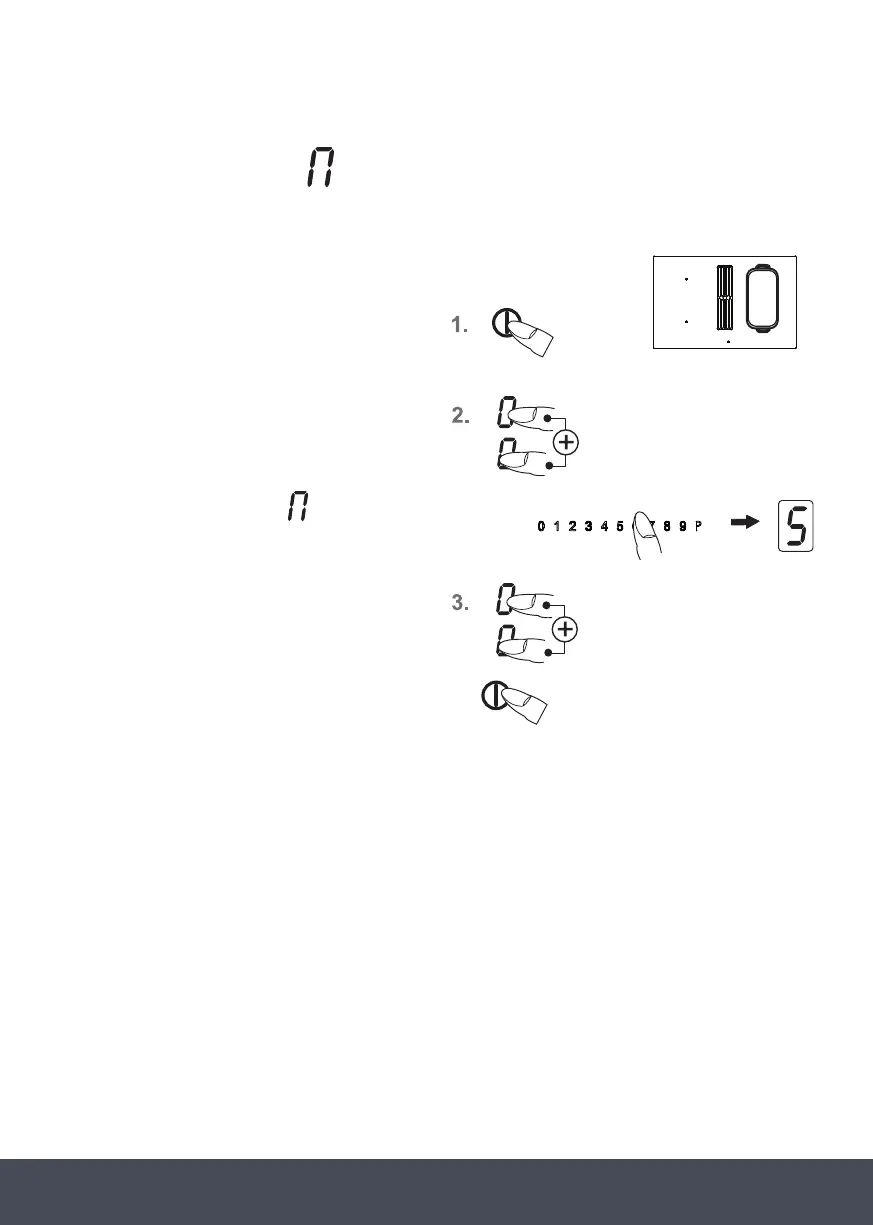
BRIDGING FUNCTION:
The front and the rear cooking zones may be activated together for a cooking process (bridging
function). This enables larger cookware to be used.
1. Switch on the hob.
2. Press the two cooking zone selection
keys of the front and back cooking zones
simultaneously to activate the bridging
function. The bridging function has been
switched on and the back power level
setting shows the bridge
1.
2. the two cooking zone selection keys of the
front and back cooking zones simultaneously to
activate the bridging function. The bridging
function has been switched on and the back power
level setting shows the bridge .
Operation is carried out with the front power level
setting and the touch control.
3.Activate the front and back cooking zones
simultaneously again or switch the hob off to
deactivate the two power level settings (as a key).
MinMin
Min
Max
Max
Min
Max
Min
Max
Min
Max
Min
Max
MinMin
Min
Max
Max
.
Operation is carried out with the front
power level setting and the touch control.
3. Activate the front and back cooking zones
simultaneously again or switch the hob off
to deactivate the two power level settings
(as a key).
NOTE:
The pan will need to cover at least half of the cooking zones used in order to be recognised by the
pan recognition device.
NOTE:
Bridge function only available on right hand side of hob.
1.
2. the two cooking zone selection keys of the
front and back cooking zones simultaneously to
activate the bridging function. The bridging
function has been switched on and the back power
level setting shows the bridge .
Operation is carried out with the front power level
setting and the touch control.
3.Activate the front and back cooking zones
simultaneously again or switch the hob off to
deactivate the two power level settings (as a key).
MinMin
Min
Max
Max
Min
Max
Min
Max
BRIDGING FUNCTION:
1.
2. the two cooking zone selection keys of the
front and back cooking zones simultaneously to
activate the bridging function. The bridging
function has been switched on and the back power
level setting shows the bridge .
Operation is carried out with the front power level
setting and the touch control.
3.Activate the front and back cooking zones
simultaneously again or switch the hob off to
deactivate the two power level settings (as a key).
MinMin
Min
Max
Max
Min
Max
Min
Max
Min
Max
Min
Max
MinMin
Min
Max
Max


 To Next Page
 Loading...