Instruction manual DD610BK
29
Please keep this instruction manual for future reference
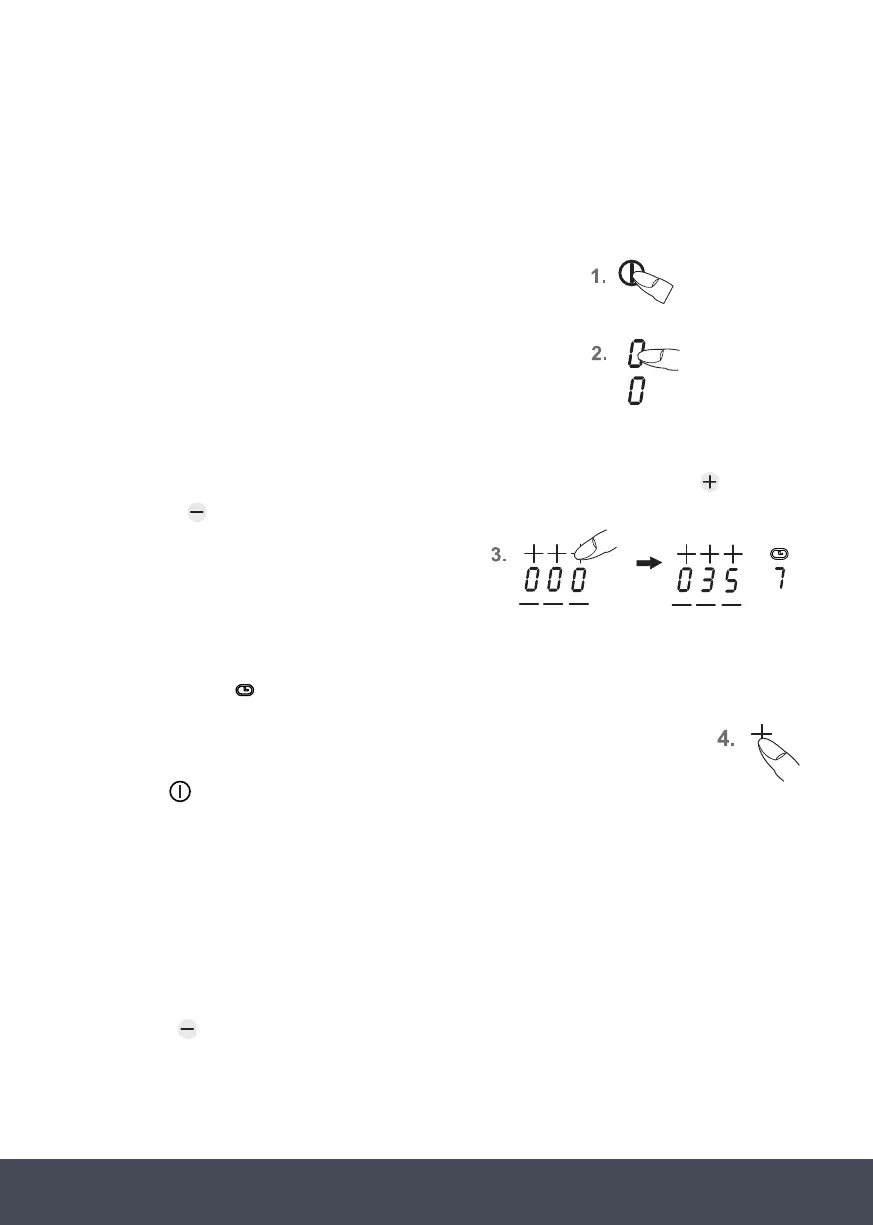
AUTOMATIC SWITCH-OFF (TIMER):
The automatic switch-off device is used to automatically switch off any cooking zone after an
adjustable period of time. Cooking times ranging from 0.10 to 9.59 (hour:minutes) can be set.
1. Switch on the hob. Switch on one or more cooking zones and
select the required power settings.
2. Switch on one or more cooking zones and select the required
power settings.
3. Use the power setting display (as a key) to select a cooking zone. The standby dot of the
cooking zone selected will light up. Select the timer display and use the Plus key
PERMANENT PAN RECOGNIT ION
A cooking setting can only be switched on via the slider (touch control) after a
pan has been detected on the hob and the power display shows 0.
6
POWER BOOST IN THE TOUCH CONTROL (7)
8
8
The most recent setting can be recovered if the hob is switched off unintentionally.
CH ILD SAFETY 9
KEEP WARM KEY 0
To keep warm.
GRILL KEY: (11)
Grill function with a griddle plate for induction.
/PLUS 12
These keys are used to set the timer and the automatic switch-off function of the
cooking zones as well as the automatic delay stop of the fan
or the
Minus key
PERMANENT PAN RECOGNIT ION
A cooking setting can only be switched on via the slider (touch control) after a
pan has been detected on the hob and the power display shows 0.
6
POWER BOOST IN THE TOUCH CONTROL (7)
8
8
The most recent setting can be recovered if the hob is switched off unintentionally.
CH ILD SAFETY 9
KEEP WARM KEY 0
To keep warm.
GRILL KEY: (11)
Grill function with a griddle plate for induction.
MINUS / 1 2
These keys are used to set the timer and the automatic switch-off function of the
cooking zones as well as the automatic delay stop of the fan
of the timer to set the required time.
Left position: Hours
Centre position: Every 10 minutes
Right position: Every minute
After a few seconds the entry will be taken over and the time will be running.
The timer symbol
Min
Max
1x,2x,3x
1x,2x,3x
1x,2x,3x
Min
Max
1x,2x,3x
Min
Max
1x,2x,3x
1x,2x,3x
9.59 (hour:minutes)
be set.
1.
2.Switch on one or more cooking zones and select
the required power settings.
3.Use the power setting display (as a key) to select a
cooking zone. The standby dot of the cooking zone
selected will light up.
Select the timer display and use the Plus key or
the Minus key of the timer to set the required
time.
Left position: Hours
Centre position: Every 10 minutes
Right position: Every minute
After a few seconds the entry will be taken over
and the time will be running.
The timer symbol of the cooking zone lights up.
4.The cooking zone will be switched off when the
time has lapsed. A signal will sound for a while
and can be switched off by pressing any key
(except the ON/OFF key ).
To check the time that has lapsed (automatic switch-off) press the timer display (as a key).
The setting displayed can be read and changed.
R-off
of the cooking zone lights up.
4. The cooking zone will be switched off when the time has lapsed. A signal will
sound for a while and can be switched off by pressing any key (except the ON/
OFF key
).
NOTE:
› Repeat steps 2 to 4 to programme the automatic switch-off device for another cooking zone.
› To check the time that has lapsed (automatic switch-off) press the timer display (as a key).
The setting displayed can be read and changed.
› Terminating the function of the timer: Select the respective cooking zone and press the
minus key
PERMANENT PAN RECOGNIT ION
A cooking setting can only be switched on via the slider (touch control) after a
pan has been detected on the hob and the power display shows 0.
6
POWER BOOST IN THE TOUCH CONTROL (7)
8
8
The most recent setting can be recovered if the hob is switched off unintentionally.
CH ILD SAFETY 9
KEEP WARM KEY 0
To keep warm.
GRILL KEY: (11)
Grill function with a griddle plate for induction.
MINUS / 1 2
These keys are used to set the timer and the automatic switch-off function of the
cooking zones as well as the automatic delay stop of the fan
to delete the time (0).
› If several cooking zones have been programmed with the automatic switch-off function, the
timer display will always show the cooking zone with the shortest time.
Min
Max
1x,2x,3x
1x,2x,3x
Min
Max
1x,2x,3x
Min
Max
1x,2x,3x
1x,2x,3x
9.59 (hour:minutes)
be set.
1.
2.Switch on one or more cooking zones and select
the required power settings.
3.Use the power setting display (as a key) to select a
cooking zone. The standby dot of the cooking zone
selected will light up.
Select the timer display and use the Plus key or
the Minus key of the timer to set the required
time.
Left position: Hours
Centre position: Every 10 minutes
Right position: Every minute
After a few seconds the entry will be taken over
and the time will be running.
The timer symbol of the cooking zone lights up.
4.The cooking zone will be switched off when the
time has lapsed. A signal will sound for a while
and can be switched off by pressing any key
(except the ON/OFF key ).
To check the time that has lapsed (automatic switch-off) press the timer display (as a key).
The setting displayed can be read and changed.
R-off
Min
Max
1x,2x,3x
1x,2x,3x
•
1x,2x,3x
•
Min
Max
1x,2x,3x
•
•
Min
Max
1x,2x,3x
1x,2x,3x
9.59 (hour:minutes)
be set.
1.
2.Switch on one or more cooking zones and select
the required power settings.
3.Use the power setting display (as a key) to select a
cooking zone. The standby dot of the cooking zone
selected will light up.
Select the timer display and use the Plus key or
the Minus key of the timer to set the required
time.
Left position: Hours
Centre position: Every 10 minutes
Right position: Every minute
After a few seconds the entry will be taken over
and the time will be running.
The timer symbol of the cooking zone lights up.
4.The cooking zone will be switched off when the
time has lapsed. A signal will sound for a while
and can be switched off by pressing any key
(except the ON/OFF key ).
To check the time that has lapsed (automatic switch-off) press the timer display (as a key).
The setting displayed can be read and changed.
R-off
Min
Max
1x,2x,3x
1x,2x,3x
1x,2x,3x
Min
Max
1x,2x,3x
Min
Max
1x,2x,3x
1x,2x,3x
9.59 (hour:minutes)
be set.
1.
2.Switch on one or more cooking zones and select
the required power settings.
3.Use the power setting display (as a key) to select a
cooking zone. The standby dot of the cooking zone
selected will light up.
Select the timer display and use the Plus key or
the Minus key of the timer to set the required
time.
Left position: Hours
Centre position: Every 10 minutes
Right position: Every minute
After a few seconds the entry will be taken over
and the time will be running.
The timer symbol of the cooking zone lights up.
4.The cooking zone will be switched off when the
time has lapsed. A signal will sound for a while
and can be switched off by pressing any key
(except the ON/OFF key ).
To check the time that has lapsed (automatic switch-off) press the timer display (as a key).
The setting displayed can be read and changed.
R-off


 To Next Page
 Loading...