WARNING: The grant of a Telepermit for any item of terminal equipment
indicates only that Telecom has accepted that the item complies with minimum
conditions for connection to its network. It indicates no endorsement of the
product by Telecom, nor does it provide any sort of warranty. Above all, it
provides no assurance that any item will work correctly in all respects with
another item of Telepermitted equipment of a different make or model, nor does
it imply that any product is compatible with all of Telecom's network services.
Emergency Dialing Instructions:
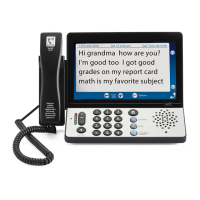
With CapTel 840i, calls to 111 are handled exactly the same as if you called
from any other phone connected to your telephone service, plus you get
captions of the call directly from the CapTel Captioning Service (during
Captioning Service operating hours). General instructions for dialing 111
are listed below. For detailed instructions about
your phone service and
111, please check with your telephone service provider.
To Dial 111:
1. Pick up handset and dial 111. Your call will be directly connected to the
Initial Call Answering Platform to extend to the relevant Emergency
Service Organisation for your local area.
2. Make sure the Caption button is on. If not, press the Caption button to
turn the captions on. During Captioning Service hours, you will receive
captions of everything the 111 Emergency Service Operator says.
3. When 111 answers, state your emergency and confirm your location.
If you turn captions on in the middle of a call to 111, there will be a brief
delay before the captions begin while the CapTel phone connects to the
Captioning Service. During that time the 111 Emergency Service Operator
will be able to hear everything you say. If necessary, tell the 111 operator
you are reading captions.
IMPORTANT NOTICE: Under power failure conditions, this telephone does
not operate. Please ensure that a separate telephone, not dependent on local
power, is available for emergency use.


 To Next Page