EasyManua.ls Logo

Carina Diamond - User Manual

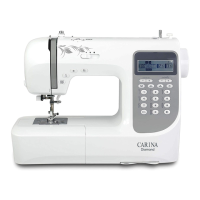
Carina Diamond
96 pages
Print Icon
To Next Page IconTo Next Page
Loading...
Diamond
DE
EN
FR
NL
ES
CZ
PL
SE
Kurzanleitung
Quick Instructions
Instrucciones rápidas
Snabbinstruktioner
Instructions rapides
Stručný návod
Skrócona instrukcja
Snelle instructies
Diese Kurzanleitung erklärt Grundeinstellungen und wichtige Sicherheitsinformationen. Für genaue
Erklärungen benützen Sie bitte die ausführliche Anleitung über unten stehenden Link.
These quick instructions explain basic settings and important safety information. For detailed expla-
nations, please use the detailed instructions via the link below.
Ce court manuel explique les réglages de base et les informations importantes en matière de sécuri-
té. Pour des explications détaillées, veuillez utiliser les instructions détaillées via le lien ci-dessous.
In deze korte handleiding worden de basisinstellingen en belangrijke veiligheidsinformatie uit-
gelegd. Voor gedetailleerde uitleg, gelieve de gedetailleerde instructies te gebruiken via de link
hieronder.
Den här korta handboken förklarar grundläggande inställningar och viktig säkerhetsinforma-
tion. För detaljerade förklaringar, vänligen använd de detaljerade instruktionerna via länken
nedan.
Esta guía rápida explica los ajustes básicos y la información de seguridad importante. Para ob-
tener explicaciones detalladas, utilice las instrucciones detalladas a través del siguiente enlace.
Tento stručný návod vysvětluje základní nastavení a důležité bezpečnostní informace. Podrob-
né vysvětlení naleznete v podrobných pokynech na níže uvedeném odkazu.
Ta skrócona instrukcja wyjaśnia podstawowe ustawienia i ważne informacje dotyczące bezpieczeństwa.
W celu uzyskania szczegółowych wyjaśnień prosimy o skorzystanie ze szczegółowej instrukcji pod
poniższym linkiem.
Follow this link to download the
detailed user manual.
http://diamond.carina-service.eu
Question and Answer IconNeed help?

Do you have a question about the Carina Diamond and is the answer not in the manual?

Summary

Important Safety Instructions

Machine Components and Controls

Machine Parts Overview

Detailed diagram identifying all principal parts of the sewing machine.

LCD Display Explanation

Explains the symbols and numbers shown on the LCD screen for various functions.

Function Buttons Overview

Explains the operation, control, and selection buttons for machine functions.

Stitch Overview Chart

Visual guide displaying standard, decorative stitches, and alphabet characters.

Threading and Bobbin Handling

Winding the Bobbin

Step-by-step instructions for winding thread onto the bobbin correctly.

Threading the Upper Thread

Detailed instructions for correctly threading the upper thread for sewing.

Needle Threader Operation

Instructions for using the automatic needle threader and troubleshooting.

Drawing up the Lower Thread

Instructions for bringing the lower thread up through the stitch plate.

Basic Sewing Operations and Adjustments

Adjustments

Covers thread cutting and presser foot lifter adjustments for sewing.

Needle and Feed Dog Adjustments

Instructions for changing the needle and adjusting the feed dogs.

Starting to Sew

Guide on how to begin sewing using the Start/Stop button and foot pedal.

Thread Tension Settings

Explains how to set and adjust thread tension for different stitch types and fabrics.

Advanced Functions and Selection

Key Functions Overview

Overview of the most important functions of the sewing machine.

Start;Stop Button Operation

How to use the Start/Stop button to begin and end sewing.

Automatic Stitching Auto-Lock Button

Explains the function of the Auto-Lock button for automatic securing stitches.

Needle Stop Up;Down Button

How to set the needle to stop up or down in the material.

Stitch Length and Width Adjustment

How to adjust stitch length and width using the respective buttons.

Mode Selection Button

How to switch between direct and number input modes for stitch selection.

Mirror Button Function

How to sew a mirror image of a selected stitch pattern.

Direct and Numbered Stitch Selection

How to select stitches directly or by number input using the selection buttons.

Accessories and Disposal

Standard Accessories

Lists the standard accessories included with the machine.

Optional Accessories

Lists optional accessories that can be purchased separately.

Disposal Information

Information on proper disposal of electrical appliances according to regulations.

Carina Diamond Specifications

General IconGeneral
Type-
DisplayLCD
Free armYes
Stitch width7 mm
Product colorGrey, White
Stitch length5 mm
Number of button holes11
Sewing machine functionsSewing
Number of stitch patterns206

Related product manuals