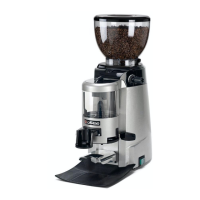
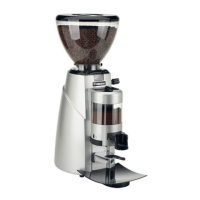
The document is a user and installation manual for the Casadio Enea and Enea OD (On Demand) coffee grinders, specifically for the USA market.
Function Description
The Casadio Enea and Enea OD are professional appliances designed for grinding coffee beans and dosing the ground coffee for espresso machines. The Enea is an automatic grinder-doser, while the Enea OD is an on-demand grinder-doser. Any use other than grinding coffee beans and dosing ground coffee for espresso machines is considered irregular.
Important Technical Specifications
- Noise Level: Assessed acoustic pressure level: 72 dB, uncertainty KpA: 2.5 dB.
- Room Temperature: Must range between 50° and 90°F (10°C and 32°C).
- Electrical Installation: Requires a circuit breaker with a complete disconnection distance for category III overload and protection against current leakage equal to 30 mA. The electrical safety relies on correct connection to an efficient earthing system.
- Weight (Enea): 10.2 Kg (23 Pounds)
- Weight (Enea On Demand): 9.5 Kg (21 Pounds)
Usage Features
General Operation:
- The appliance must be installed in a place where it is used by carefully trained staff aware of the risks.
- It is for professional use only.
- Children aged 8 and above, and persons with reduced physical, sensory, or mental capabilities, or lack of experience and knowledge, can use the appliance if supervised or instructed on safe use and hazards.
- Children should not play with the appliance.
- Cleaning and user maintenance should not be done by children without supervision.
- The appliance should never be left unattended while in use.
- It must not be used outdoors or exposed to atmospheric agents (rain, sun, cold).
- Cleaning with jets of water is prohibited.
- The grinder only works when the coffee beans receptacle ring nut (A) is completely tightened.
- Both models feature an ON/OFF switch/ON indicator light (11).
Enea (Automatic Grinder-Doser):
- Daily Switch-On: Check the coffee beans receptacle (2) is correctly positioned, lift the lid (1), fill with coffee beans, and ensure the gate (3) is open. Turn the appliance on by turning switch (11) to "1".
- Automatic Cut-Off: The appliance has an automatic cut-off switch that intervenes when the doser (6) has sufficient ground coffee. If switch (11) is left on "1", the grinder-doser will start automatically to refill the ground coffee level.
- Ground Coffee Dosing: Position the coffee machine filter basket on the bracket (12) and push home. Pull the ground coffee distribution lever (9) to obtain one coffee dose (for a one-dose conic filter) or two doses (for a double filter).
- Grind Regulation: Adjust the grind (from fine to coarse) using screw (4) on the graded indicator (18). Turning anticlockwise results in a coarser grind (numbers increase), while turning clockwise results in a finer grind (numbers decrease).
- Dose Regulation: To regulate the ground coffee doses for each withdrawal, lift the lid (5) of the coffee distributor and turn the dose regulating screw (17). Turning anti-clockwise increases the amount, and clockwise decreases it.
Enea OD (On Demand Grinder-Doser):
- Daily Switch-On: Turn the appliance on by turning switch (11) to "1". The display (10) shows the set time for single and double coffee doses, and a bar indicates the coffee granulometry with its reference value.
- Ground Coffee Dosing: Position the coffee machine filter holder on the fork (12) corresponding to the ground coffee chute (16). Press one of the keys (single dose or double dose); the grinder will start grinding for the set time. The selected dose icon appears on the display (10), and the grinding time decreases to zero. Grinding can be interrupted by pressing the enabled dose key again.
- Automatic Dose Adjustment: This function is factory-set and automatically adjusts grinding time based on selected granulometry. It's a universal adjustment (0.1% to 10%, default 3.5%).
- Manual Dose Adjustment: To increase or decrease the ground coffee dose:
- Single Dose: Press and hold the single dose key. After a few seconds, the programming icon appears on the display (10). Change grinding time using the + or - keys (range 1.0"-30.0"). Press the key to confirm.
- Double Dose: Press and hold the double dose key. After a few seconds, the programming icon appears on the display (10). Change grinding time using the + or - keys (range 1.0"-30.0"). Press the key to confirm.
- Manual Operation: The grinder can work in continuous mode by pressing and holding down one of the dose keys. Grinding continues until the key is pressed again.
- Counters: To view single or double dose counts, turn on the grinder with switch (11), then press and hold the respective dose button. The number of dispensed doses will appear on the display (10).
Coffee Storage:
- Always use fresh coffee beans and store them in sealed, waterproof jars or bags, away from light, in a cool, dry place.
- Try to use all coffee in the doser by the end of the day to preserve aroma.
Maintenance Features
General Maintenance:
- Installation, dismantling, and adjustments must only be performed by qualified and authorized technicians.
- Maintenance by unqualified people can jeopardize safety and conformity.
- Only use original spare parts guaranteed by the manufacturer; otherwise, the warranty will be void.
- If the power-supply cord is damaged, it must be replaced by qualified and authorized technicians.
- Periodically check that all safety devices are intact and functioning properly (first inspection within three years of purchase, then annually).
Cleaning Operations (HACCP compliant):
- Daily Cleaning: To be performed at the end of the working day.
- Switch Off: Always switch off the appliance at switch (11) and disconnect from the mains via the omnipolar switch before cleaning.
- No Immersion: Do not immerse the appliance in water.
- Coffee Beans Receptacle (2): Close the gate (3), unscrew the ring nut (A), and detach the receptacle (2). Remove remaining coffee, wash with a damp cloth using food-safe methods and detergents, rinse thoroughly, and dry completely before reattaching.
- Ground Coffee Doser (6) (Automatic Version Only): Remove all ground coffee and the lid (5). Clean inside surfaces and the dosing star with a brush, rotating it. Remove organic residue. Store the brush in a sheltered place and use it exclusively for cleaning the grinder-doser to prevent contamination. Do not clean the doser or its parts with liquids or damp cloths.
- Ground Coffee Chute (16): Do not insert any objects inside the chute.
- Bodywork: Clean with a soft cloth and products that do not contain ammonia or abrasive substances. Remove organic residue. Do not spray liquids inside appliance openings.
Machine Close-Down (for prolonged periods):
- Remove the plug or turn off the main switch.
- Empty the coffee beans receptacle and the ground coffee doser.
- Clean as indicated in the dedicated chapter.
Malfunctions – Faults:
- Appliance not functioning, indicator light OFF (11): No electricity. Remedy: Check electricity, check mains switch (11) position.
- Appliance not working, indicator light ON (11): Thermal protector cut in. Remedy: Wait for the appliance to cool down.
- Appliance functions correctly but no ground coffee dispensed: Coffee beans receptacle gate (3) closed. Remedy: Pull gate (3) outwards to open the passage.
Check-Control Messages (Technical Service Intervention):
- "Carry out maintenance" (technical key icon steady on display): After a certain number of cycles. Remedy: Contact technical service centre.
- "FLASH memory malfunction" (technical key icon flashing at 2Hz): CPU board malfunction. Anomaly does not block grinder/dispenser, but data integrity is not guaranteed; parameters could be corrupt. Remedy: If problem persists after multiple restarts, contact technical service centre.
- "Data integrity error in non-volatile memory" (technical key icon flashing at 1Hz): Data integrity error during start-up. Anomaly does not block grinder/dispenser, but normal operation is not guaranteed; parameters could be corrupt. Remedy: If problem persists after multiple restarts, contact technical service centre.

 Need help?
 General

 To Next Page