The AUTO 1 function ma-
kes it possible to run the
fan depending on room
temperature.
The more the tempera-
ture in the room drops,
the more the fan speed is
reduced. The fan switches
off, once the room tem-
perature reaches a value
of 7 °C below the set
max. room temperature.
This function is ideal for
ventilation of hot rooms
on hot summer nights
when the fan should not
run all night.
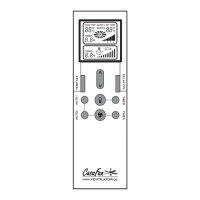
- The symbol AUTO 1 is activated on the display
by pressing the button AUTO 1. By pressing the
button TEMP SET again, the max. room tempera-
ture indication (right value) starts to blink.
- With the / buttons you may now set the
max. room temperature (16 °C - 32° C). Waiting
3 seconds or pressing the button TEMP SET saves
the setting.
- By pressing the button AUTO 1 twice program
AUTO 1 is started.
- The fan operates at speed 4 (highest speed)
when room temperature is higher than or equal to
the set max. room temperature. Or...
- ...fan speed switches to speed 3 (second highest
speed), when room temperature drops 2 °C below
the set max. room temperature. Or...
- ...fan speed switches to speed 2 (second highest
speed), when room temperature drops 4 °C below
the set max. room temperature. Or...
- ...fan speed switches to speed 1 (lowest speed),
when room temperature drops 6 °C below the set
max. room temperature.
If the room temperature increases during one of
the phases then the motor will also run at a corre-
spondingly higher speed. Or...
- ... the fan is switched off when room tempera-
ture drops 7 °C below the set max. room tempera-
ture value.
Upon this, the fan will remain switched off even
when the room temperature rises.
- Press button AUTO 1 again to restart the pro-
gram.
The AUTO 2 function ma-
kes it possible to run the
fan depending on room
temperature.
The more the tempera-
ture in the room drops,
the more the fan speed
is reduced. The max. fan
speed may be preset.
- By pressing the button AUTO 2, the symbol AUTO
2 is activated on the display. By pressing the button
TEMP SET again, the max. room temperature indica-
tion (right value) starts to blink.
- With the / buttons you may now set the max.
room temperatur (16 °C - 32 °C). Waiting 3 seconds
or pressing the button TEMP SET saves the setting.
- Now the max. fan speed may be selected by means
of the / buttons. The values are saved after 3
seconds without pressing any button.
GB


 To Next Page
 Loading...