EasyManua.ls Logo

Casio Casiowriter CW-16 - 3 Message Table

Casio Casiowriter CW-16
63 pages
Print Icon
To Next Page IconTo Next Page
To Previous Page IconTo Previous Page
Loading...
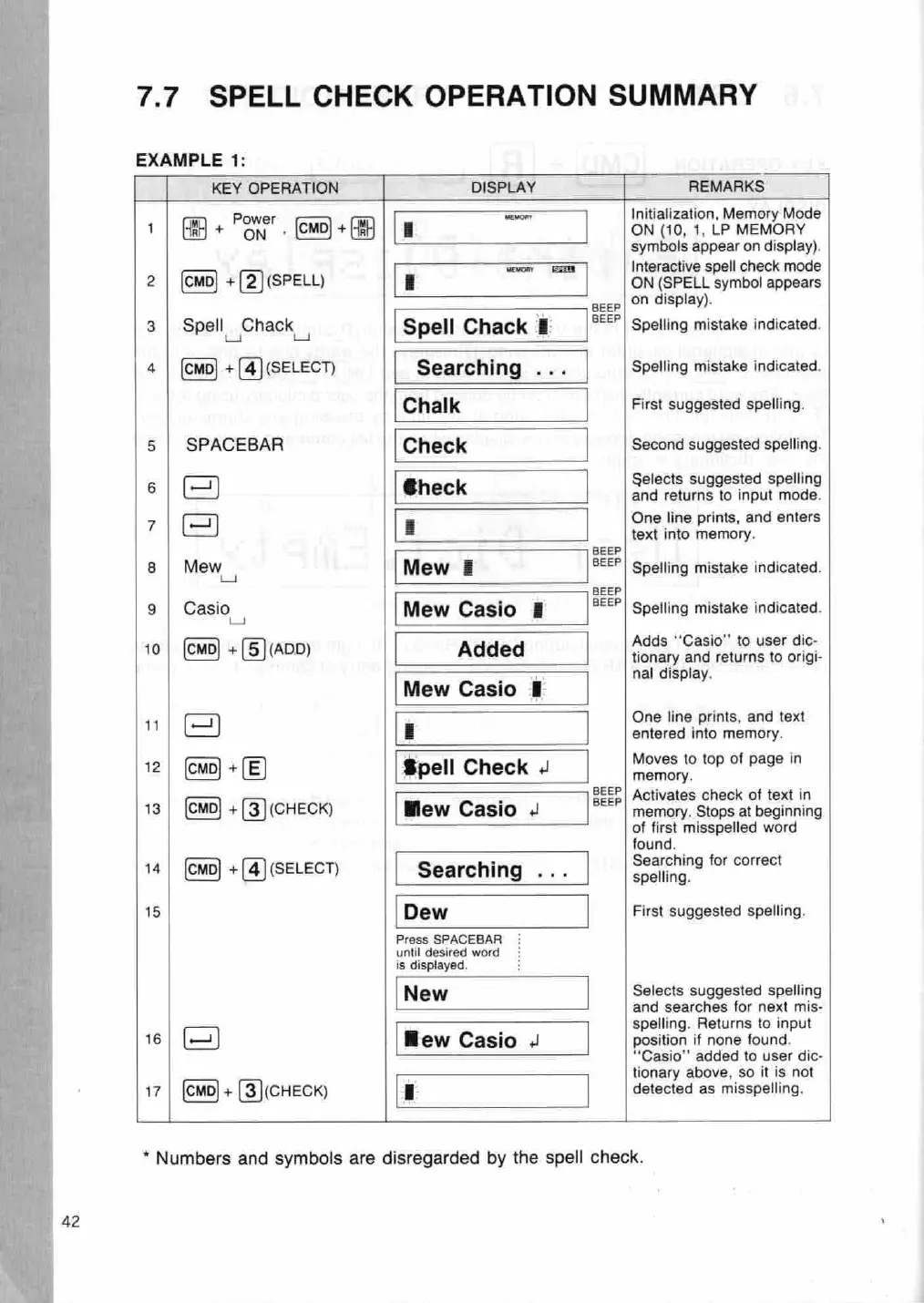
7.7
SPELL
CHECK OPERATION
SUMMARY
EXAMPLE
1:
KEY
OPERATION
~
DISPLAY
REMARKS
P
enon
Initialization,
Memory
Mode
1
+
on
+
[Cvo)+(
||
m
ON
(10,
1,
LP MEMORY
symbols
appear
on display).
avon
EZ
Interactive
spell
check
mode
2
+[2]
(PELL)
B
ON
(SPELL symbol
appears
a
display).
3
|
Spell
Chack
Spell
Chack
EB
|°"|
Spelling
mistake
indicated.
4
+
(4)
(SELECT)
Searching
...
Spelling
mistake
indicated.
Chalk
First
suggested spelling.
5
|
SPACEBAR
Check
Second
suggested spelling.
=
Selects
suggested
spelling
:
€heck
and
returns
to
input
mode.
One
line
prints,
and
enters
r
E
text
into
memory.
BEEP
8
|
Mew
Mew
E
BEEP|
Spelling
mistake
indicated.
BEEP
9
|
Casio
Mew
Casio
§
BEEP!
Spelling
mistake indicated.
Adds
*‘Casio" to
user
dic-
no
-
(5)a00)
Added
tionary
and
returns
to
origi-
=
=
nal
display.
Mew
Casio
1
.
One
line
prints,
and
text
u
E
entered
into
memory.
4
Moves
to
top
of
page
in
12
+(E)
Spell
Check
yp
:
BEEP
|
Activates
check
of
text
in
13
+B]
(CHECK)
Mew
Casio
+
BEEP!
memory.
Stops
at
beginning
of first
misspelled
word
und,
earching for
correct
1a
+(4]
(sELECT)
Searching
rye
seling.
15
Dew
First
suggested
spelling.
Press
SPACEBAR
until
desired word
is displayed.
New
Selects
suggested
spelling
and
searches
for
next
mis-
-
spelling.
Returns
to
input
16
Hew
Casio
4
position
if
none
found.
Casio”
added
to
user
dic-
-
tionary
above,
so
it
is not
17
+
[3)(cHECK)
1
detected
as
misspelling.
*
Numbers
and
symbols
are
disregarded
by
the
spell
check.

Related product manuals