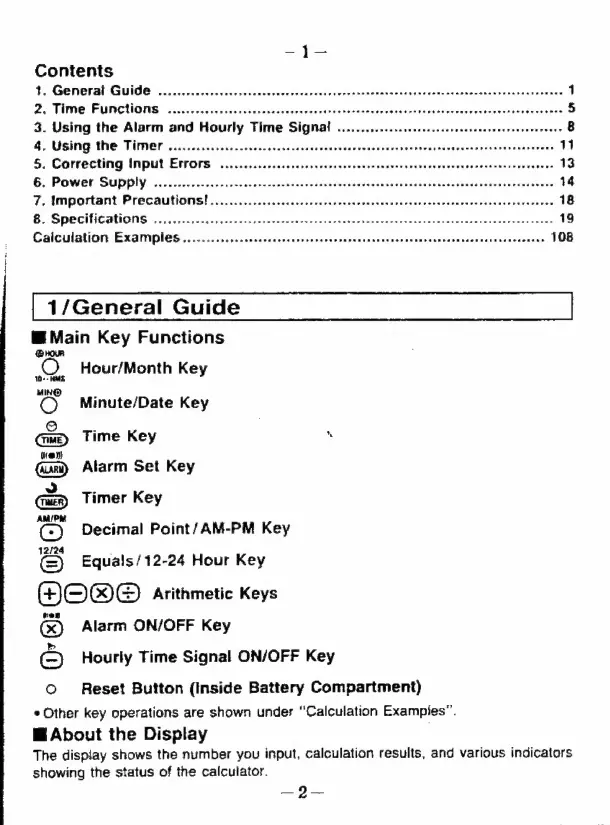
Contents
General:
Guide:
wcciccsd.
cccctcccsessceccadeesvessectetooatecetetsoieveadsceccsesssedrencoceceronsase
T
.
Time
Functions
..........
sca
senpnseseensee
dibs
rernccscsscesdbeser
cesses
.
Using
the
Alarm
and
Hourly
Time
Signa
sehigadeeysauiad
uate
,cakies
cava
deuGarioasuonesess
8
,
Using
the
Timer
.
SaSeges
Suess
evhobcaseuedareodcevndeveseoessVeeiscencesbaepeawssaatseress,
TA
.
Correcting
input
Errors
aGicgi'Pa
ndediuwastedivecedsedesusdudothevesabdscbanvnedececispasseeceieea
De
«
Power
Supply
0.2.0...
c-ceeceeceaserecesesseerescnenssrcurenceenrnsccurnsscesscusncecrersassenee
$4
.
Important
Precautions!
..............cecceeeeceeeereeereesseserersarrerseersesersssssersarsenres
1B
S
Specilications:
oi.
ssccses
cscs
ee
Pesos
Soc
add
oe
ea
ae
pa
See
okie
int
date
vouvenestereouts
19
Caiculation
Examples
............cccccccesececececerscenrentsssseccscensssnssresscesssoseseseesns
DOB
SON
Mm
RON
a
1/General
Guide
@
Main
Key
Functions
Brow
Hour/Month
Key
10--
WMS
MIR@
©
Minute/Date
Key
a
Time
Key
*
aren}
Alarm
Set
Key
~)
és
Timer
Key
Decimal
Point
/AM-PM
Key
(=)
Equals/12-24
Hour
Key
HOW@
Arithmetic
Keys
(x)
Alarm
ON/OFF
Key
©)
Hourly
Time
Signal
ON/OFF
Key
©
Reset
Button
(Inside
Battery
Compartment)
*
Other
key
operations
are
shown
under
“Calculation
Exampies”.
@
About
the
Display
The
display
shows
the
number
you
input,
calculation
results,
and
various
indicators
showing
the
status
of
the
calculator.
ase
yore



 To Next Page