EasyManua.ls Logo

Casio SF-3300A - Page 8

Casio SF-3300A
14 pages
Print Icon
To Next Page IconTo Next Page
To Previous Page IconTo Previous Page
Loading...
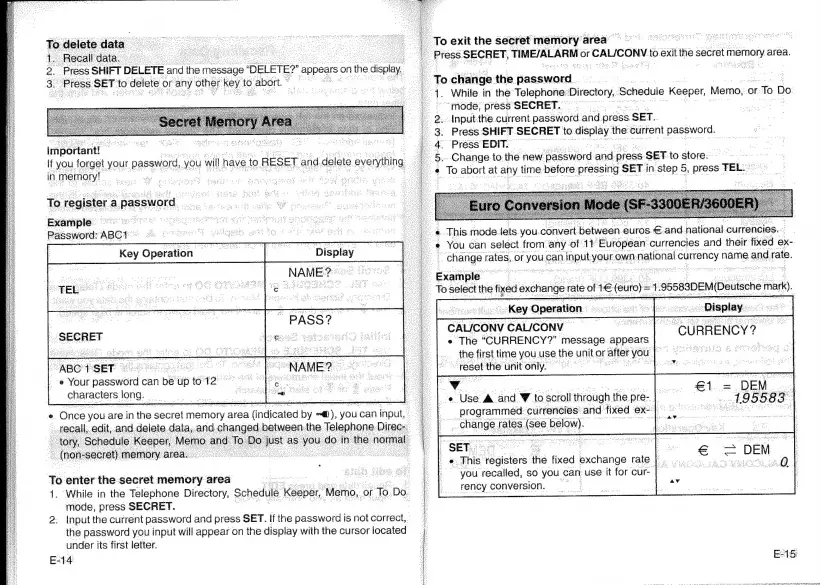
To
exit
the
secret
memory
area
Press
SECRET,
TIME/ALARM
or
r
CALICONV
to
exit
‘the
secret
memory
area.
|
.
4
;
=
Press
SHIFT
DELETE
and
ther
message
DELETE?"
appears.
onthe
display,
3.
Press
SET:
to
delete
or
any
omer
Key
t
to
abort.
©
:
To
change
the
Gassword.
é
:
F
1.
While
in
the
Telephone:
Directory,
Scheduie
Keeper,
Memo,
oF:
To
Do
mode,
press
SECRET.
2...
Input
the.
current
password
and
press
SET.
3:
Press
SHIFT
SECRET
to
bre
the
current
pecaielc
4.
Press
EDIT.
5
¢
important!
'
If
you
forget
your.
password,
you
will
nave
to
RESET
and
delete
everything
|
;
in
‘memory!
.
To
register
a
password
Example
ar
rz
ens
:
Password:
ABC
‘This
mode
lets
you.convert
between
euros.
€.and.national.currencies.
ae?
SIE
aR
SESSLER
SOP
zeae
7
You
can
select
from
any
of
11
‘European
currencies
and
their
fixed
ex-
Key
Operation
:
:
a
_—
i
_
change
rates,
or.
eyon
can
input
your
own
national
currency
name.
and
rate.
te
at
Example
|
To
select
the
fixed
exchange
rate
of
1
Cu
1
SB580DEM|Deusche
mark).
CURRENCY?
okey
Operation
CALICONV
‘CAL/CONV
«
The
“CURRENCY?”
message.
appears
the
first
time
you
use.
the
unit
or
‘aller
you
“reset
the
unit
only.
©
Vv
-e
Use
&
and
Vv
to
scroll
through
the
pre-
programmed
currencies:
and
fixed
ex-
|
change.
rates
(see
below).
.
SET
Doks
«This
registers
the
fixed
exchange
rate
|
.
you
recalled,
so
you
can
use
it
for
cur
|
rency
conversion.
SECRET
“ABC'1'SET
©
@
Your
password
can
be
up
to
12°
characters
long.
€1
=
DEM
_
Ee
oes
»
A
95583
«
Once
you
are
in
the
secret
memory
area
indested
by
nf),
you
can
input,
:
recall,
edit
cand
delete
data,
and
bea
manna
the
ee
Direc:
Ree
ene
eRe
To
enter
the
secret
memory
area
le
1.
While
in
the
Telephone
Directory,
Schedule
Keeper,
Memo,
oF
To
Do.
|
mode,
press
SECRET.
|
2:
Input
the
current
password
and
press
SET.
If
the
password
is
not
correct,
the
password
you
input
will
appear
on
the
display
with
the
cursor
located
under
its
first
letter.
E-14
E15)

Related product manuals