EasyManua.ls Logo

Casto CPS-80 - Page 3

Casto CPS-80
13 pages
Print Icon
To Next Page IconTo Next Page
To Previous Page IconTo Previous Page
Loading...
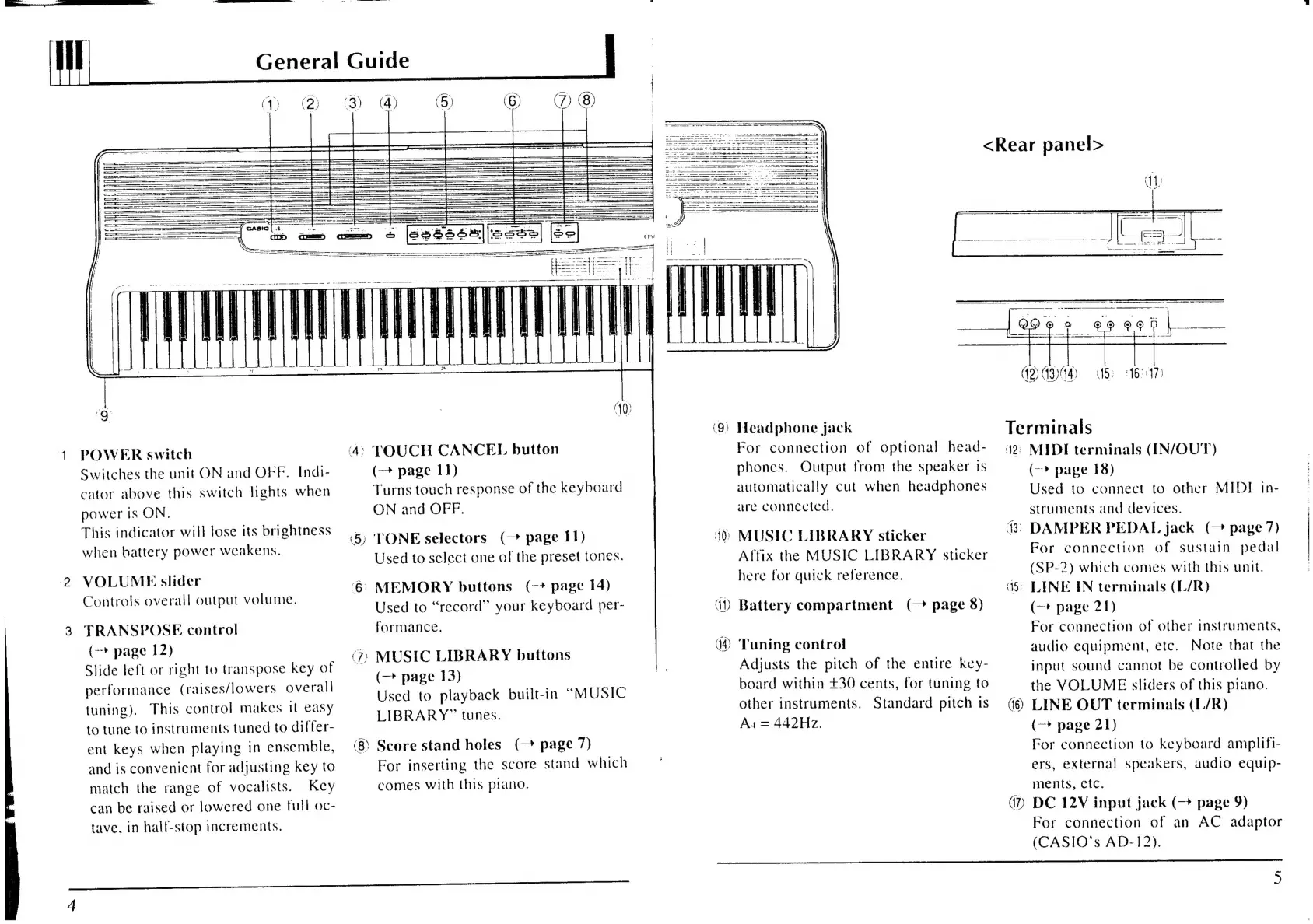
General
Guide
POWER
switch
Switches
the
unit
ON
and
OFF.
Indi-
cator
above
this
switch
lights
when
power
Is
ON,
This
indicator
will
lose
its
brightness
when
battery
power
weakens.
VOLUME
slider
Controls
overall
output
volume.
—'FRANSPOSE
control
(->
page
12)
Slide
left
or
right
to
transpose
key
of
performance
(raises/lowers
overall
tuning).
This
control
makes
it
easy
to
tune
to
instruments
tuned
to
differ-
ent
keys
when
playing
in
ensemble,
and
is
convenient
for
adjusting
key
to
match
the
range
of
vocalists.
Key
can
be
raised
or
lowered
one
full
oc-
tave,
in
half-stop
increments.
10
TOUCH
CANCEL
button
5)
(+
page
11)
Turns
touch
response
of
the
keyboard
ON
and
OFF.
TONE
selectors
(-
page
I1)
Used
to
select
one
of
the
preset
tones.
:
MEMORY
buttons
(-*
page
14)
ee,
Used
to
“record”
your
keyboard
per-
formance.
‘7;
MUSIC
LIBRARY
buttons
(—
page
13)
Used
to
playback
built-in
“MUSIC
LIBRARY”
tunes.
Score
stand
holes
(-*
page
7)
For
inserting
the
score
stand
which
comes
with
this
piano.
<Rear
panel>
(9)
Headphone
jack
*
ancl
(Ap
(14)
For
connection
of
optional
head-
phones.
Output
from
the
speaker
1s
automatically
cut
when
headphones
are
connected.
40)
MUSIC
LIBRARY
sticker
Affix
the
MUSIC
LIBRARY
sticker
here
for
quick
reference.
Battery
compartment
(—
page
8)
Tuning
control
Adjusts
the
pitch
of
the
entire
key-
board
within
£30
cents,
for
tuning
to
other
instruments.
Standard
pitch
is
As
=
442Hz.
(12)
13)44)
5)
1617)
Terminals
42:
MIDI
terminals
(IN/OUT)
15)
(16)
)
(->
page
18)
Used
to
connect
to
other
MIDI
in-
struments
and
devices.
43);
DAMPER
PEDAL
jack
(-
page
7)
For
connection
of
sustain
pedal
(SP-2)
which
comes
with
this
unit.
LINE
IN
terminals
(L/R)
(—>
page
21)
For
connection
of
other
instruments,
audio
equipment,
etc.
Note
that
the
input
sound
cannot
be
controlled
by
the
VOLUME
sliders
of
this
piano.
LINE
OUT
terminals
(L/R)
(—*
page
21)
For
connection
to
keyboard
amplifi-
ers,
external
speakers,
audio
equip-
ments,
etc.
DC
12V
input
jack
(—
page
9)
For
connection
of
an
AC
adaptor
(CASIO’s
AD-12).