EasyManua.ls Logo

Casto CPS-80 - Page 7

Casto CPS-80
13 pages
Print Icon
To Next Page IconTo Next Page
To Previous Page IconTo Previous Page
Loading...
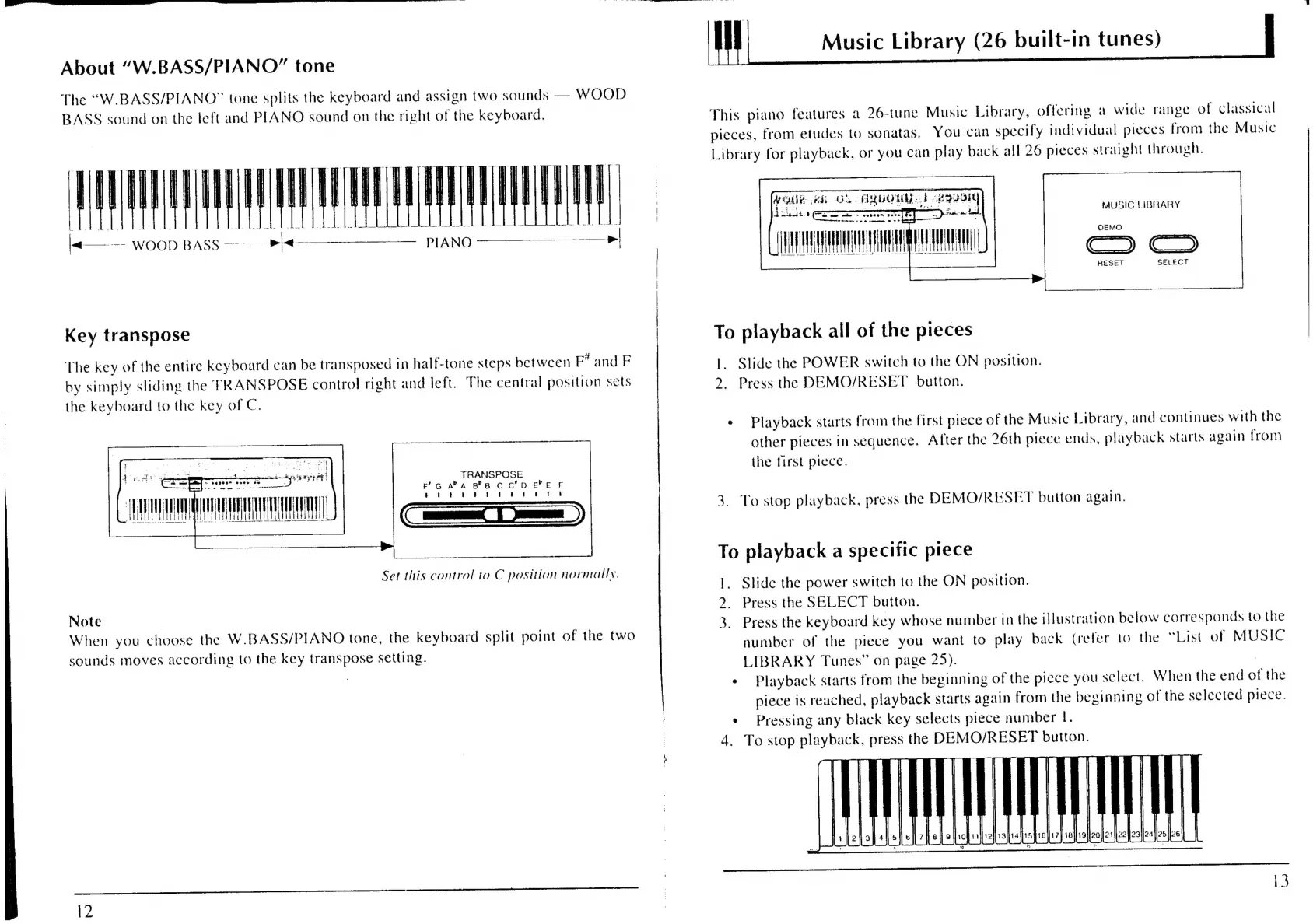
About
“W.BASS/PIANO”
tone
The
“W.BASS/PIANO”
tone
splits
the
keyboard
and
assign
two
sounds
WOOD
BASS
sound
on
the
left
and
PIANO
sound
on
the
right
of
the
keyboard.
7
PIANO
se
a=
WOOD
BASS
=
el
Key
transpose
The
key
of
the
entire
keyboard
can
be
transposed
in
half-tone
steps
between
F*
and
F
by
simply
sliding
the
TRANSPOSE
control
right
and
left.
The
central
position
sets
the
keyboard
to
the
key
of
C.
Tc)
i
|
va
Set
this
control
to
C
position
normally.
Note
When
you
choose
the
W.BASS/PIANO
tone,
the
keyboard
split
point
of
the
two
sounds
moves
according
to
the
key
transpose
setting.
{2
ey
actioned
tt
Music
Library
(26
built-in
tunes)
|
This
piano
features
a
26-tune
Music
Library,
offering
a
wide
range
of
classical
pieces,
from
etudes
to
sonatas.
You
can
specify
individual
pieces
from
the
Music
Library
for
playback,
or
you
can
play
back
all
26
pieces
straight
through.
Woe
ei
OL
AUOUAE
b-292014
dil
eau
fF
eee
MUSIC
LIBRARY
RESET
SELECT
dH
To
playback
all
of
the
pieces
1.
Slide
the
POWER
switch
to
the
ON
position.
2.
Press
the
DEMO/RESET
button.
¢
Playback
starts
from
the
first
piece
of
the
Music
Library,
and
continues
with
the
other
pieces
in
sequence.
After
the
26th
piece
ends,
playback
starts
again
from
the
first
piece.
3.
To
stop
playback,
press
the
DEMO/RESET
button
again.
To
playback
a
specific
piece
1.
Slide
the
power
switch
to
the
ON
position.
2.
Press
the
SELECT
button.
3.
Press
the
keyboard
key
whose
number
in
the
illustration
below
corresponds
to
the
number
of
the
piece
you
want
to
play
back
(refer
to
the
“List
of
MUSIC
LIBRARY
Tunes”
on
page
25).
:
¢
Playback
starts
from
the
beginning
of
the
piece
you
select.
When
the
end
of
the
piece
is
reached,
playback
starts
again
from
the
beginning
of
the
selected
piece.
¢
Pressing
any
black
key
selects
piece
number
I.
4.
To
stop
playback,
press
the
DEMO/RESET
button.