6 7
6 7
SAVE THESE INSTRUCTIONS
WARNING: TO REDUCE THE RISK OF INJURY:
Follow these instructions and those published by the battery manufacturer and manufacturer of any
equipment you intend to use with this unit. Review cautionary markings on this product and on engine.
INTRODUCTION
Thank you for selecting the
Cat
®
25 Amp fully automatic battery charger with 75 Amp engine start.
With proper care and use, it will give you years of dependable service. This battery charger has a high
charge rate of up to 25 amps, and 75 amps of engine starting power.
This battery charger features 3-stage, high-efficiency charging technology, built-in microprocessor
control that ensures fast, safe and complete charging of serviceable batteries.
BEEP
BEEP
OFF BEEP
STAGE THREE
CHARGING
COMPLETE
STAGE ONE
STAGE TWO
BEEP
Stage One —
Rapid Start Charge at 25 amps delivers maximum charging amperage to “wake up” any
serviceable 12 volt battery and allows for quick engine starting. When battery reaches a maximum safe
predetermined voltage, the charger will automatically signal a “beep” and move into Stage 2 of the
charging process.
Stage Two —
Absorption Charge maintains the maximum possible charge at a constant, safe,
predetermined voltage. During this phase, the charging voltage remains constant, while the actual
charging current is reduced to allow for the maximum proper internal chemical energy transfer. At the
end of Stage 2, the charger will automatically move into Stage 3 charge mode.
Stage Three —
Top-Off Charge — voltage is automatically maintained and reduced to a predetermined
level while current is adjusted for a safe, effective battery charge. At the conclusion of Stage 3, the unit
will BEEP signaling the completion of the charging cycle.
The Automatic Float Charge feature is ideal for maintaining a battery. It automatically tops off battery as
needed to keep battery fully charged all the time.
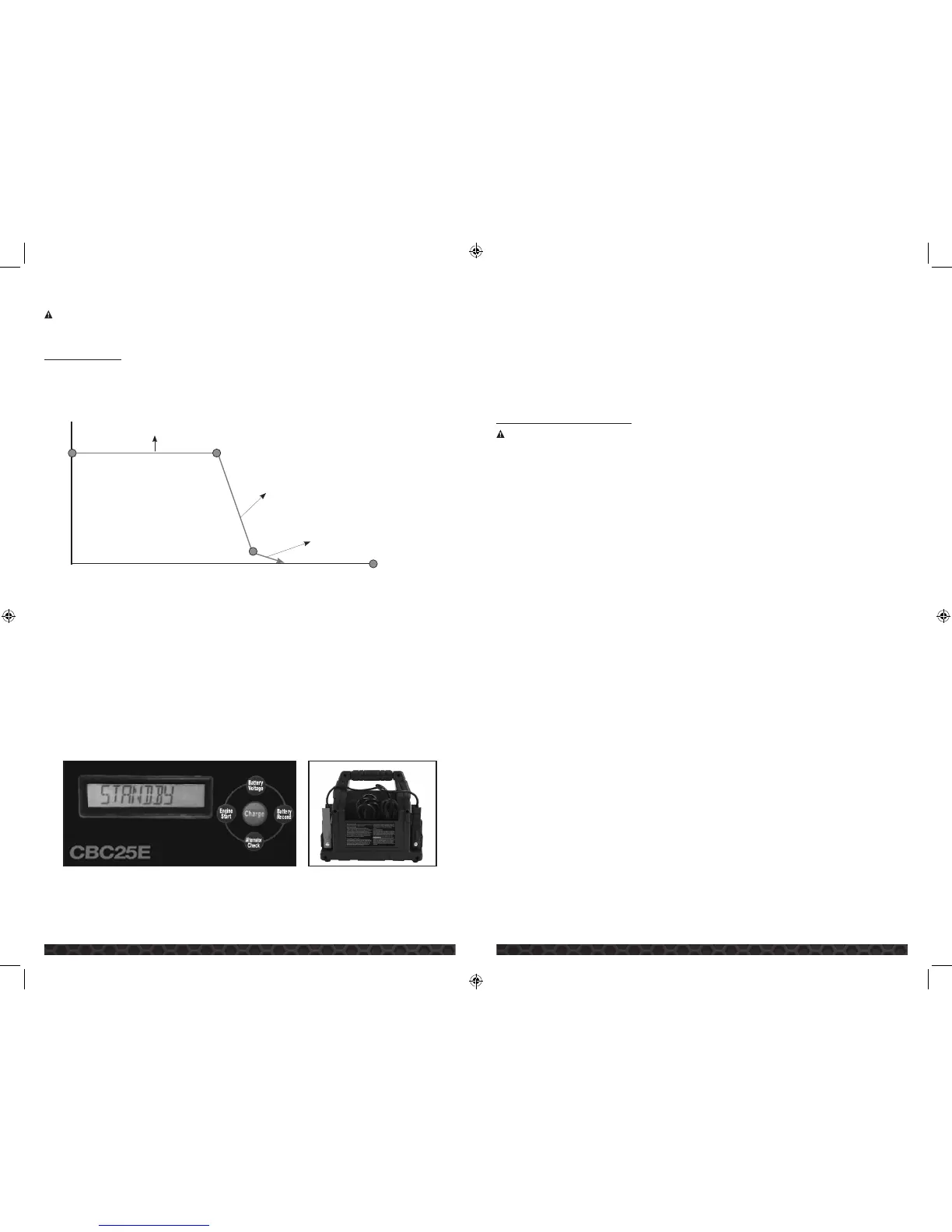
Controls and Functions
Control Panel
Cable and Clamp Storage
(back of unit)
Function Buttons
Charge
analyzes the battery and starts the recharging process. If the battery is fully charged, this button
will place the unit in Float Charge Mode. Pressing this button a second time will place the unit in
Standby Mode.
Battery Voltage
is a quick check that measures the battery voltage.
Battery Recondition
is an automatic mode that, once started, continues for 24 hours and then stops.
A series of electrical pulses breaks the crystalline form of lead sulfate to return these chemicals into
useful battery electrolytes. More than 24 hours may be needed to restore. Periodic reconditioning is
recommended to maintain a battery’s optimum performance. However, if 5 cycles does not improve
battery performance, discontinue and recycle the battery.
Alternator Check
checks to determine that the alternator is keeping up with the electrical load.
Engine Start
places the charger in an engine start sequence.
Scrolling Message LCD Display
The Scrolling Message LCD Display (LCD)
in the upper left of the control panel indicates the various
conditions and/or status messages as described in the Operating Instructions section that follows.
OPERATING INSTRUCTIONS
WARNING: TO REDUCE THE RISK OF INJURY OR PROPERTY DAMAGE:
Always disconnect the
AC plug from the AC outlet first before disconnecting the charger from the battery being charged.
Setting Up the Unit
Ensure that all operating instructions and safety precautions are understood and carefully followed by
anyone using the charger. Follow the steps outlined in the “Important Safety Instructions” section of this
manual.
After charger clamps are correctly connected, plug in the charger into a functioning 120 volt AC outlet.
The unit will be in Standby mode and the LCD screen will display the message of “STANDBY”, indicating
that the unit is set up properly and ready to use.
Note:
The LCD displays
No Battery Connected
when the unit is turned on and there is no battery connected to the
charger.
If there is a problem with the connections or battery, the LCD will display a Fault Condition message. Refer to the
“Troubleshooting” section of this Instruction Manual and take the appropriate action.
Charging the Battery
1. Set up the unit as described in the “Setting Up the Unit” section.
2. When the STANDBY message displays on the LCD, press the Charge button on the Control Panel. The LCD
will then display the charge rate (for example: 10.8 A CHARGING).
3. When the unit is fully charged, the LCD displays BATTERY FULLY CHARGED.
Note:
Once the battery is fully charged, the unit will not automatically shut off. It will go into Float Charging Mode.
4. Press the Charge button again. STANDBY will display on the LCD and the unit will be in Standby Mode.
5. Disconnect the charger from the battery, taking the following steps in order: a) disconnect the AC plug from
the AC outlet; b) remove the clamp from the vehicle chassis; then c) remove the clamp from the battery
terminal. Observe the “Important Safety Instructions” at the front of this manual when disconnecting.
Automatic Float Charging
Automatic Float Charging is ideal for maintaining a fully charged battery. It automatically tops off the
battery as needed to keep the battery fully charged all the time.
1. Follow steps 1 through 3 in the “Charging the Battery” section.
2. When the LCD displays BATTERY FULLY CHARGED. The unit will go into Float Charging Mode.
3. Keep the AC power and battery connected. The charger monitors the battery and tops it off as needed. The
unit remains in Float Charging Mode as long as the charger is connected to the battery and plugged into a
functioning AC outlet.
4. To exit Float Charging Mode, press the Charge button. STANDBY will display on the LCD and the unit will be
in Standby Mode.
5. Disconnect the charger from the battery, taking the following steps in order: a) disconnect the AC plug from
the AC outlet; b) remove the clamp from the vehicle chassis; then c) remove the clamp from the battery
terminal. Observe the “Important Safety Instructions” at the front of this manual when disconnecting.
Checking the Battery Voltage
1. Set up the unit as described in the “Setting Up the Unit” section..
2. When LCD displays STANDBY, press the Battery Voltage button on the Control Panel. The LCD screen will
display the current voltage of the connected battery (for example: 12.8V) for 10 seconds. Press the Battery
Voltage button again to return the unit to Standby mode. Pressing any other buttons will have no effect. The
unit will also automatically return to Standby mode after 10 seconds.
CBC25E_CBC25ECA_ManualENFRSP_090613.indd 6-7 9/6/2013 11:57:28 AM


 To Next Page
 Loading...