Application and Installation Guide EMCP 4 SCADA Data Links
©2013 Caterpillar
All rights reserved. Page 16
F
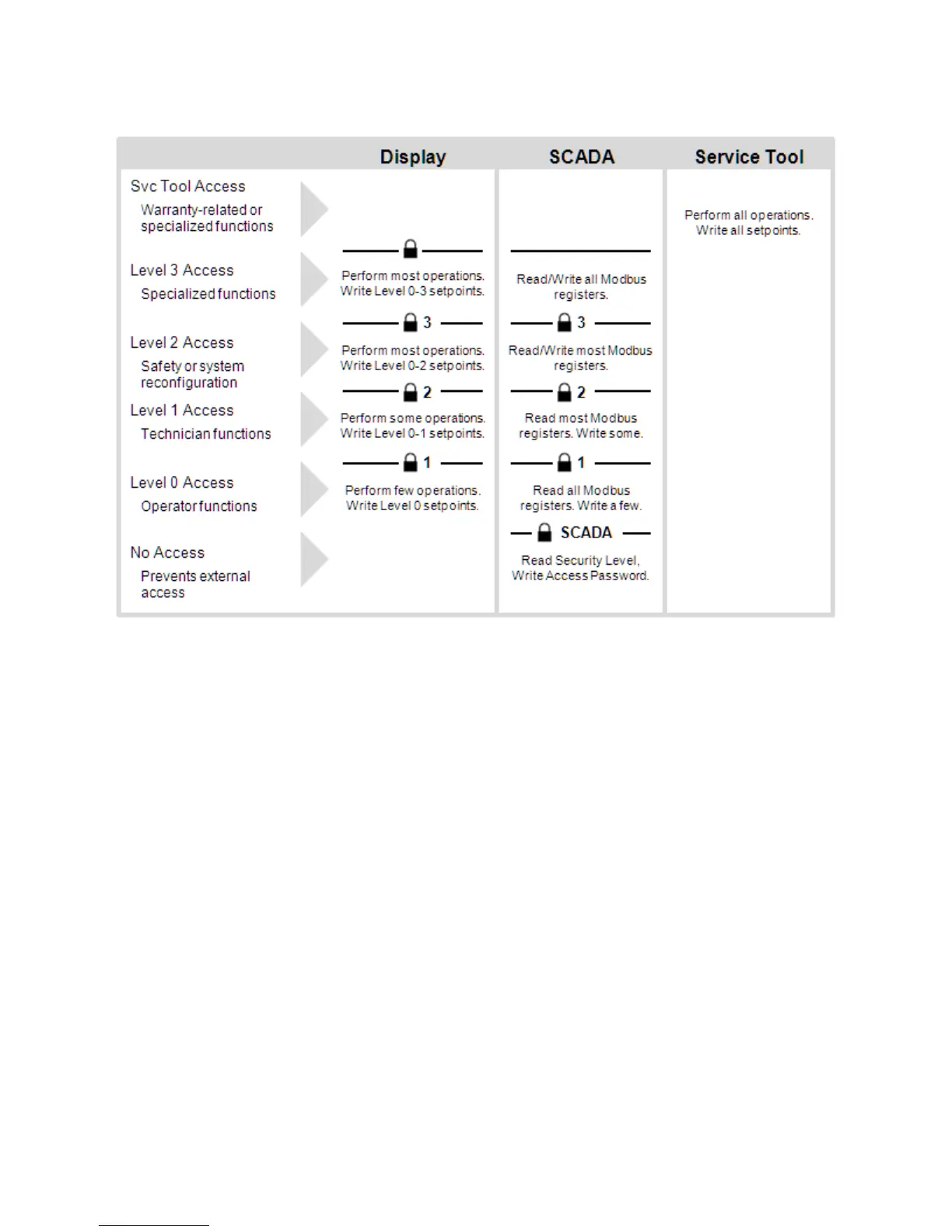
IGURE 4-1: EMCP 4 SECURITY LEVELS ILLUSTRATION
READING OR WRITING ASCII DATA
All passwords are numeric. They all use a string of ASCII codes with 1 byte per digit. The password entry
registers are 16 bytes long. However, passwords can be different lengths, so in order to enter a shorter
password, the entire register set must be the written, padding the unused bytes with the space character
(0x20). All other characters are considered invalid data, and will result in a Modbus error response.
Example: 12345678 = 0x 3132 3334 3536 3738 2020 2020 2020 2020.
ENTERING A SECURITY LEVEL
In order to determine the current security level, the Current Security Level (732) register must be read. If
the value returned is 0xFFFF, then the level is No Access.
In order to enter any security level, the appropriate password must be written into the Write Access
Password (700) register. If Level 1 and Level 2 passwords are the same, and that password is entered,
Level 2 access will be granted. If the entered password doesn’t match any configured passwords, there
will be no change in access level.
In order to enter Level 3, the Level 3 Password Phone In Prompt (734) must be read and communicated
to a factory support operator who can provide the correct password to enter. This prompt, and
corresponding password, does change over time; it may be related to day, engine hours, or even number
of setpoints changed. Therefore, care should be taken to avoid many other changes and to avoid delay
between receiving the password and entering it.
In order to drop to a lower security level, the number of the security level must be written into the Write
Current Security Level (733) register.
NOTE: If the level above the current level does not have a password configured, the EMCP 4
will automatically grant that next level of access. For example, by default there is no
SCADA Password, Level 1 Password, or Level 2 Password configured; so when first
powered up, Level 2 access is granted.



 To Next Page
 Loading...