Display
Display layout
Notifications and Status Information
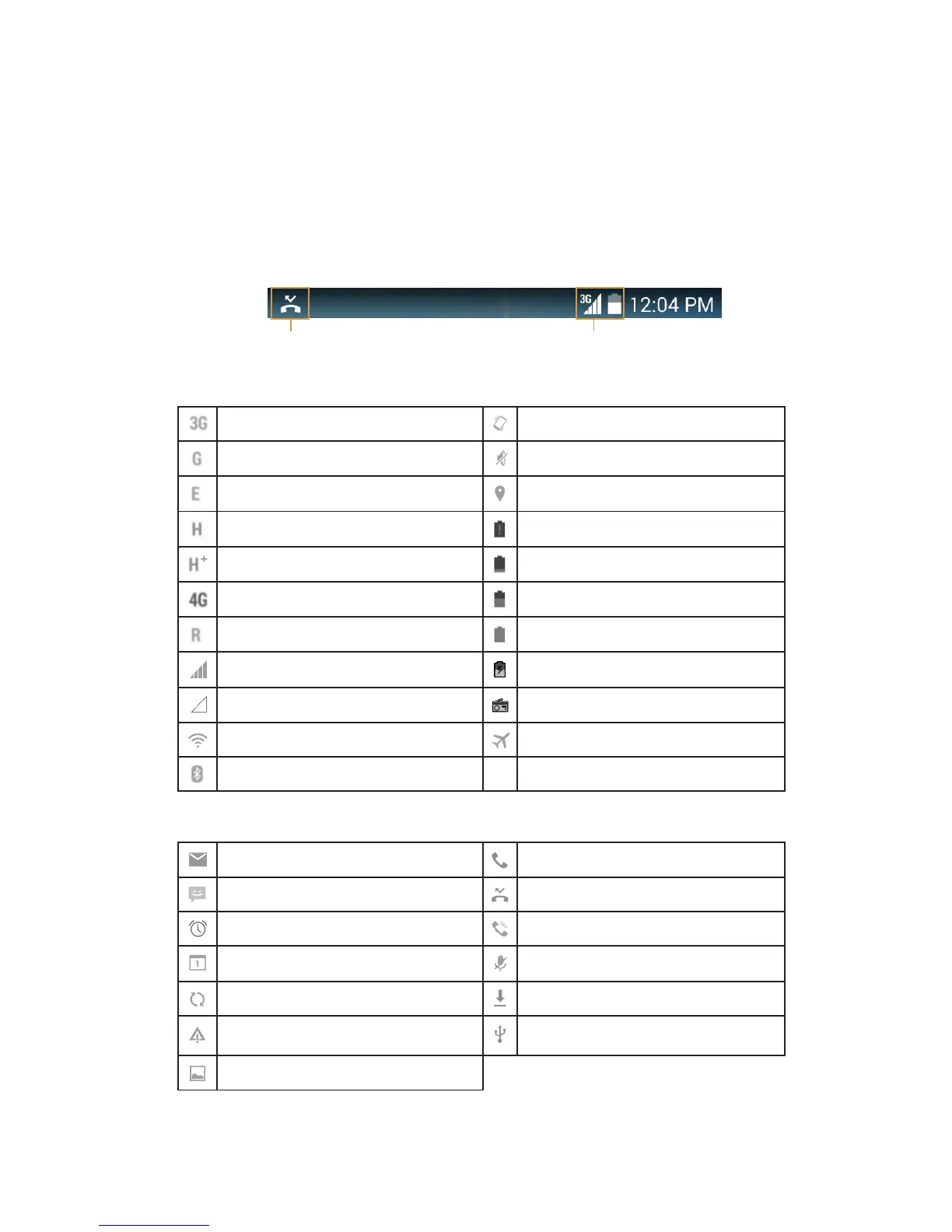
The Status bar appears at the top of every screen. It displays notications icons, such as
missed call or received messages (on the left) and phone status icons, such as battery status
(on the right), along with the current time.
Notication icons Status icons
Status Icons
Connected to 3G mobile network Vibrate mode
Connected to GPRS mobile network Ringer is silenced
Connected to EDGE mobile network Location is found
Connected to HSDPA mobile network Battery is very low
Connected to HSPA+ mobile network Battery is low
Connected to 4G mobile network Battery is partially drained
Roaming Battery is full
Mobile network signal strength Battery is charging
No signal FM Radio is turned on
Connected to a Wi-Fi network Airplane mode
Connected to a Bluetooth device
Notification Icons
New email message Incoming call
New text or multimedia message Missed call
Alarm is set Speakerphone is activated
Upcoming event Phone microphone is muted
Data is syncing Downloading data
Problem with sign-in or sync Phone is connected via USB cable
A screenshot is captured



 To Next Page