HPS-2971
g) At a distance of 5 times the height of the screen, observe that no color dirty
may appear.
h) Repeat this procedures now utilizing a red pattern.
Note:
ü If the receiver is moved during the test procedure, always degauss again the
device
3.5 Convergence
a) Connect the receiver to a 117V
AC
line.
Turn on the TV and adjust bright and contrast control to max.. position,
saturation and volume to min. position. Wait for pre-heating period (please
see specification for each model).
b) Apply to the antenna input a 60dBµV level signal with 88% modulated
“CROSSHATCH” pattern (frequency and channel factory defined).
c) Turn the face tube to West/Lest orientation.
d) Degauss the device properly.
e) Adjust bright and contrast control to minimum position.
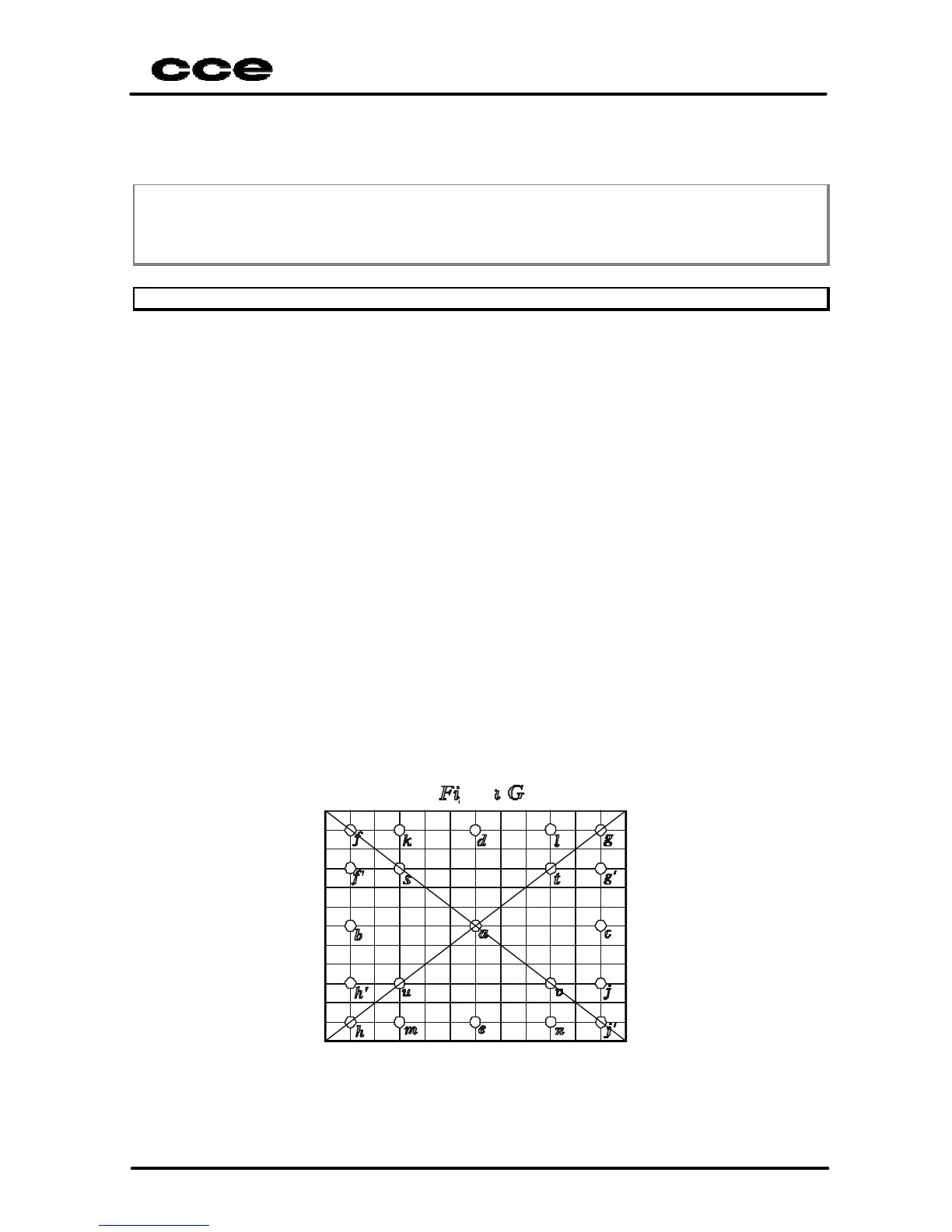
f) For the next reads, please take references by figure G (distances in
millimeters).
g) Observing the image on the screen and with Gauge Convergence help,
measure the indicated positions by the screen:
a) distance between the center of the vertical lines (X),
b) distance between the center of the horizontal lines (Y) for:
ü R/G (red / green)
ü R/B (red / blue)
ü B/G (blue / green)
(See specification by model)
(*) Apply for signals PAL-M and PAL-N


 To Next Page
 Loading...