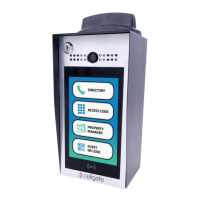
The Cellgate W410 is a gate access control system designed for customer site installation, offering remote management capabilities through a web portal. This device facilitates secure entry and monitoring of gates, integrating both physical and digital access methods.
Function Description:
The W410 system allows users to manage gate access remotely via a web portal. This includes setting up user accounts, creating and managing access codes, and configuring call groups for the "Push to Call" feature. The device supports both internal and optional external cameras, enabling visual verification of visitors and recording events. When a valid access code is entered or a call is answered, the system triggers the gate to open. It also provides notifications for various events such as gate open/closed status, invalid code entries, and camera activity. The system is designed to be integrated with existing gate controllers.
Important Technical Specifications:
- Power: The W410 unit requires a 12V DC Transformer with 5A capability for operation.
- Connectivity:
- Modem: The device includes a modem for internet connectivity, indicated by LED lights.
- Ethernet: Supports Ethernet connection for optional external cameras and potentially for system communication.
- Wiring:
- 18/6 shielded wire is required for power and gate connections.
- 18/4 shielded wire is needed for optional external camera connection.
- All electrical cables (power and Ethernet) should be run in conduit.
- Relay Outputs: The system features two relays (Relay 1 and Relay 2) for gate activation, indicated by blue LED lights.
- Camera: Includes an internal camera and supports an optional external camera.
- User Interface: Keypad for entering access codes and a "Push to Call" button.
- FCC Compliance: The device complies with Part 15 of the FCC Rules, indicating it has been tested and found to comply with limits for a Class B digital device.
Usage Features:
- Web Portal Management: Users can log into a web portal (user.zapopen.com) to configure the W410.
- User Management: Create and manage user accounts with different access permissions (e.g., Administrator, Manager).
- Access Code Creation: Generate and assign unique access codes for gate entry. These codes can be saved to the device.
- Call Group Configuration: Define groups of phone numbers to be called when the "Push to Call" button is pressed. This includes a primary group (30 seconds ring time) and a secondary group (additional 30 seconds ring time) if the first group doesn't answer.
- Device Monitoring: The portal dashboard displays real-time device information, including gate status (open/closed), camera feeds (internal and external), and event logs.
- Remote Gate Trigger: Ability to remotely open the gate from the web portal.
- Remote Camera Trigger: Remotely activate internal and external cameras to capture images.
- On-Site Access:
- Keypad Entry: Users can enter a valid access code on the unit's keypad to open the gate.
- Push to Call: Visitors can press the "Push to Call" button to initiate a call to predefined call groups, allowing remote gate opening by the answering party.
- Notifications: The system sends notifications for various events, such as gate open/closed, invalid code entries, and camera activity, to defined devices.
- Logging: The web portal maintains a log of all events, including successful gate openings, invalid code entries, and picture captures.
Maintenance Features:
- LED Indicators: The W410 unit features LED lights that provide status information:
- Blue Lights (Relay Status):
- Slow Blink: Relay 1 Activation.
- Fast Blink: Relay 2 Activation.
- Solid Blue: Both Relays Active.
- Red Lights (Connection Error):
- Slow Blink: No Phone Account Connection.
- Fast Blink: No Internet Connection.
- Solid Red: No Ethernet Connection Detected.
- Green Light (System Working):
- Troubleshooting Guide: The manual provides a troubleshooting guide to address common issues such as:
- Unit/modem not powering up (check 12V power connections).
- Gate not opening (check connections to gate controller, test continuity).
- Gate code not working (verify code in web portal, check permissions, ensure "key" button is pressed).
- External camera issues (verify cabling, connections, and active Ethernet switch lights).
- Inconsistent web portal connection (check modem signal strength, antenna connections, and power).
- Installation Recommendations: It is recommended to have a laptop with a network connection for post-installation testing and configuration.
- FCC Compliance Information: Includes guidelines for addressing potential radio or TV interference, such as reorienting antennas, increasing separation, or consulting a technician.

 Need help?
 General

 To Next Page