BIO X6 User Manual v. 1.0 38
4.3.3 Printhead Configuration tab
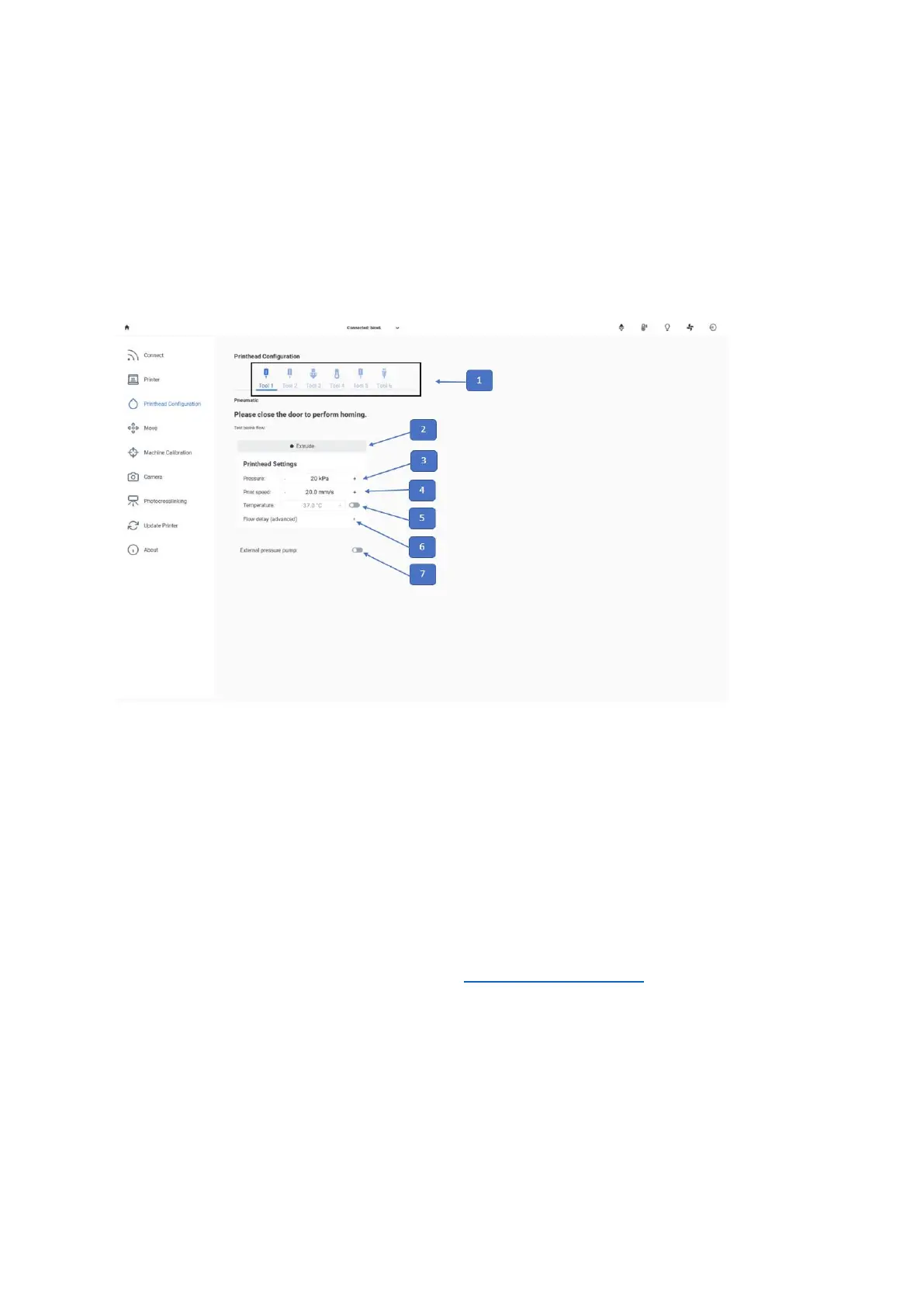
Use this tab to control general tool settings such as printhead temperature and pressure.
You have the option to pre-heat or pre-cool your equipment and to test the bioink flow
(printhead configuration) by extruding the material.
1. Toolhead bar: Use this bar to navigate through the settings for each one of the
toolheads connected to the bioprinter. The selected toolhead is highlighted in blue,
and its settings are displayed below. The displayed settings may vary depending on
the printhead or tool connected.
2. Extrude: Tap and hold to test the bioink flow by extrusion with the Printhead settings
displayed below.
3. Pressure: Set printhead pressure (see Technical specifications). Extrusion pressure
depends mainly on the viscosity and rheological properties of the material to be
printed.
4. Print speed: Tap to set the print speed.
5. Temperature: Tap to enable or disable temperature control on the printhead.



 To Next Page