33
Other Settings
For other TV settings refer to the information available at
yandex.ru/support/smart-tv.
Watch TV Channels, Movies, Serials and Videos
This TV does not require to be connected to a cable, satellite or analog TV broadcast
network: it already provides the possibility to watch dozens of Internet TV channels.
And if You have a Yandex.Plus or KinoPoisk subscription, you can chose a film or
serial from the KinoPoisk library.
To watch a TV programme, film, seial, video blog or cartoon, select the desired
menu section in the left section of the screen. If you do not know what to watch,
go to the Main section: it contains the videos recommended to you.
Search for Videos on KinoPoisk or on the Internet
In order to find a video on the Internet or a movie in the KinoPoisk* library, select
Search in the left section of the screen and type in the name of the video.
Besides, you can enter the name by voice input. To do this, press the button
on the RC and say what you want to find. Voice input is only active if the RC is
connected to the TV via (see “Connect an RC Unit or Other Device via Bluetooth”).
Play a Video from an External Device
-
Connect the TV and the device as described in the “Connecting External Devices”
section.
-
Press the button on the RC, then find the source to which the device is
connected in the signal source list.
*A Yandex.Plus or KinoPoisk subscription is required for movies and serials. An
active promo code or promo period will also apply. Internet TV programmes and
videos can be watched free of charge.
Play Media Files from a USB Storage Device
The TV supports the following USB storage devices:
• up to 2 TB capacity with the NTFS file system;
• up to 128 GB capacity with the FAT32 file system;
• up to 2 GB capacity with the FAT16 file system.
NOTE. The TV may be incompatible with some external USB devices. Besides, some
USB devices may require an external power supply.
Media files of the following formats can be played:
Pictures - PNG, JPEG, BMP.
Music - AAC, MP3 (32–320 kb/s). For the TV to correctly display the author and
track name the metadata in the MP3 file should be in the ID3v2.4 format and use
the UTF-8 character table.
Video - AVI, TS, VOB, MPG (MPEG-2), MP4, MKV.
Subtitles - SRT (Unicode). To read the subtitles correctly, the .SRT file should
be stored in the same folder as the video and both files should have the same
filename. Besides, ensure that the subtitle text is in the Unicode format.
For safe connection of USB data carriers refer to the “Connecting External Devices”
section. In order to play a media file, in the Home Screen press and start the
Media Player application. Once in the application, find and open the desired file
– movie, photo or audio track.
Play Sound Via External Audio System or Headphones
Plug the audio system or headphones cable into the port on the back panel of
the TV. An audio system should be connected to the DIGITAL AUDIO OUT port, the
headphones – to the 3.5 mm audio port. Sound will be immediately played via
the connected device.
For detailed information refer to the “Connecting External Devices” section.
Using the Applications
You can start third-party applications on the TV, such as: browsers, media players,
online cinema applications, etc. Some of them are preinstalled; others can be
installed from the application store in the TV.
In order to start an application, in the Home Screen press , then select the desired
application. If the application is already installed, wait for it to start up. If the
application is not installed, press Install.
Transmitting Video Signal from Smartphone or Tablet
In the Home Screen, press and start the Screen Mirroring application. Then
activate the broadcasting function in the smartphone or tablet and select the TV
from the list of available devices.
For detailed information on screen mirroring refer to the operating documentation
of your smartphone or tablet.
Restart or Turn Off the TV
Press and hold the power button on the RC unit or the TV housing. The shutdown or
restart commands will appear on the screen – select the desired option.
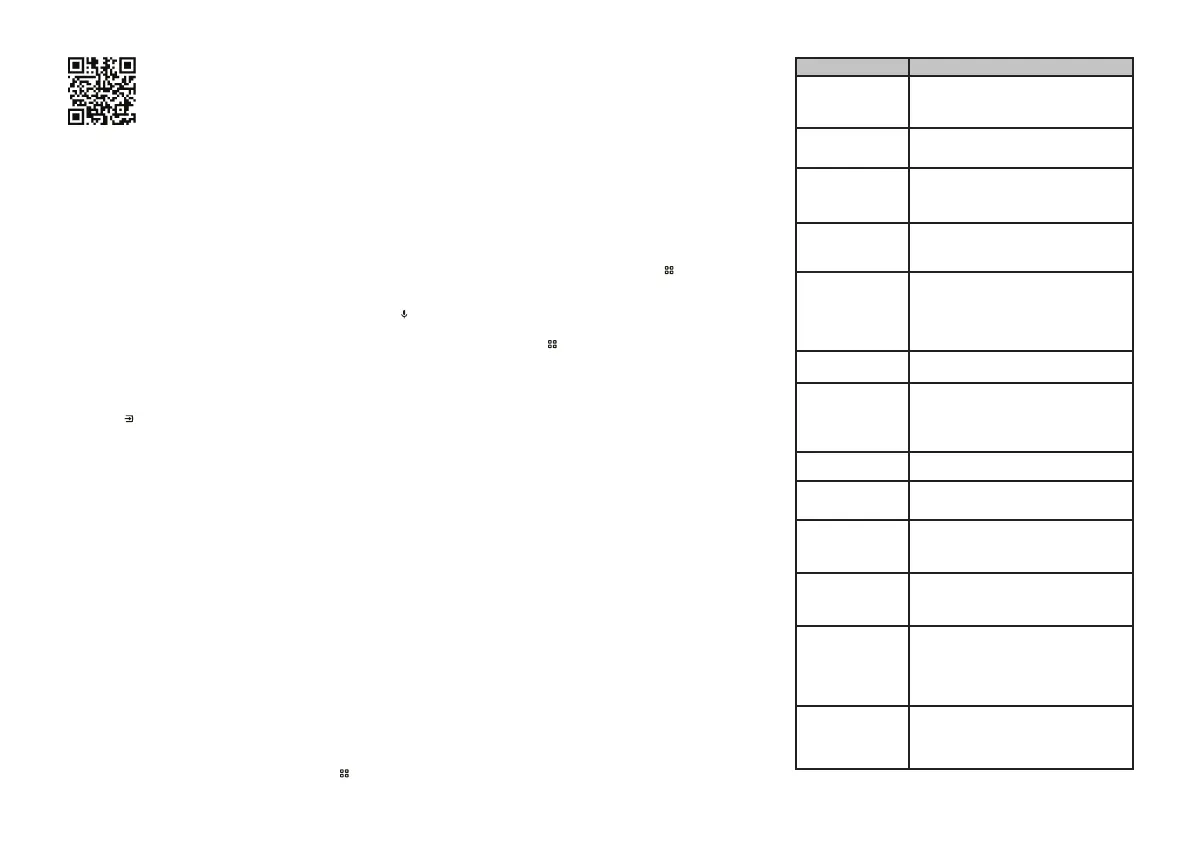
5. TROUBLESHOOTING INSTRUCTION
Troubleshooting
If you experience any malfunctions during TV operation, turn it off and on again.
You can also use the table below to identify and eliminate malfunctions. If the
malfunction cannot be eliminated, contact a technical service center.
PROBLEM SOLUTION
The TV will not turn on (the
standby mode indicator does
not light)
Check connection of the TV’s power cable to the 220–240 V ~50/60
Hz power supply grid. Check for voltage in the electric socket.
Disconnect the power cable from the electric socket, wait for 2
to 3 minutes and plug it in again. Check operation of the RC unit
No TV signal reception
Check correctness of the TV setting. Select another TV channel.
Check correctness of antenna cable connection. There may be an
antenna failure or a temporary loss of transmitting station signal
No sound is played
Check sound volume setting.
Ensure that the sound is not muted with the button. Check
correctness of sound system selection in the channel settings.
Check correctness of the sound settings
Disturbed image color
rendering
Check correctness of color system selection in the channel
settings. Check correctness of the image settings. The signal
from the transmitting station may be weak or disturbed; select
a different channel
The TV cannot be controlled
from the RC unit
Open the RC battery compartment and replace the batteries.
Point the RC unit emitter directly at the RC sensor on the front
panel of the TV. There should be no obstacles (furniture items,
etc.) between the RC unit and the RC sensor of the TV. The distance
between theRC unit and theRC sensor of the TV should notexceed
5 meters, and the angle of deflection from the imaginary line
perpendicular to the screen should not exceed 20 degrees
Blinking image or stripes in
the PC
-
HDMI mode
Incorrect computer settings. Start up the computer in safe mode
and select the right screen settings
Individual small dots (pixels)
appear on the screen
This TV is equipped with a high-resolution LC screen matrix. The
modern matrixmanufacturing technology allows forthe occurrence
of individual small dark orcolored dots (pixels)in the screen image,
which do not disturb the overall image perception. All matrixes
have been factory tested and comply with the industry standards
for this product group
The USB does not work
Disconnect the USB storage card (external USB device) from the
TV’s USB interface. Carefully reconnect the device
Some files on the USB device
cannot be read
The types of files readable via the USB interface should comply
with the specification. Ensure that the TV supports this type of
files (see the “Play Media Files from aUSB Storage Device” section)
Crackling or humming sound
during operation or upon
shutdown
This is a normal occurrence caused by thermal contraction of the
plastic during temperature and humidity fluctuations. The TV can
emit a quiet humming noise caused by electric circuit operation.
This is not a malfunction
Slow response to control
commands
The TV requires a certain time for the proper execution of a control
command. Make a sufficient break between different control
inputs to ensure stable operation of the TV. This does not affect
the functionality of the TV and is not a malfunction
Online video playback is
jerky or retarded
Stop the playback, wait for 2 to 3 minutes, then resume the
playback. The wrong tariff plan may have been selected with
your Internet provider. It is recommended to use a tariff plan
with a minimum data transfer speed of 10 Mbit/s. The speed can
be reduced if additional wireless devices are connected to your
home WLAN router. Check the router specifications and settings,
replace the router in case of malfunctions
One of the installed
third-party applications
does not work (or operates
without sound, or has other
malfunctions)
The problem is probably related to the software (application) itself.
Try to startit again later or contactthe customersupport service
of the developer company.
The Manufacturer shall not be liable for the functioning of third-
party applications


 To Next Page
 Loading...