Centroid Acorn Plasma Users Manual Beta CNC12 v4.65 rev6
4.) Verify Torch Touch off and breakaway input functionality
Before we can use the Torch we must verify that the Touch off input is working and therefore the Auto Touch Off
cycle.
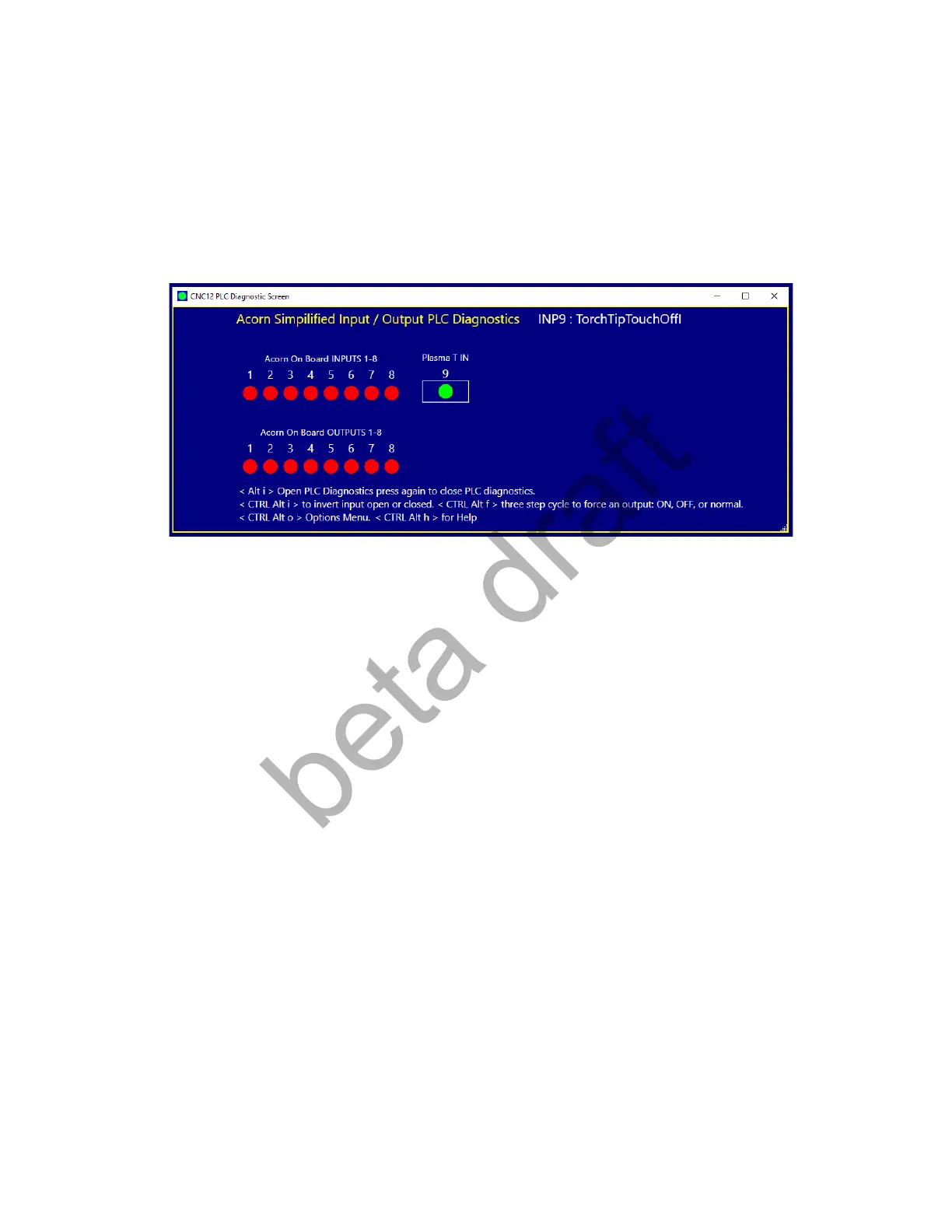
To verify the wiring and the PLC input assignment are working view the PLC input with the PLC Diagnostic App by
pressing the keys <ALT> and <i> at the same time <ALT i>
and this menu appears.
Now with your hands trigger the Float switch, ground out the Torch Tip and Trigger the Breakaway Switch and
observe the inputs on the screen. The virtual LED should change color when the switches are triggered. By
definition the Torch conductive tip is “Normally Open” so the LED will change from Red to Green when the Torch tip
is grounded. Typical Float and Breakaway switches are “Normally Closed” so they change from Green to Red when
triggered.
Not only observe the LED changing color but also verify the correct input in being activated.
For instance. We have the Float Switch assigned to input # 2 in the Wizard, verify that the LED for input #2 is
changing colors when the Float Switch is being triggered by hand.
Page 20 D:\Keith Documents\centroid_acorn_plasma_users_manual_draft27.odt rev27 3-15-22


 To Next Page
 Loading...