Learning additional transmitter buttons:
1. Press any button on the master transmitter for at
least ten flashes of the red LED. If the receiver is not
visible, count at least ten seconds. After at least ten
seconds, release the master transmitter button
(The receiver will not enter learn mode if this
button is pressed for more than twenty seconds).
2. The receiver is now in learn mode, and will remain
so for ten seconds. The red LED will remain on
during this time
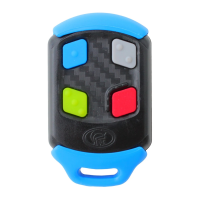
3. Press the required button on the NOVA transmitter
during this time and it will be learned into the
NOVA VOYAGER’s memory. Each time a button is
pressed, the learn time is extended for another ten
seconds.
4. Ten seconds after the last transmitter button has
been pressed, the red LED will turn off, indicating
that the NOVA VOYAGER receiver has exited learn
mode.
*Erasing the NOVA VOYAGER receiver memory
1. Bridge pins J1 or J2 with the jumper provided.
2. The red LED will flash eleven times. Removing the
jumper during this time will cancel the erase
operation.
3. After eleven flashes, the red LED will remain on.
4. Remove the jumper to completely erase* the
receiver memory.
Procedure to create a new master transmitter
(if the existing master transmitter is mislaid):
1. The master transmitter can be identified by
looking at the red LED when pressing any
transmitter button on the master transmitter. The
red LED will give one long flash, followed by one
short flash to indicate a master transmitter.
2. If the master transmitter is lost, the only way to add
more transmitters is to first erase the receiver’s
memory, and then learn in a new master
transmitter. Unfortunately, all existing buttons will
need to be re-learned.
1. Rotate the inner
casing, as shown in
F i g u r e 1 , a n d
remove it from the
outer clip (Figure 2).
2. U s i n g a c o i n ,
separate the two
halves of the case as
shown in Figure 3.
3. Replace the battery
with type GP23 or
similar.
4. Pay attention to the
battery ’s positive
a n d n e g a t i v e
terminals ensuring
that the new battery
is correctly inserted
(See Figure 4).
Instructions to replace the NOVA
remote transmitter battery
Figure 1
Figure 2
Figure 3
Figure 4
Operating frequency
Frequency stability
Power source
Operating voltage
Minimum operating
voltage
Operating current
Transmit indication
Operating temperature
range
Dimensions (LxBxH)
Mass (including battery)
NOVA remote transmitter
technical specifications
433.92Mhz
0.037ppm/C2/10ppm/year
GP23 12V alkaline battery
12V DC
5V DC
7mA
Green LED
-15°C to 50°C
59mm x 35mm x 16mm
38 grams
FCC information to users
USA and Canada only – where a FCC ID number
is inscribed on the transmitter, the following
information is applicable to users:
FCC Label @ FCC 15.21 and 15.105
For Class B – Unintentional radiators:
This equipment has been tested and found to comply with the
limits for Class B digital devices, pursuant to Part 15 of the FCC
Rules. These limits are designed to provide reasonable
protection against harmful interference in a residential
installation. This equipment generates, uses, and can radiate
radio frequency energy, and if not installed and used in
accordance with the instruction manual, may cause harmful
interference to radio communications, however, there is no
guarantee that interference will not occur in a particular
installation. If this equipment does cause harmful interference to
radio or television reception, which can be determined by
turning the equipment off and on, the user is encouraged to try
to correct the interference by one or more of the following
measures:
Reorient or relocate the receiving antenna
Increase the separation between the equipment and
receiver
Connect the equipment into an outlet on a circuit different
from that to which the receiver is connected
Consult the dealer or an experienced radio/TV technician
for help
Warning to users @ FCC 15.21 & 15.105
Changes or modifications not expressly
approved by CENTURION SYSTEMS (Pty) Ltd.
could void the user's authority to operate the
equipment.
FCC Label @ FCC 15.19
For Class B - Unintentional radiators:
This device complies with Part 15 of the FCC Rules. Operation is
subject to the following two conditions: (1) this device may not
cause harmful interference and (2) this device must accept any
interference received, including interference that may cause
undesired operation.
0.07.A.0114_22072013
www.centsys.com


 To Previous Page
 Loading...