41
PROGRAMING
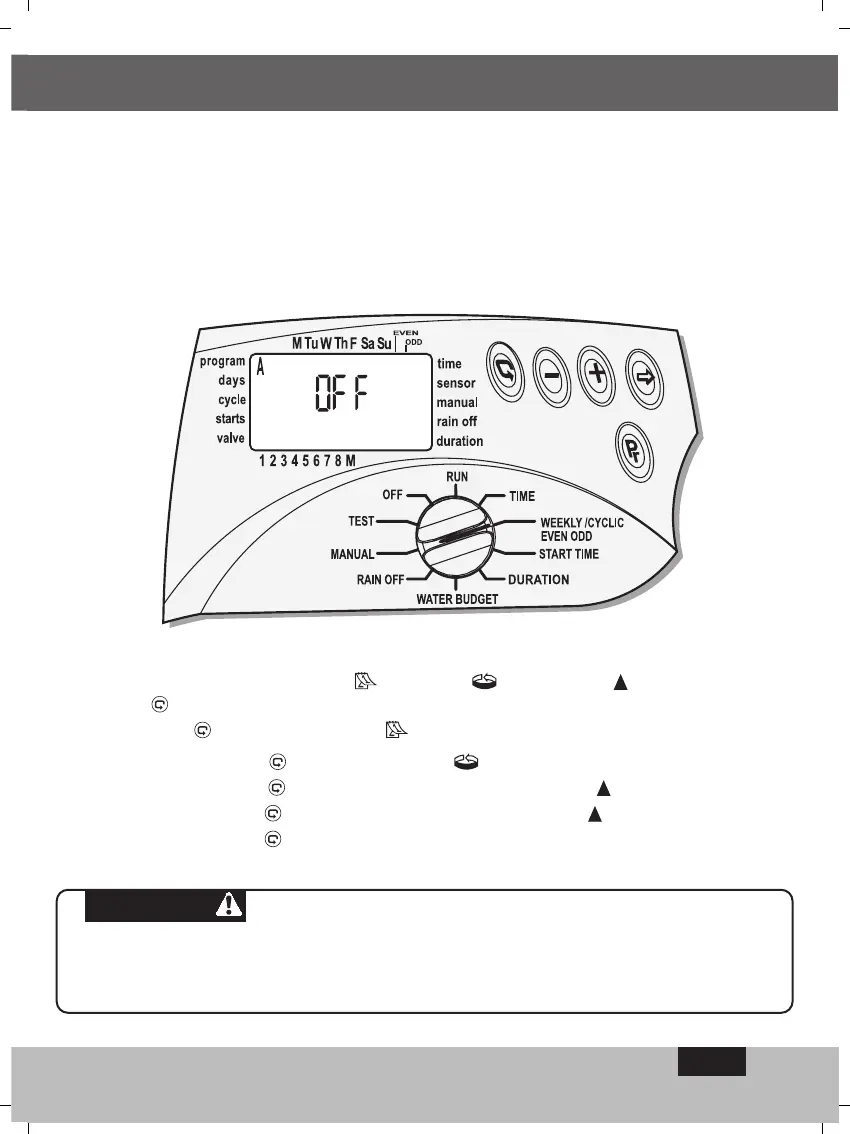
In order to activate the program in the operational manner you require, select one out of
the these three modes : Weekly
Cyclic Even-odd by pressing
button
.
By pressing
- weekly program A - - is selected.
By pressing again on -
cyclic program A - - is selected
By pressing again on even-days of the month program A - is selected
By pressing again on
odd-days of the month program A is selected
By pressing again on program A is shut down OFF. The program is then inactive.
4.2.3 Programing the Controller for Multi-valve - (Program A, B, C)
To select an irrigation program A, B, and C, or the X program, switch the selector to the
weekly/cyclic/even-odd mode.
One of the three programs will appear on the display press the
Pr
button until the program
you are interested in appears, for example A together with the word Off. (The X sign will
also appear the Support program. We will look at this program in Section 4.3.4 on page24).
PLEASE NOTE
From this stage on, the controller has to be programed according to the method
of activation selected - weekly: Section 4.2.4; cyclical: Section 4.2.5; even-odd:
Section 4.2.6.
EN


 To Next Page
 Loading...