02
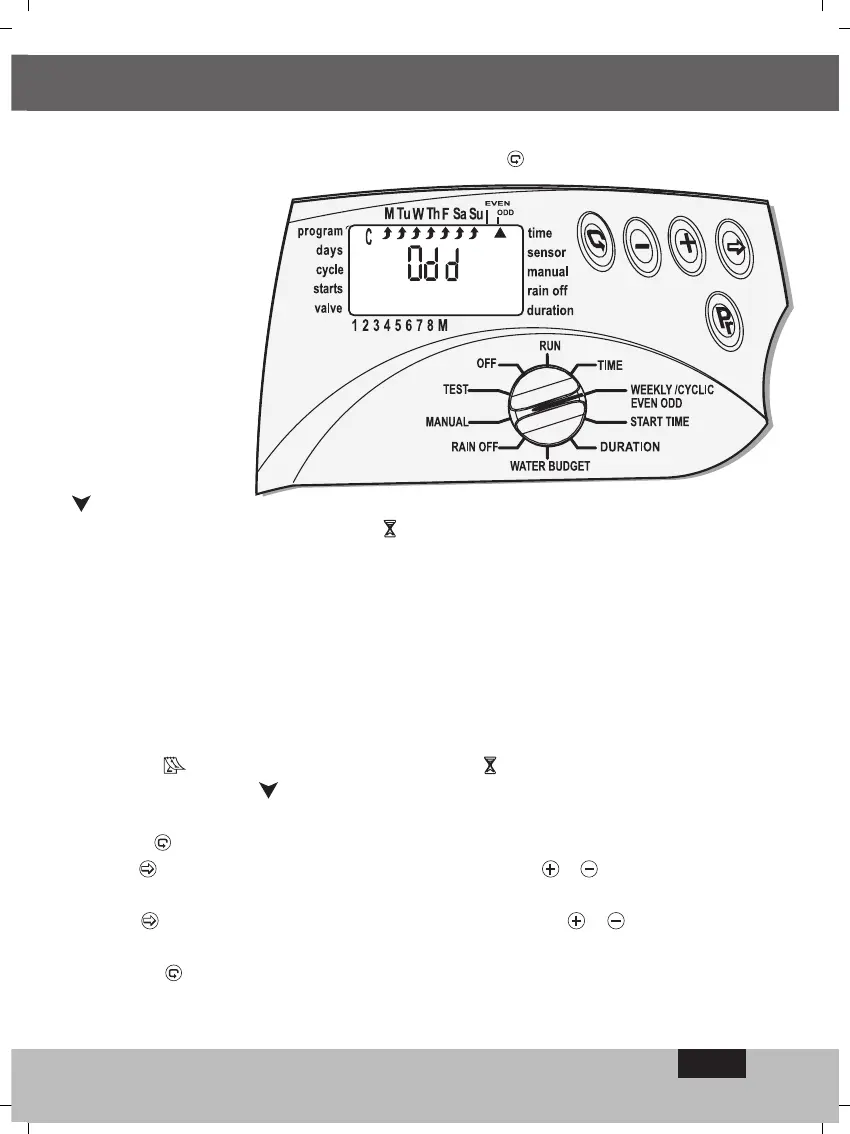
To select odd irrigation days, again press the button and Odd will appear on the
display.
Select the days of the
week you wish to
block,as in the
previous section.
For programing the
starting hour for
irrigation , START
See page 14, as it is
identical to the method
of weekly activation.
4.2.7 Selecting valves
for the program
and setting the duration of irrigation -
for each valve. This is suitable for all modes
of activation.
In this operation you choose the valves for each program and you set the duration of irrigation
for each valve.
The duration of irrigation for each valve can be set from 1 minute up to 4 hours (3:59).
A number of valves, from 1 up to 8, can be allocated to a particular program.
Please note that each valve can itself be allocated to any one of the programs A, B, C.
Switch the selector to Duration mode. The symbol for the program selected will appear on
the display, - for example program A, - together with the mode of activation selected, for
example
-, the Duration of Irrigation symbol and the flashing symbol for the first
valve in the program
.
The last start hour entered or 0:00 will appear on the display. To move to another program
press
.
Press
and the hourly digits will flash. With the aid of & set the required number
of hours.
Press
and the minutes digits will flash. With the aid of & set the required
number of minutes.
Pressing
will move the arrow onto the next valve.
Please note : A valve with its duration of irrigation remaining at 0:00 will not open.
For programing the additional programs B or C, repeat the procedure.
PROGRAMING
EN


 To Next Page
 Loading...