8
Menu description
OSD menu
EN
OSD lock
OSD unlock: Press and hold the ''Menu'' button for about 5 seconds until it pops up below icon.
● The color and shape of the OSD menu of the actual monitor may be slightly different from them
shown in the figure.
● Specifications of the OSD menu may change with improvements of functions without prior notice.
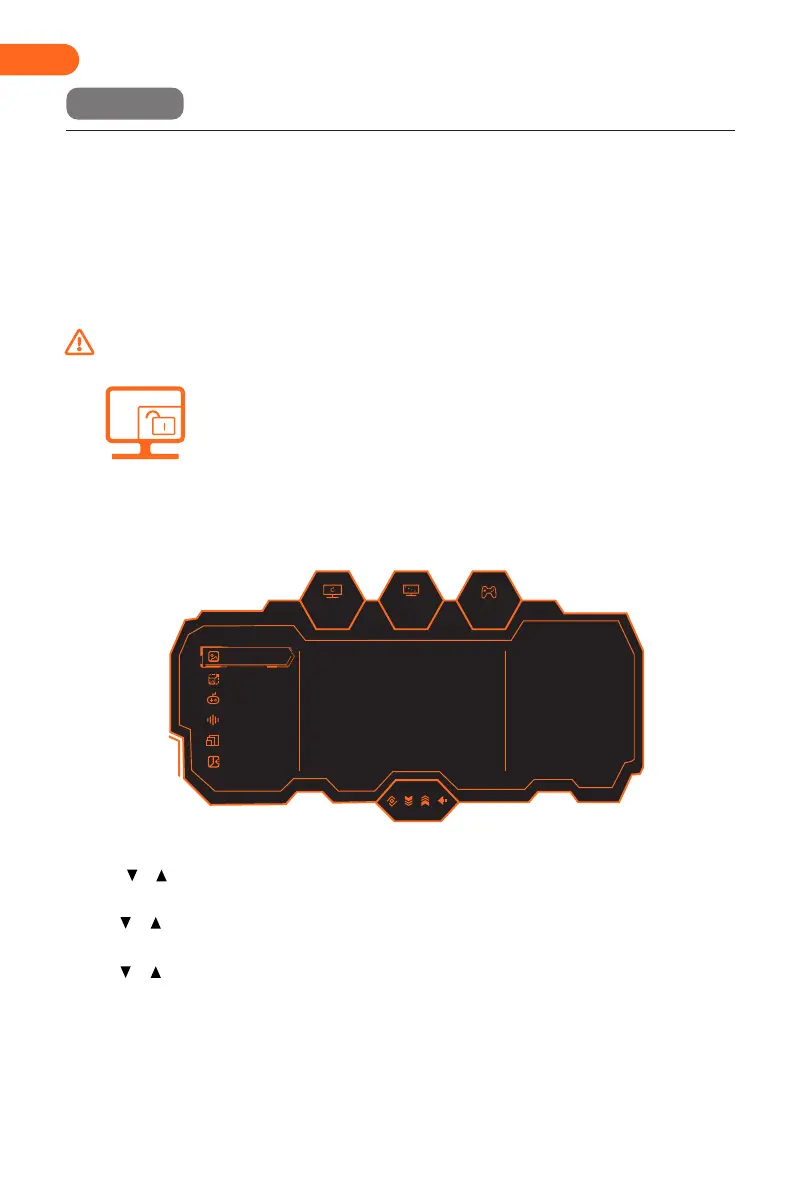
The on-screen display (OSD) menu can be used to adjust the settings of the monitor and is displayed
on the screen after turning on the monitor and pressing the M button.
2. Press or to browse through the functions.
-Select the desired function, then press the M button to enter the submenu.
-Press or to browse the sub-menus, and then press the M key to confirm the selection of
the desired function.
-Press or to select an option, then press M to confirm the setting and exit the current menu.
3. Press E to exit the menu interface.
1.Press the button M to activate the browser screen.
180hz
2560
x
1440
OFF
I/O Settings
Picture Mode
PIP/PBP
Game +
Audio Settings
Picture Settings
On
Off
Off
Off
Off
50
Standard Mode
RTS/RPG Mode
FPS Mode
MOBA Mode
Movie Mode
Reading Mode


 To Next Page