4. Manual Operation
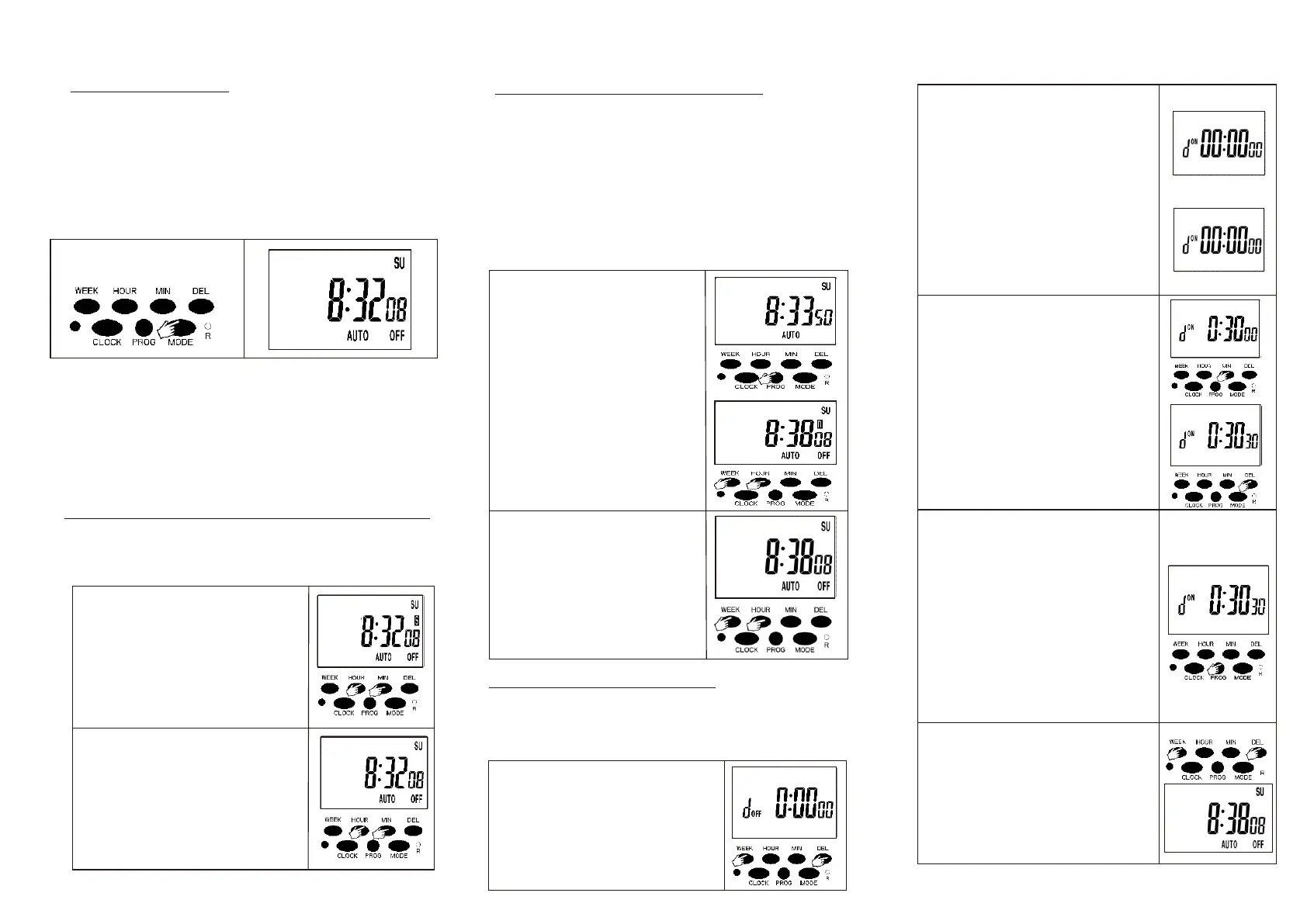
Press “Model” button setting
the mode to Auto(Timer ).
5. Daylight saving Time(Summer time)
6.Anti-theft Random Function
Display d mode
Display d mode
Independent programming is possible to advance the next following
switching command at any given time and turn the timer "ON" or "OFF",
so that make your appliances working as you want.
After you press the " MODE" button, the screen of the timer will shows
below:
OFF: Always off (Timer function disabled, the outlet always turn off)
AUTO OFF: Auto mode (The outlet is turn off at the current time)
ON: Always on (Timer function disabled, the outlet always turn on)
ON AUTO: Auto mode (The outlet is turn on at the current time)
Note:
1.When the mode from OFF change to AUTO, the screen will
shows ”AUTO OFF”, and the outlet will turn off until the next
turn on time comes, the outlet auto turn on, then the timer will
works exactly as you programmed.
2.when the mode from ON change to AUTO, the screen will
shows “ON AUTO”,and the outlet will turn on until the next
off time comes, the outlet turn off, then the timer works
exaxctly as you programmed.
This function will adjust the current clock time of
the timer an hour ahead of time ti adapt to daylight
saving time.
a.Set the daylight saving tim
e:
Press the “HOUR” and “MIN”
button at the same time, there
will has a “s”shows on the
screen. And the current clock
time will add be one hour ahead
of time.
b.Cancel daylight saving time:
Press the “HOUR” and “MIN”
button at the same time, the “S”
will disappear, and the clock
timewill move back one hour,
and the daylight saving time is
cancelled.
1.The timer can operate a plug-in appliance with
random ON/OFF while you are away from home, it can
simulate the scene of you are at home to give your
home a linedin impression. This function is especially
useful during you are not to home.
2.Whe
n the timer is set random mode, it will turn on and
off your appliance randomly for 10~42minutes
variation based on the turn on and off schedule you
set.
3.The random function can only working when the timer
is set finished, and the timer in auto mode.
Set Random Function:
a. Check and make sure the
program has been set, and
the mode is AUTO mode.
Note: If the timer is not in
AUTO mode, please
follow 4&5 section to
set it up.
b. Press the “WEEK”and the
“HOUR” button at the same
time, there will has a “R”
shows on the screen, and
the random mode will start.
Cancel the random function:
Press the “WEEK” an
d the
“HOUR” button again at the
same time, and the “R” will
disappear, and the random
function will be cancelled.
7.Countdown Function:
This function allow a plug-in appliance to turn on
and off with a countdown timer. The user can set the
duration time of the countdown(1sec to 99h 59min
59S).
1. Press the “WEEK” and “DEL”
button at the same time to set
the countdown time, the screen
will showing “d 0:00 00".
2. Press the “MODE” button to switch
the d and the d for the
countdown function.
(as the picture shows)
Note:
a. The d mode is the status of the
countdown funcntion turn on, after
the countdown time finished, the
mode will change to “AUTO OFF”
mode.
b.The d mode is the status of the
countdown funcntion turn off, after
the countdown time finished, the
mode will change to “ON AUTO” .
3.Set countdown time:
a. Press the “HOUR”, “MIN” and
“DEL” button to adjust the hour
minute, sec f
or countdown
time.
b. Press the “HOUR”, “MIN” and
“DEL” button for more 3s, the
hour ,minute or sec will add
rapidly.
c. Press the “WEEK” button can
cancel/recover the countdown
time setting.
4. Countdown Operation Manual
a. After the countdown time
setting finished, press the
“PROG” button to start the
countdown.
b. In countdown working status,
press the “PROG” can pause
or continue the countdown.
Note:1.If in d mode, the countdown
finished, the output will change
to off (AUTO OFF mode) .
2.If in d mode, the countdown
finished, the output will change
to ON (ON A
UTO mode).
5. Cancel countdown mode:
You can cancel the countdown
at any time, press “WEEK” and
“DEL” button at the same time,
the screen will shows back to
clock time, the countdown mode
be cancelled.
ON
OFF
ON
OFF
OFF
ON
ON
OFF
OFF


 To Previous Page
 Loading...