
 Need help?
Do you have a question about the Challenger IGNITE and is the answer not in the manual?
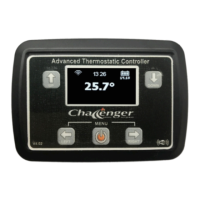
The Challenger Ignite is an advanced thermostatic heater controller designed for use in vehicles, offering both local and remote control capabilities. It features a 14-day programmable timer, allowing users to schedule heating cycles according to their needs. The device is Wi-Fi enabled, facilitating remote access and monitoring through a mobile application or a web interface.
The core function of the Challenger Ignite is to control a vehicle's heater, maintaining a desired temperature. It operates in various modes, including Thermostat mode, Fixed power mode, and Comfort mode. In Thermostat mode, the heater adjusts its output to reach and maintain a set temperature. Fixed power mode allows the user to set a specific fuel pump frequency, directly controlling the heat output. Comfort mode is a sophisticated method that uses fixed Hz or "heat demand" mode, adjusting the fuel rate linearly based on the deviation from a user-defined temperature window around the set-point.
The controller includes a Real Time Clock (RTC) for accurate time and date keeping, which is maintained by an integrated lithium coin cell even when power is off. This enables the 14-day programmable timer function, where users can set specific on/off times for the heater. Timers can be configured to repeat daily or operate as a one-shot event. The system checks for overlapping timers to prevent conflicts, disabling any conflicting timers and providing a notification.
The Challenger Ignite also features a Wi-Fi interface, allowing it to act as an Access Point (AP) for direct connection from a mobile device or to connect to an existing Wi-Fi network in Station (STA) mode. This connectivity enables remote control and monitoring of the heater via a web server interface, accessible through a local browser or an MQTT broker for true remote access from anywhere with internet connectivity. The web interface provides a graphical representation of the heater's status, allowing users to adjust settings, monitor performance, and view fault messages.
The device can be controlled directly via its physical keypad or remotely through its web interface. The basic control menu, accessible on the device, allows users to turn the heater on/off, adjust the desired temperature, switch between Thermostat and Fixed power modes, and toggle between Celsius and Fahrenheit display. Holding down the PWR button starts or stops the heater. Starting the heater initiates a "Starting" message, followed by "Running" once ignited. Stopping the heater triggers a "Shutting down" sequence, which includes fuel delivery cessation, glow plug reheating, and fan cool-down, taking about a minute to complete.
The web interface offers a more intuitive way to manage settings. Users can access a detailed control menu to monitor pump speed, fan RPM, heat exchanger temperature, and glow plug activity. Temperature adjustments are made by pressing UP or DOWN buttons on the device or using the graphical interface. The desired temperature is indicated by a small triangle on the screen, with the actual temperature shown below.
Timer settings are managed through a dedicated menu, where users can enable or disable timers, set start and stop times, and choose specific days for operation. The web interface provides a visual chart of timer coverage for the entire week.
The Wi-Fi mode menu allows users to configure the device's network connection, choosing between AP only, STA only, or STA+AP modes. The device's IP address for the Access Point is always 192.168.4.1. To connect to an existing Wi-Fi network, users must select a Configuration Portal enabled mode and enter network credentials. Firmware updates can also be performed via the Wi-Fi interface (OTA updates) when enabled, though it's recommended to enable this feature only when needed for security reasons.
Remote access via an MQTT broker allows for control and monitoring of the Challenger from anywhere in the world, provided internet access is available at both ends of the connection. The remote access interface has a limited menu system, primarily for switching the heater on/off and managing timers, ensuring system settings cannot be inadvertently changed remotely.
The Challenger Ignite includes fault reporting, displaying error codes and descriptions on the screen if a fault is detected. Common user errors include low voltage (E01), no fuel (E08), and combustion error (E10). Actual heater errors range from over-voltage (E02) and damaged glow plug (E03) to overheat sensor tripped (E05) and fan error (E06).
For optimal performance and to prevent issues like combustion errors (E10), it is recommended to periodically run the heater at maximum temperature for approximately 5 minutes every few days to clear any combustion chamber build-up.
Fuel management is also a key maintenance aspect. Users are advised not to let the fuel tank drop below ¼ full, even when the heater is not in use, to prevent fuel back-siphoning. The heater should be started and run at least once a month to keep the fuel fresh and prevent starting issues due to stale diesel.
In case of an E08 error (no fuel) after refueling, the system may require manual fuel priming to clear airlocks in the fuel line. This involves refueling the vehicle, then using the "prime fuel pump" function from the Wi-Fi interface, monitoring the disconnected fuel pipe until clear fuel is expelled, and then reconnecting the fuel line.
The device's built-in temperature sensor requires calibration upon first installation by matching it to an independent temperature display and adjusting the sensor offset via the settings menu.
The Challenger Ignite also supports factory defaulting, which resets all stored parameters, including fuel mixture tuning, Wi-Fi access point passwords, and firmware update settings. This feature should be used with caution and preferably after consulting support, as it restores the device to its initial state.
 General
| Vibration | Dual vibration motors |
|---|---|
| Weight | 220g |
| Connectivity | Wireless (2.4GHz) |
| Compatibility | PC, Android |
| Analog Sticks | 2 |
| Battery | 600mAh rechargeable lithium battery |
| Dimensions | 155mm x 105mm x 65mm |

 To Next Page
