Chevrolet Sonic Owner Manual (GMNA-Localizing-U.S./Canada-11373973) -
2018 - crc - 5/15/17
Keys, Doors, and Windows 31
2. Remove the battery cover by
prying with a finger.
3. Remove the old battery.
4. Insert the new battery, positive
side facing up. Replace with a
CR2032 or equivalent battery.
5. Snap the battery cover back on
to the transmitter.
Remote Keyless Entry
(RKE) System Operation
(Keyless Access)
The Keyless Access system allows
for vehicle entry when the Remote
Keyless Entry (RKE) transmitter is
within 1 m (3 ft). See “Keyless
Access Operation” following.
The RKE transmitter functions may
work up to 60 m (197 ft) away from
the vehicle.
Other conditions can impact the
performance of the transmitter.
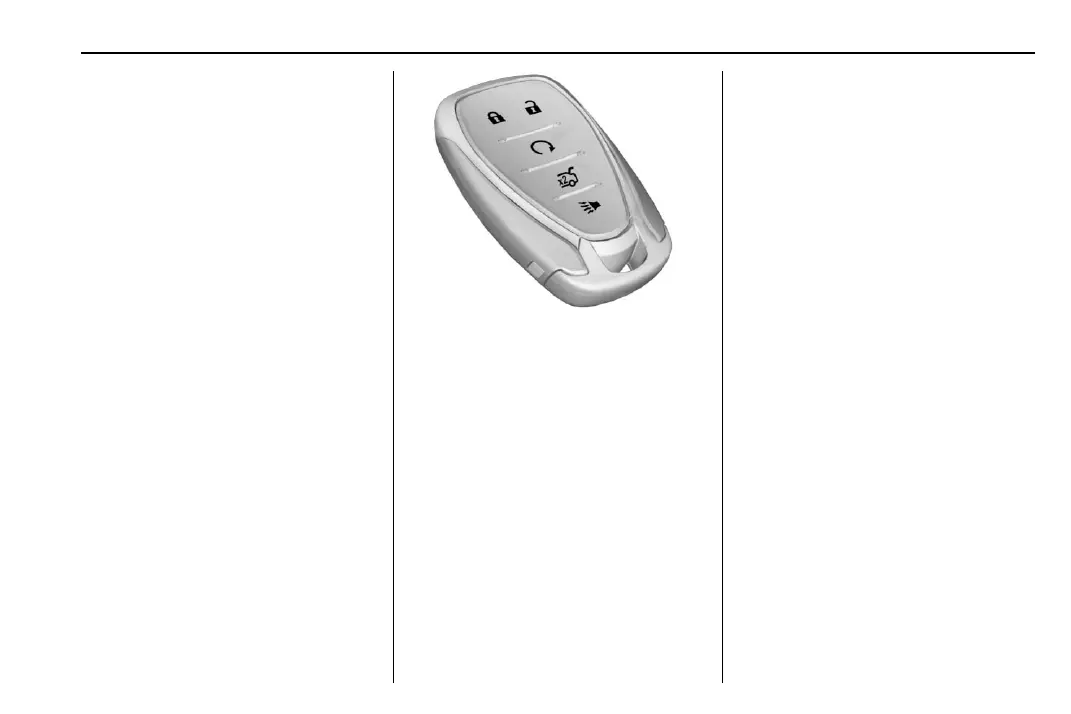
With Remote Start Shown
Q : Press once to lock all doors and
the liftgate or trunk.
The turn signal indicators may flash
and/or the horn may sound on the
second press to indicate locking.
If any door is open when
Q is
pressed, all doors will lock,
if disabled through vehicle
personalization. If enabled, only the
driver door unlocks. See Vehicle
Personalization 0 129.
Pressing
Q may also arm the alarm
system. See Vehicle Alarm System
0 44.
K : Press to unlock the driver door
and the liftgate or trunk. Press again
to unlock all doors.
The turn signal indicators may flash
to indicate unlocking has occurred.
See Vehicle Personalization 0 129.
Pressing
K will disarm the alarm
system. See Vehicle Alarm System
0 44.
X : If equipped, press twice to
release the trunk.
7 : Press and release one time to
initiate vehicle locator. The exterior
lamps flash and the horn chirps
three times.
Press and hold
7 for at least
three seconds to sound the panic
alarm. The horn sounds and the
turn signals flash for about
30 seconds until
7 is pressed again
or the ignition is turned on.
/ : If equipped, press Q and then
immediately press and hold
/ for at
least four seconds or until the turn
signal lamps flash to start the












 To Next Page