Chevrolet Sonic Owner Manual (GMNA-Localizing-U.S./Canada-11373973) -
2018 - crc - 5/15/17
Keys, Doors, and Windows 35
2. Wait for 10 minutes until the
DIC displays PRESS ENGINE
START BUTTON TO LEARN
and then press ENGINE
START/STOP.
The DIC will again display
REMOTE LEARN PENDING,
PLEASE WAIT.
3. Repeat Step 2 two additional
times. After the third time, all
previously known transmitters
will no longer work with the
vehicle. Remaining transmitters
can be relearned during the
next steps.
The DIC should now display
READY FOR REMOTE # 1.
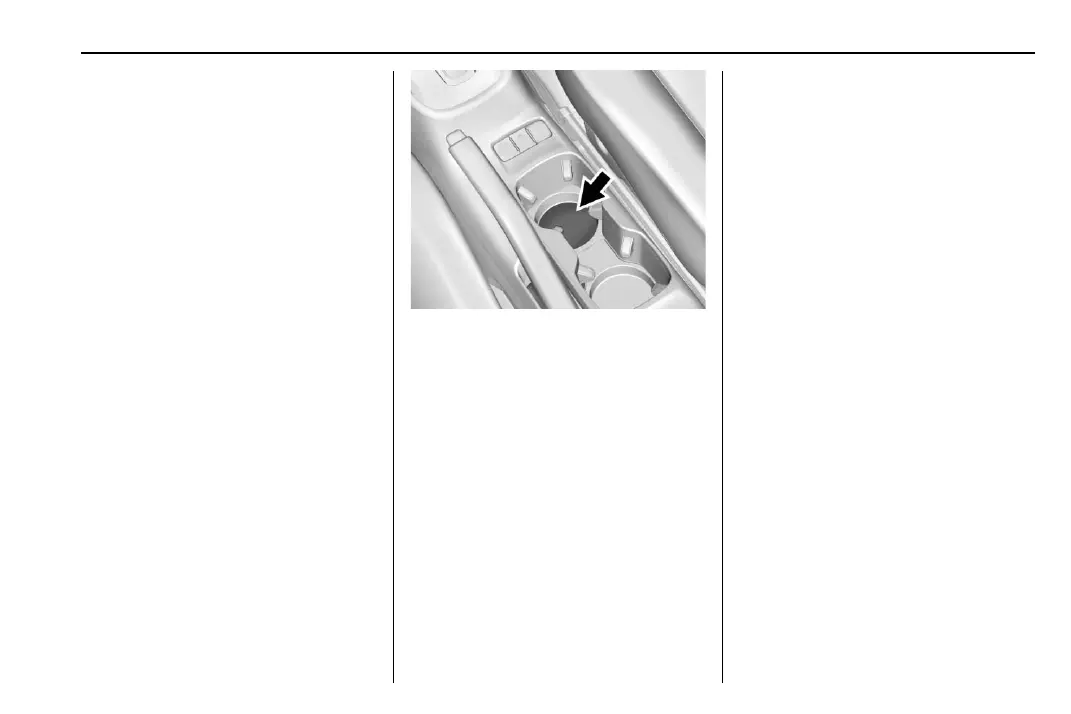
4. Place the new transmitter into
the front cupholder.
5. Press ENGINE START/STOP.
When the transmitter is
learned, the DIC will show that
it is ready to program the next
transmitter.
6. Remove the transmitter from
the front cupholder and
press
K.
To program additional
transmitters, repeat Steps 4–6.
When all additional transmitters
are programmed, press and
hold ENGINE START/STOP for
10 seconds to exit
programming mode.
Starting the Vehicle with a Low
Transmitter Battery
While trying to start the vehicle,
if the transmitter battery is weak, the
DIC may display NO REMOTE
DETECTED. The REPLACE
BATTERY IN REMOTE KEY
message may also be displayed at
this time.
1. Place the transmitter in the
front cupholder.














 To Next Page