Page 2 For technical questions, please call 1-888-866-5797. Item 95205
Button/Coin Battery Safety
WARNING
• INGESTION HAZARD: This product contains
a button cell or coin battery.
• DEATH or serious injury can occur if ingested.
• A swallowed button cell or coin battery can cause
Internal Chemical Burns in as little as 2 hours.
• KEEP new and used batteries OUT OF REACH OF CHILDREN
• Seek immediate medical attention if a battery is suspected
to be swallowed or inserted inside any part of the body.
This symbol means:
INGESTION HAZARD: This product contains a
button cell or coin battery.
1. Remove and immediately recycle or dispose
of used batteries according to local regulations
and keep away from children. Do NOT dispose
of batteries in household trash or incinerate.
2. Even used batteries may cause
severe injury or death.
3. Call a local poison control center
for treatment information.
4. Non-rechargeable batteries are not to be recharged.
5. Do not force discharge, recharge, disassemble,
heat above 113°F or incinerate. Doing so
may result in injury due to venting, leakage
or explosion resulting in chemical burns.
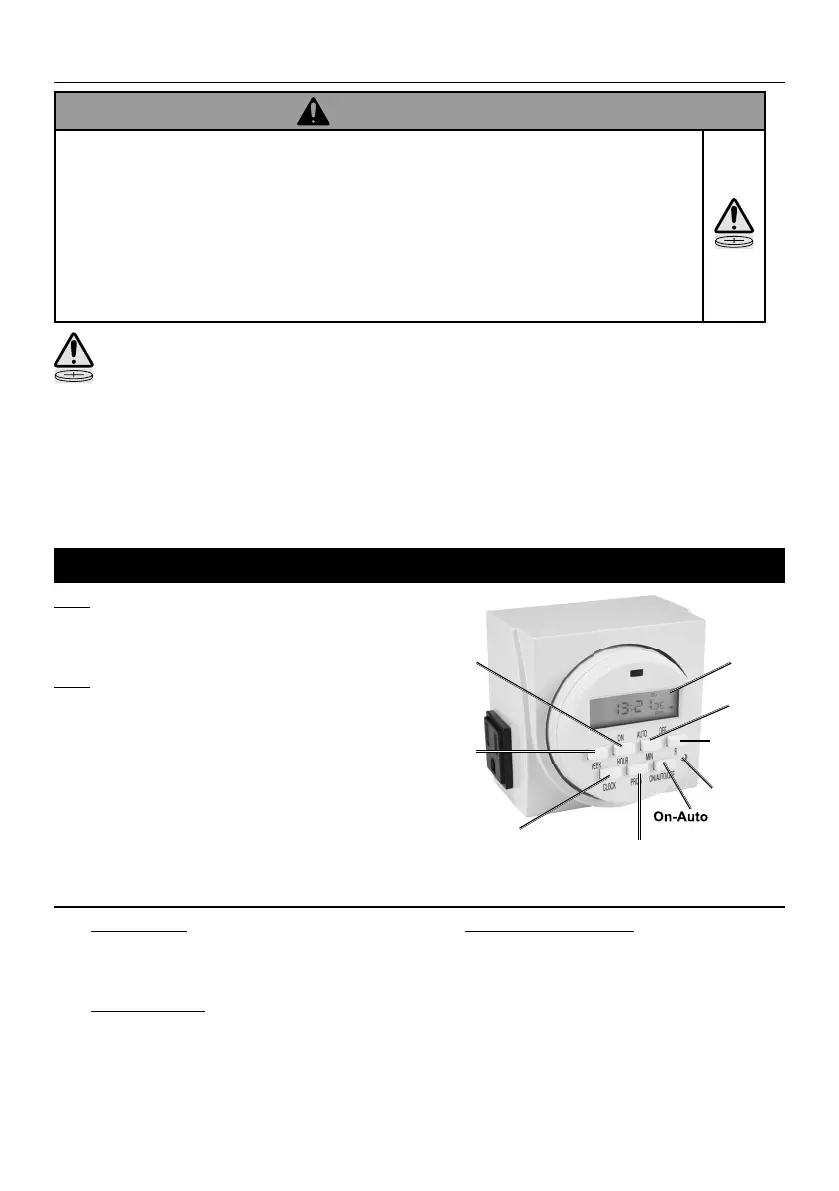
Operation
Note: Before using the Digital Timer, plug
it in for 15 minutes to allow the internal
battery to charge. After recharging, press
the Reset Button to show display.
Note: The Digital Timer uses a
24 hour day (A.M. hours are 1 to 12,
P.M. hours are 13 to 24, midnight is 0)
Example: 2 P.M. = 14.
Week
Hour
R (to undo
a setting)
Minute
Clock
Program
On-Auto-Off
Display
Reset
Setting Actual Time
1. To set the Hour: Press and hold CLOCK
and HOUR buttons down at the same time.
The Digital Timer will circulate through each hour.
Release buttons once correct hour is selected.
2. To set the Minutes: Press and hold CLOCK
and MIN buttons down at the same time.
Release buttons once correct minute is selected.
3. To set the Day of the Week: Press and hold
CLOCK and WEEK buttons down at the
same time. The display will scroll through
each day of the week. Release buttons
once correct weekday is displayed.


 To Next Page
 Loading...