7
chickenguard.com
ABOUT THE BATTERIES
1. Do not use 9V batteries – they will destroy the unit.
2. Always use 4 x AA batteries (Alkaline only).
3. Do not use lithium batteries.
4. Do not use rechargeable batteries (as their voltage can drop in
hot/cold weather conditions).
5. When the batteries need changing, the red LED on the front panel
will be permanently lit (the red LED on the front panel always
flashes every 30 seconds when the door is CLOSED).
6. When changing batteries, all your settings will be kept in memory,
only the Time will need to be updated.
CHECKING THE BATTERY LEVEL
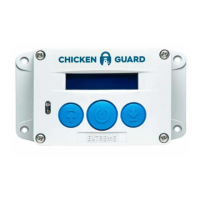
1. Press MENU to enter the programme menu.
2. Press UP or DOWN until you find: MISC SETTINGS
3. Press MENU to enter the miscellaneous mode.
4. Press UP or DOWN until you find: STANDARD, PREMIUM
or EXTREME
5. The battery status should read OK and tell you the voltage.
6. If the voltage is less than 5.1, it will affect the unit performance and
the batteries will need replacing.
ADJUSTING THE LIGHT SENSOR
1. Press MENU to enter the programme menu.
2. Press UP or DOWN until you find: LUX ADJUSTMENT.
3. Press MENU to enter the LUX adjustment mode.
4. Press UP or DOWN and navigate the > symbol to READ
5. Press MENU.
6. This will take a quick snapshot of the current light level.
LIGHT SENSOR: ADJUSTING OPEN/CLOSE SENSOR VALUES
To adjust the OPEN or CLOSE trigger values, navigate the > symbol
to either OPEN or CLOSE. Press MENU once and then using the UP
or DOWN button, change the relevant value. When completed, press
MENU to save this value.
Open: Min = 200 Max = 253 DEFAULT = 210
Close: Min = 0 Max = 199 DEFAULT = 80
NB: Darker is a lower number – Brighter is a higher number
Note: This feature is only available on the Premium and Extreme
models.
CHANGING THE TIME
1. Press MENU to enter the programme menu.
2. Press UP or DOWN until you find: SET TIME.
3. Press MENU to enter the SET TIME mode.
4. Press UP or DOWN to set the hour.
5. Press MENU to save.
6. Press UP or DOWN to set the minutes.
7. Press MENU to save.



 To Next Page
 Loading...