"g"
11'
I
DISPLAY CIRCULAR
(=> Press the U key)
=> UNIT 1 => UNIT 2 =>
"g"
U
I
PIECECOUNTING:
+
1+
5
u
20
u
100
u
1000
20
o pcs
PCS
PCS
PCS
PCS
pcs
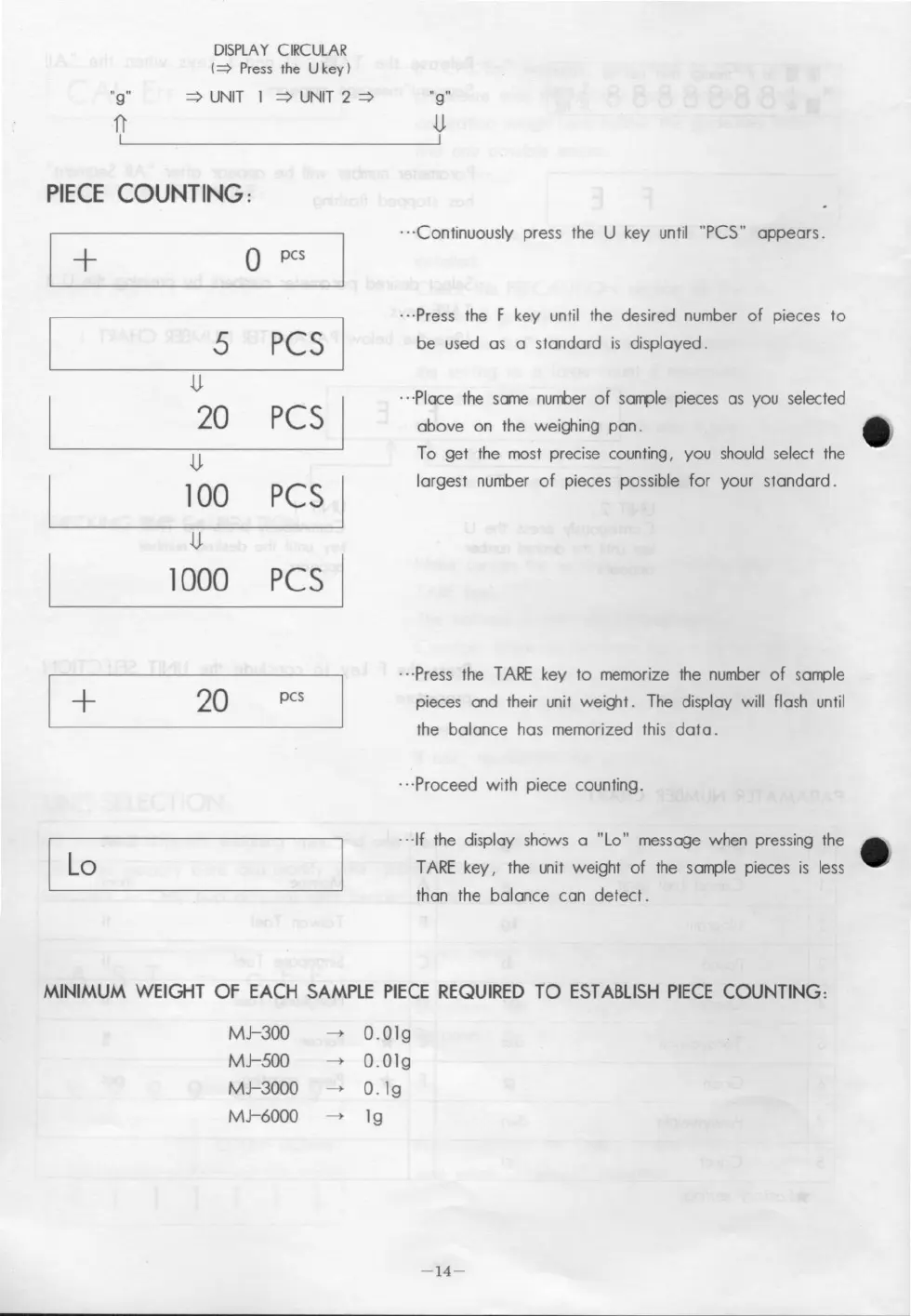
.. 'Continuously press the U key until "PCS" appears.
.. ·Press the F key until the desired number of pieces to
be used as a standard is displayed.
.. ·Place the same number of sample pieces as you seleeted
above on the weighing pan.
To get the mast precise counting, you should select the
largest number of pieces possible for your standard.
.. ·Press the TARE key to memarize the number of sample
pieces and their unit weight. The display will flash until
the balance has memorized this data .
.. ·Proceed with piece counting .
.. ·If the display shows a "Lo" message when pressing the
TARE key, the unit weight of the sample pieces is less
than the balance can detect.
MINIMUM WEIGHT OF EACH SAMPLE PIECE REQUIRED TO ESTABLlSH PIECE COUNTING:
MJ-300
-+
O.Olg
MJ-500
-+
O.Olg
MJ-3000
-+
0.1g
MJ-6000
-+
19
-14-



 To Next Page